PowerStore: PUHC fails for "CA serial number validity check failed. Please call Support. (invalid_ca)"
Summary: The PowerStore Pre Upgrade Health Check (PUHC) fails for "CA serial number validity check failed. Please call Support. (invalid_ca)".
This article applies to
This article does not apply to
This article is not tied to any specific product.
Not all product versions are identified in this article.
Symptoms
The PowerStore Pre Upgrade Health Check (PUHC) fails for "CA serial number validity check failed. Please call Support. (invalid_ca)".
PUHC failed with invalid_ca on both the nodes.
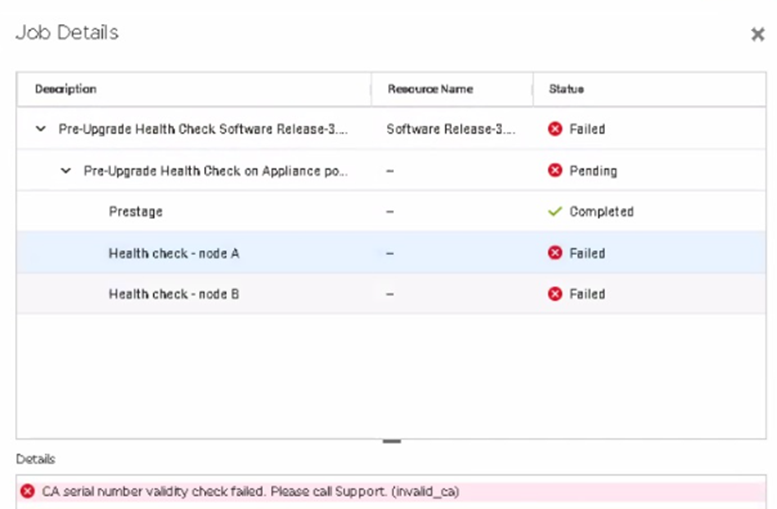
PUHC failed with invalid_ca on both the nodes.
Cause
The CA certificate on PowerStore has an invalid serial number, due to a strongSwan bug. This issue can occur on appliances running PowerStore OS 2.1 and below that are later upgraded to PowerStore OS 3.0 or 3.2.
A check was added to the 3.5 release of PUHC to identify this issue and allow for corrective action before performing an NDU.
A check was added to the 3.5 release of PUHC to identify this issue and allow for corrective action before performing an NDU.
Resolution
Workaround:
If this issue is encountered contact Dell Technical Support and reference this article so a plan of action can be performed to resolve the CA certificate invalid serial number and allow PUHC to complete successfully.
Fix:
This issue is fixed in PowerStore OS 3.5.0.0
If this issue is encountered contact Dell Technical Support and reference this article so a plan of action can be performed to resolve the CA certificate invalid serial number and allow PUHC to complete successfully.
Fix:
This issue is fixed in PowerStore OS 3.5.0.0
Affected Products
PowerStoreArticle Properties
Article Number: 000218891
Article Type: Solution
Last Modified: 29 Jul 2025
Version: 3
Find answers to your questions from other Dell users
Support Services
Check if your device is covered by Support Services.