PowerStore: PUHC Error: Web Server for UI and REST Access Not Working, Multiple Checks Skipped
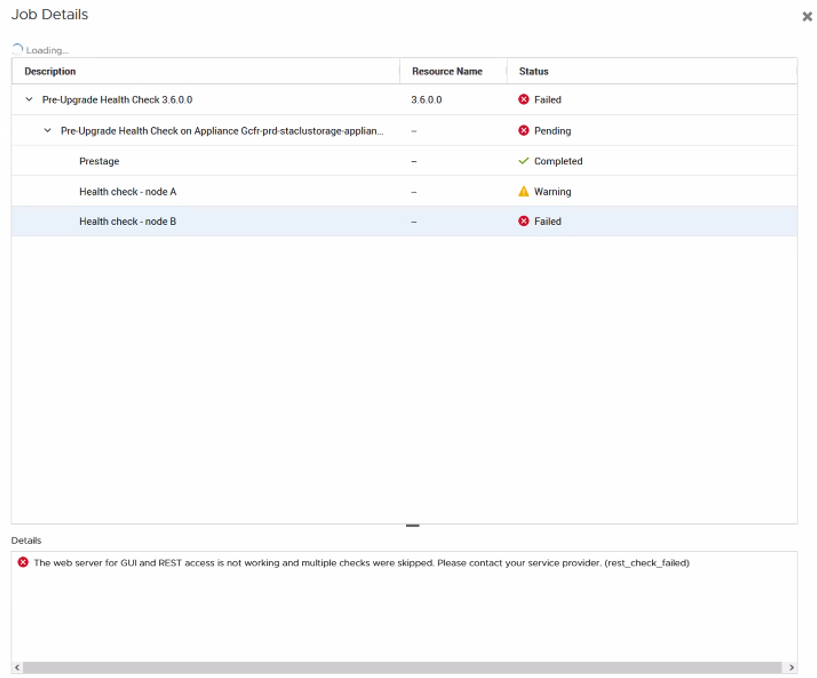
Summary: Pre-Upgrade Health Check (PUHC) is failing when trying to upgrade to PowerStoreOS 3.6 or PowerStoreOS 4.0. Error received is "The web server for UI, and REST access is not working and multiple checks were skipped. (0XE1001003FFFF) ...
Symptoms
PUHC is failing when trying to upgrade to PowerStoreOS 3.6 or PowerStoreOS 4.0.
UI Details:
The web server for GUI and REST access is not working and multiple checks were skipped. Please contact your service provider. (rest_check_failed)
Log Message:
Error: The web server for GUI and REST access is not working and multiple checks were skipped. (0XE1001003FFFF)
Cause
There are three possible causes for this PUHC error when upgrading to PowerStoreOS 3.6 or PowerStoreOS 4.0.
Issue 1:
The user has a third-party certificate which does not include the PowerStore ICM Clustering IP address in it, resulting in the UI and REST check failing.
Issue 2:
A new PUHC check was added to PowerStoreOS 3.6 and later that checks connectivity from both nodes to the ICM Cluster IP. There is a routing issue in the PowerStoreOS 2.1 code that affects the ICM Cluster IP and prevents this new PUHC check from completing successfully.
Issue 3:
The user.db has multiple records for the External Management_HTTP server certificate in the x509_certificate_table. One entry is invalid, and the other entry is valid. Due to the stale invalid certificate record in user.db being read first, PUHC fails to generate the appropriate certificate file resulting in REST access from the PUHC scripts to Control Path (CP) failing.
Resolution
Workaround:
Issue 1:
If the PUHC errors are due to the user having a third-party certificate which does not include the PowerStore ICM Clustering IP address in it, the third-party certificate must be regenerated to include the cluster ICM IP.
To address this issue, the user must regenerate the third-party cert with the cluster ICM IP. Detailed steps for generating a third-party certificate are covered in the Dell PowerStore Security Configuration Guide (a registered Dell Support login is required to view document)
Another option to address this issue would be to revert back to the self-signed certificate. Find more information about this process in the following article: Reverting Third-Party Management Certificate to Self-Signed.
Issue 2:
In some instances, a Control Path (CP) restart has resolved these PUHC errors without having to to take any additional actions.
Restart Control Path (CP) and rerun PUHC after waiting five minutes.
svc_container_mgmt restart CPIf a CP restart does not resolve the issue, and it has been confirmed that the issue is not due to the user having a third-party certificate which does not include the PowerStore ICM Clustering IP address in it, escalate to Dell Technical Support or your authorized service provider and reference this article for assistance.
Issue 3:
Escalate to Dell Technical Support or your authorized service provider and reference this article for assistance.