NetWorker 19.9: vProxy Backup and Recovery Jobs not starting, no vProxy is picked up by the process
Resumen: A NetWorker VMware Protection (NVP) backup or restore is started; however, the Virtual Machines (VM) in the workflow sit in a "waiting to run" state. VM restore sessions start but do not progress, no write session is established. vProxy backup and recover jobs must be canceled manually. ...
Síntomas
The VM backup workflow shows the VMs in a waiting to run state. The backup action details in the NetWorker Management Console show: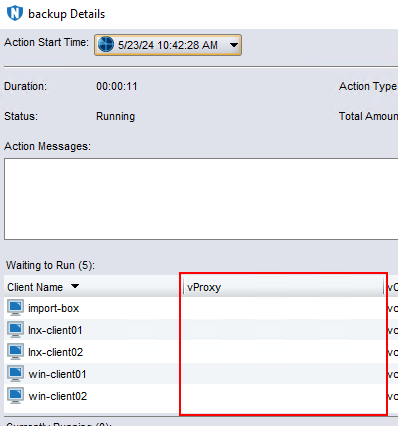
VM Recovery Sessions show the same symptom. The recovery session starts, but no vProxy is picked up by the session. The job does not progress and must be manually canceled. There are no vProxy availability issues:
- vProxies are showing enabled: Yes under Devices->VMware Proxies
- There are no "vProxy is unavailable" messages in the NMC Alerts window.
- The NetWorker server can correctly resolve the vProxy Fully Qualified Domain Name (FQDN), shortname, and IP address.
- The vProxy can correctly resolve the NetWorker server FQDN, shortname, and IP address.
- Port 9090 is open between the NetWorker server and vProxy appliance. Each system can communicate with the other over this port.
The NetWorker server is 19.9.0.0->19.9.0.3 or 19.10.0.0.
Causa
Before the VM backup or restore session can be established, the NetWorker server must identify and connect to an available vProxy appliance.
Code optimizations went in to NetWorker 19.9.0.4 and 19.10.0.1 through NETWORKER-85156.
Resolución
If the NetWorker server is 19.9.0.3 or older, upgrade to 19.9.0.4/19.10.0.1 or later. The vProxy appliances should also be upgraded to the latest version supported by NetWorker. Upgrading the vProxy appliance ensures that the latest security fixes are applied. New vProxy releases also bundle updated ddboost libraries, VMware Virtual Disk Development Kit (VDDK) version, and VMware Tools.
NetWorker and vProxy package downloads are available through: https://www.dell.com/support/home/product-support/product/networker/overview
Información adicional
There are several potential causes for a vProxy not getting selected for a backup or restore operation. If the NetWorker server is 19.9.0.4, 19.10.0.1 or later, perform the following to ensure that no other issues are preventing vProxy selection:
vProxy Enabled Status:
-
From the NMC go to Devices->VMware Proxies, or from the NetWorker Web User Interface (NWUI) go to Protection->VMware Proxies.
-
Check that the vProxies are enabled. The enabled column should show Enabled: Yes:
 NOTE: If the vProxy shows Enabled: No, edit the vProxy and select Enabled: Yes
Name Resolution:
Ensure that the environment is using Domain Name System (DNS). NetWorker server, vProxies, Data Domain systems, VMware vCenters, and VMware ESXi hosts must all be using FQDNs resolvable in DNS. Resources configured in NetWorker should be added using FQDN. The FQDN, shortname, and IP addresses should all resolve correctly. Any systems using hosts file entries must have correct IP addresses, FQDNs, and aliases populated correctly.
NVP vProxy: Troubleshooting Network Connectivity For Backup and Restore Operations
Dual stack (IPv4 and IPv6) is not supported by the vProxy appliance, one or the other must be used. In an IPv6 enabled VMware environment, the following components should not have any unreachable IPv4 entries in the DNS server:
-
- NetWorker server FQDN
- vProxy appliance FQDN
- Data Domain FQDN
- vCenter FQDN
- ESXi FQDN
The FQDNs listed above should return only AAAA records from the DNS and should not have any unreachable IPv4 records in the DNS.
See: NVP vProxy: VM backups sitting in Waiting to Run state in an environment using hosts file entries or dual stack (IPv4 and IPv6) configuration
-
From the vProxy appliance and the NetWorker server confirm that the FQDN, short name, and IP address are resolvable for each corresponding system:
nslookup FQDN
nslookup Short_Name
nslookup IP_ADDRESS
NetWorker: Name Resolution Troubleshooting Best Practices -
Check the
/etc/hostsfile on each system and ensure that if any hosts file entries exist they have the correct IP address and corresponding host names.NOTE: When accessing the vProxy over SSH, you must log in using the "admin" account. Root access over SSH is disabled by default.
Port 9090 communication:
-
From the NetWorker server, confirm that you can communicate with port 9090 on the vProxy:
nsrports -t vProxy_Address -p 9090
-
From the vProxy appliance, confirm that you can communicate with port 9090 on the NetWorker server:
curl -v NetWorker_Address:9090
NOTE: When accessing the vProxy over SSH, you must log in using the "admin" account. Root access over SSH is disabled by default.
vProxy Availability:
-
Check the NetWorker server's
daemon.rawfor any vProxy availability or SSL errors.Linux:
/nsr/logs/daemon.raw
Windows:C:\Program Files\EMC NetWorker\nsr\logs\daemon.raw
Certificate and SSL errors
If SSL errors are observed, re-registering the vProxy appliance may resolve the issue: NVP vProxy: How To Unregister/Re-Register a vProxy Appliance?
Hot Add Availability.
By default a vProxy appliance has 13 Hot Add sessions enabled and Network Block Device (NBD) disabled.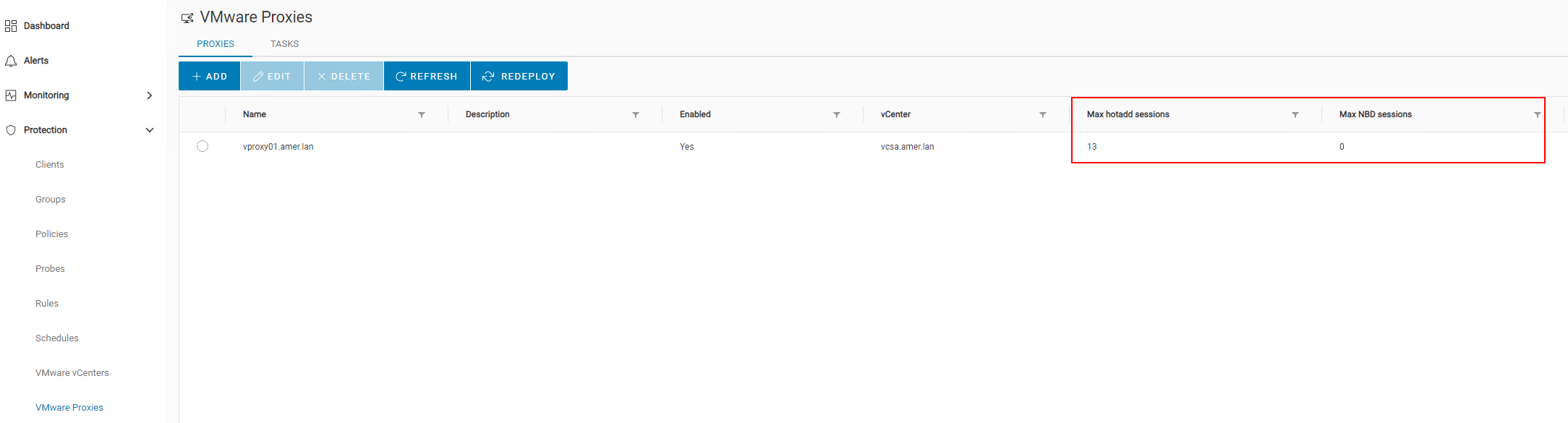
This means that the vProxy appliance must reside on an ESXi host which has datastore access to the VMs it is backing up. If only HotAdd is enabled, you can temporarily enable NBD to see if the backup session starts. If the backup starts, this suggests a Hot Add access issue in VMware. This can be resolved by deploying vProxy appliances on ESXi hosts so that each VMware datastore is accessible by at least one vProxy appliance. It is not recommended to use NBD (when possible). Large amounts of NBD sessions can cause congestion on the ESXi management network. For more information about scalability and hotadd/NBD recommendations and limitations, see the NetWorker VMware Integration Guide available through: https://www.dell.com/support/home/product-support/product/networker/docs
HotAdd can also be validated with the ProxyHC utility: NVP-vProxy: How to use health check tool ProxyHC on vProxy appliance.
Backup action has manual vProxy selected:
The backup action has a vProxy manually selected in it: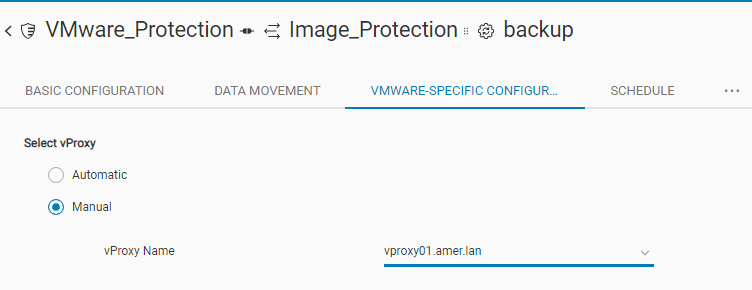
Ensure that there are no issues (as detailed above) access this vProxy or with its availability, test another available vProxy or set to "Automatic" selection.