PowerStore: Secure Connect Gateway device View displays appliance object failed
Summary: A common scenario where the appliance object shows failed when using a Secure Connect Gateway (SCG).
This article applies to
This article does not apply to
This article is not tied to any specific product.
Not all product versions are identified in this article.
Symptoms
The Cluster connection status is Success, however the Appliance connection status is Failed.
While hovering the cursor over the Failed status icon, the tooltip indicates: There is an issue with your connection or device configuration.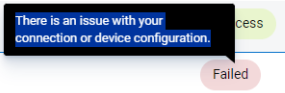
Cause
Likely caused by SSH being disabled on the PowerStore or a firewall blocking port 22 access between SCG and PowerStore
Resolution
- Check SSH status using the PowerStore UI: Settings -> SSH Management -> <Select Appliance> -> Enable SSH
- Check all firewalls between PowerStore and SCG appliance to ensure port 22 is allowed.
Affected Products
Secure Connect Gateway, PowerStoreArticle Properties
Article Number: 000227755
Article Type: Solution
Last Modified: 27 May 2025
Version: 5
Find answers to your questions from other Dell users
Support Services
Check if your device is covered by Support Services.