PowerFlex 4.x Add Existing RG fails due to incorrectly defined network mappings vxfm00157 IDENTITYPOOLMANAGER
Summary: Add Existing Resource Group (RG) fails due to incorrectly defined network mappings.
This article applies to
This article does not apply to
This article is not tied to any specific product.
Not all product versions are identified in this article.
Symptoms
Two failure scenarios are listed below while adding the existing RG:
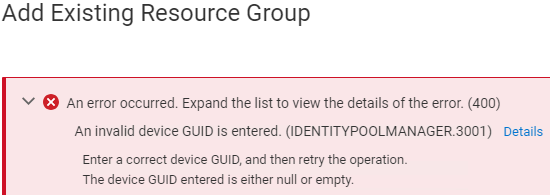
1) Incorrect Network Type defined results in:
An invalid device GUID is entered. (IDENTITYPOOLMANAGER.3001)
2) Out of Band (OOB) network defined as static, instead of DHCP, results in:
A static ip from oob network could not be reserved (vxfm00157)

Impact
Unable to add an RG.
Cause
1) PowerFlex Manager Networks do not have correctly defined network types.
Example of incorrectly defined network:

Example of a correctly defined network:

- If ESXi MGMT network - the network type should be Hypervisor Management
- If ESXi vMotion network - the network type should be Hypervisor Migration
- If PowerFlex DATA network - the network type should be PowerFlex Data
- If PowerFlex MGMT network - the network type should be PowerFlex Management
- etc.
- Defining an OOB network in PFxM is optional
- If the OOB network is on a supported NIC type and you want "Add node" to add that VLAN to the switch configuration you do must map the OOB network, but IP Address Setting should be DHCP as PFxM does not support configuring static OOB IP addresses

Resolution
1) Ensure network type and IP ranges for each defined network are correct.
2) If defining the OOB network, set it to DHCP.
2) If defining the OOB network, set it to DHCP.
- Defined Networks can be seen in the following section:
- PowerFlex Manager > Settings > Networking > Networks
Additional Information
Impacted Versions
All
Affected Products
PowerFlex rack, PowerFlex Appliance, PowerFlex SoftwareArticle Properties
Article Number: 000228099
Article Type: Solution
Last Modified: 09 Jul 2025
Version: 2
Find answers to your questions from other Dell users
Support Services
Check if your device is covered by Support Services.