PowerEdge: XE9685L - Linux command "lspci -vvv" shows "downgraded" on the NVIDIA CX7
Summary: Using the Linux command "lspci -vvv" on PowerEdge XE9685L, the "LnkSta" value of the NVIDIA ConnectX-7 device is shown as "downgraded."
This article applies to
This article does not apply to
This article is not tied to any specific product.
Not all product versions are identified in this article.
Symptoms
In the PowerEdge XE9685L, there are 4 CX7 (ConnectX-7, NVSwitch bridge) ports on B200. The PCIe speed is capable of Gen4, but the link is Gen3 due to AMD root port limitations.
When performs the "lspci -vvv" command in Linux, the output of the LnkSta (Link Status) value shows the string "downgraded." This symptom is a cosmetic issue and the behavior is working as designed, without any functional impact.
The Linux "lspci -vvv" command checks the LnkCap (Link Capabilities) and LnkSta values and compares them with each other. When the value of LnkSta is less than LnkCap, it shows "downgraded" as the result.
In this case, as shown in Figure 1, LnkSta is 8 GT/s and LnkCap is 16 GT/s (LnkSta < LnkCap)
The "lspci -vvv" command shows "downgraded" as the result in LnkSta.
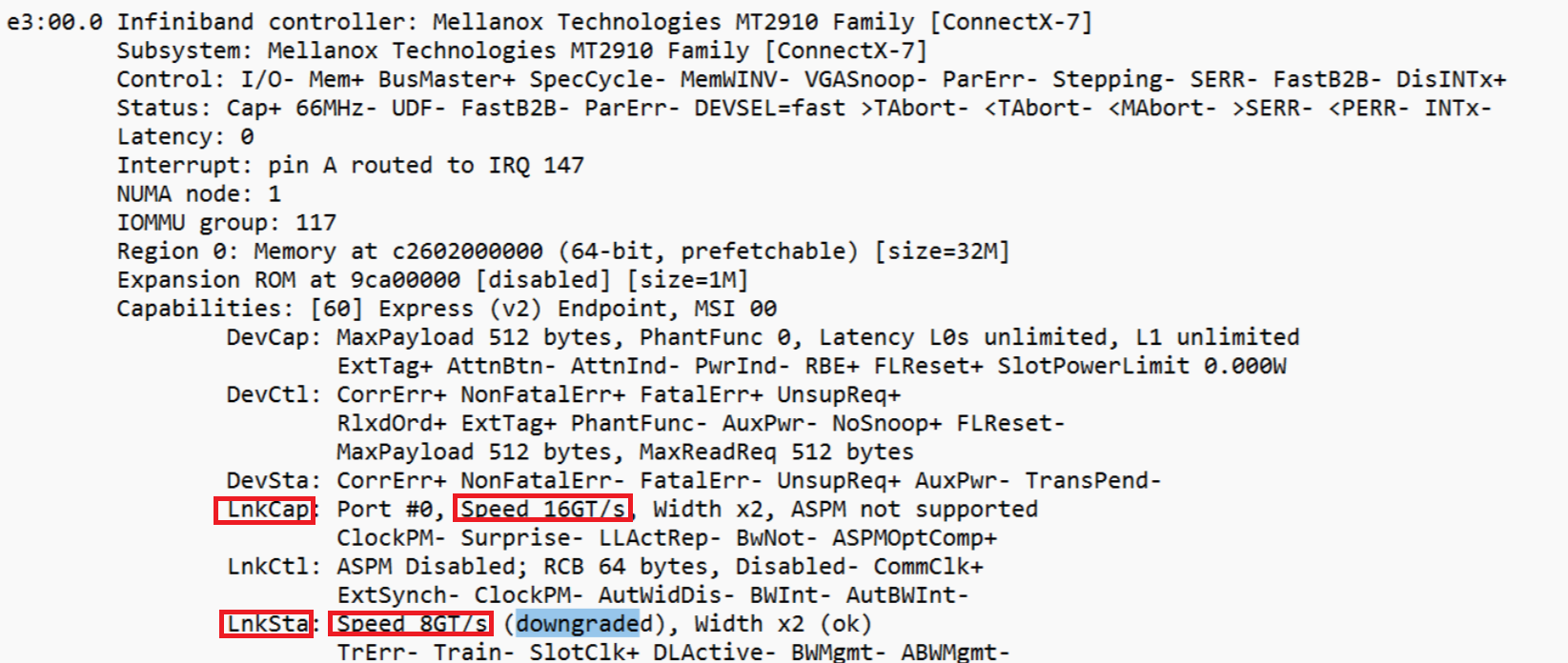
Figure 1: The l
spci -vvv output of CX7
Cause
According to NVIDIA's specifications, the minimum PCIe link speed for the CX-7 NVSwitch bridge to the CPU is Gen4 (8 GT/s) for one port and Gen3 (4 GT/s) for two ports.
However, the connected ports from AMD are limited to PCIe Gen3 (4 GT/s) speeds.
The PowerEdge XE9685L uses two ports to connect the CX-7 NVSwitch bridge, following both NVIDIA and AMD specifications.
This results in a combined speed of 8 GT/s (4 GT/s x 2), as shown in the LnkSta value in Figure 1 above
This is not an issue and has no performance impact, the speed matches the design guidelines of both NVIDIA and AMD.
Resolution
This is not an issue, the "downgraded" message can be ignored.
Affected Products
XE ServersArticle Properties
Article Number: 000308325
Article Type: Solution
Last Modified: 22 May 2026
Version: 3
Find answers to your questions from other Dell users
Support Services
Check if your device is covered by Support Services.