PowerFlex 4.x OS replacement from CentOS with CloudLink to SUSE Fails
Summary: While performing OS migration from CentOS to SLES, when CloudLink (clc-agent) is installed, it fails, and retrying will not be possible as the Replace tab will be disabled.
Symptoms
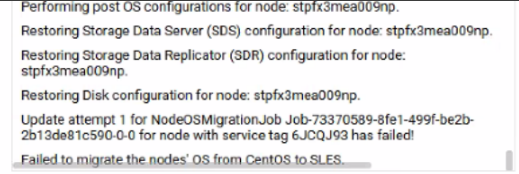
As seen in the PowerFlex Manager Platform (PFMP) UI, the migration job has failed:
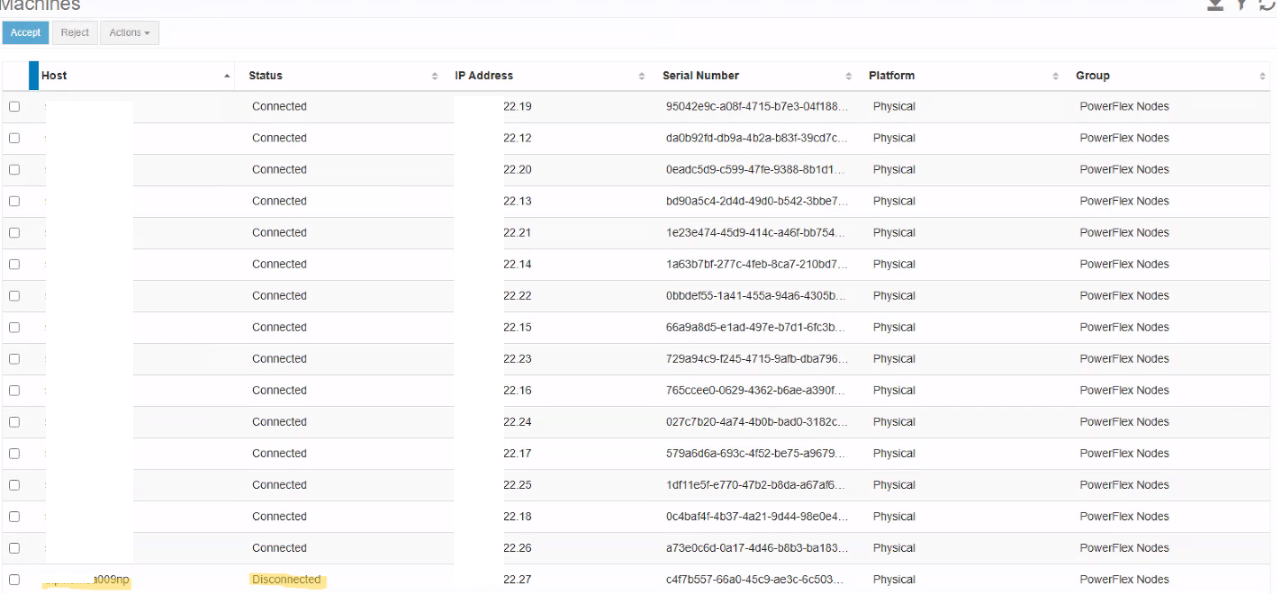
As seen in the CloudLink UI, the device is in the disconnected state:

deployment.log
DEBUG [2025-03-31T07:39:59.703290] 2345512: provider/elementmanager/scaleio.rb:3934:in `update_device_original_path': scaleio-block-legacy-gateway: Updating the original path of device /dev/mapper/svm_nvme15n1
legacy-gateway: Endpoint: /api/instances/Device::df7d8fba000f0004/action/updateDeviceOriginalPathname Payload: {}
INFO  [2025-03-31T07:40:24.967795] 2345512: provider/elementmanager/scaleio.rb:1197:in `post_request': scaleio-block-legacy-gateway: VXOS REST API error encountered in post_request: {"message"=>"Device has an unhandled error that cannot yet be cleared", "httpStatusCode"=>500, "errorCode"=>564}
DEBUG [2025-03-31T07:40:24.968923] 2345512: provider/configuration/centos_sles_migration.rb:469:in `restore_disk_configuration': rackserver-6jcqj93: Failed to update disk configuration. {"message"=>"Device has an unhandled error that cannot yet be cleared", "httpStatusCode"=>500, "errorCode"=>564}:ASM::Provider::Elementmanager::Scaleio::WrappedRestClientException:/opt/asm-deployer/lib/asm/provider/elementmanager/scaleio.rb:1198:in `post_request'
/opt/asm-deployer/lib/asm/provider/elementmanager/scaleio.rb:3935:in `update_device_original_path'
DEBUG [2025-03-31T07:47:18.696164] 2345512: type/server.rb:3832:in `block in linux_ready?': rackserver-6jcqj93: OS is not yet ready: Net::SSH::ConnectionTimeout
deployer/rules/service/configuration_lane_provision_rule.rb> failed to run: VXFM332::Failed to perform OS Replacement for node stpfx3mea009np.
ERROR [2025-03-31T08:17:45.344924] 2345388: service_deployment.rb:672:in `process': VXFM332::Failed to perform OS Replacement for node stpfx3mea009np.
ERROR [2025-03-31T08:17:45.393236] 2345388: service_deployment.rb:675:in `process': VXFM332::Failed to perform OS Replacement for node stpfx3mea009np.
ERROR [2025-03-31T08:17:45.393600] 2345388: service_deployment.rb:676:in `process': ["/opt/asm-deployer/lib/asm/provider/configuration/centos_sles_migration.rb:864:in `process!'", "/opt/jruby/jruby-9.4.6.0/lib/ruby/stdlib/forwardable.rb:238:in `process!'", "/opt/asm-deployer/rules/configuration/common_configuration_rule.rb:16:in `block in (eval)'", "/opt/asm-deployer/lib/asm/rule_engine/rule.rb:204:in `run'", "/opt/asm-deployer/lib/asm/rule_engine/rule.rb:235:in `process_state'", "/opt/asm-deployer/lib/asm/rule_engine.rb:88:in `block in process_rules'", "/opt/asm-deployer/lib/asm/rule_engine/rules.rb:75:in `block in by_priority'", "org/jruby/RubyArray.java:1983:in `each'", "/opt/asm-deployer/lib/asm/rule_engine/rules.rb:74:in `by_priority'", "/opt/asm-deployer/lib/asm/rule_engine.rb:76:in `rules_by_priority'", "/opt/asm-deployer/lib/asm/rule_engine.rb:86:in `process_rules'", "/opt/asm-deployer/lib/asm/service/processor.rb:45:in `process_state'", "/opt/asm-deployer/lib/asm/service/processor.rb:52:in `block in process_state_threaded'"]
INFO  [2025-03-31T08:17:45.394190] 2345388: service_deployment.rb:678:in `process': Status: Error
exception.log and os-migration.log
#<ASM::UserException: VXFM332::Failed to perform OS Replacement for node stpfx3mea009np.>
/opt/asm-deployer/lib/asm/provider/configuration/centos_sles_migration.rb:864:in `process!'
/opt/jruby/jruby-9.4.6.0/lib/ruby/stdlib/forwardable.rb:238:in `process!'
/opt/asm-deployer/rules/configuration/common_configuration_rule.rb:16:in `block in (eval)'
/opt/asm-deployer/lib/asm/rule_engine/rule.rb:204:in `run'
/opt/asm-deployer/lib/asm/rule_engine/rule.rb:235:in `process_state'
/opt/asm-deployer/lib/asm/rule_engine.rb:88:in `block in process_rules'
/opt/asm-deployer/lib/asm/rule_engine/rules.rb:75:in `block in by_priority'
org/jruby/RubyArray.java:1983:in `each'
Impact
OS migration from CentOS to SLES, on a system that has the CloudLink installed with all the disks encrypted, fails.
Cause
To successfully replace the OS on a system that uses CloudLink, PFMP requires CloudLink to be compliant. Once compliance is confirmed, PFMP disconnects the clc-agent from CentOS and install it on SLES. After connecting to the CloudLink server and exchanging keys, the devices can unlock drives successfully, ensuring a smooth migration with CloudLink.
When an OS replacement is performed while CloudLink is in a noncompliant state, the CloudLink migration is ignored, similar to a standard OS replacement on a system without CloudLink. The PFMP will not disconnect the clc-agent on CentOS and will fail to install on SLES, leading to the devices entering an error state.
Resolution
|
To install CloudLink on the newly installed SLES nodes, use the following steps:
Change the IP before running the command.
Note -G denotes Group Id.

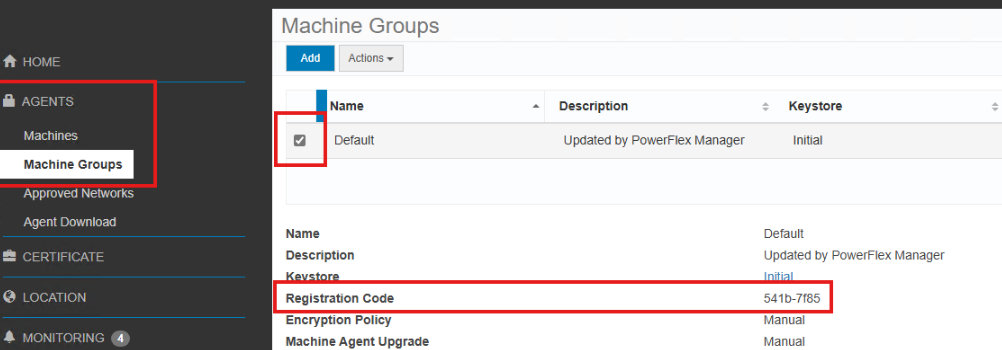
Group ID" is the Registration Code of the group in Cloud link, as per the screenshot.
If no Group ID is provided, the machine is added to the Default group.
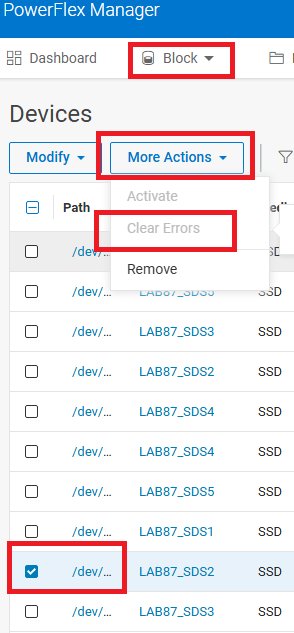
If the device/s were removed manually, add them back. |

| Impacted Versions
4.x |