OpenAI CLIP-vit-base-patch32 installeren voor gebruik met Dell Pro AI Studio op Qualcomm-platforms
Samenvatting: Het volgende artikel bevat informatie over het proces voor het installeren van OpenAI CLIP op Qualcomm voor gebruik met Dell Pro AI Studio op één apparaat.
Dit artikel is van toepassing op
Dit artikel is niet van toepassing op
Dit artikel is niet gebonden aan een specifiek product.
Niet alle productversies worden in dit artikel vermeld.
Instructies
Betreffende producten:
- Dell Pro AI Studio
Bij de onderstaande stappen wordt ervan uitgegaan dat u de benodigde vereiste programma's en installatieprogramma's al hebt gedownload en uitgepakt. Voordat u doorgaat, moet u ervoor zorgen dat u het volgende hebt verzameld:
- .NET Desktop Runtime ARM64 8.0.15 of hoger
- ASP.NET Core Runtime ARM64 8.0.15 of hoger
- C++ Redistributable ARM64 14.42.34438.0 or higher
- Dell Core Services
- Dell AI-framework
- OpenAI CLIP-vit-base-patch32
Opmerking: Bevestig dat uw Dell computer een ondersteund platform is op de pagina Handleidingen en documenten van Dell Pro AI Studio. (Raadpleeg de Dell Pro AI Studio-implementatiehandleiding voor Microsoft Endpoint Configuration Manager (MECM) of de Dell Pro AI Studio Intune-gids.)
-
Klik met de rechtermuisknop op het menu Start van Windows en selecteer de optie Terminal (admin).
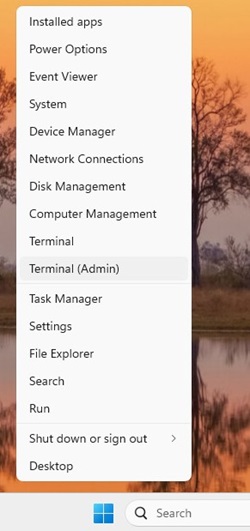 Opmerking: Klik op Ja als daarom wordt gevraagd door het Gebruikersaccountbeheer.
 -
Wijzig de map in Terminal in het adres waar u de bestanden hebt uitgepakt. (Bijvoorbeeld: Typ
cd C:\DPAIS\ARM64en druk op Enter:PS C:\> cd C:\DPAIS\ARM64\ -
In Terminal-type
.\windowsdesktop-runtime-8.0.15-win-ARM64.exe /install /quiet /norestarten druk op Enter:PS C:\DPAIS\ARM64> .\windowsdesktop-runtime-8.0.15-win-ARM64.exe /install /quiet /norestart -
In Terminal-type
.\aspnetcore-runtime-8.0.15-win-ARM64.exe /install /quiet /norestarten druk op Enter:PS C:\DPAIS\ARM64> .\aspnetcore-runtime-8.0.15-win-ARM64.exe /install /quiet /norestart -
In Terminal-type
.\VC_redist.x64.exe /install /quiet /norestarten druk op Enter:PS C:\DPAIS\ARM64> .\VC_redist.ARM64.exe /install /quiet /norestart -
In Terminal-type
.\Dell.Core.Services.Installer_Arm64.msi /qn /norestarten druk op Enter:PS C:\DPAIS\ARM64> .\Dell.Core.Services.Installer_Arm64.msi /qn /norestart -
In Terminal-type
.\Dell.AI.Framework.Arm64.msi /qn /norestarten druk op Enter:PS C:\DPAIS\ARM64> .\Dell.AI.Framework.Arm64.msi /qn /norestart -
In Terminal-type
.\Dell.Model.CLIP-vit-base-patch32.NPU.ORT-QNN.arm64.msi /qn /norestarten druk op Enter:PS C:\DPAIS\ARM64> .\Dell.Model.CLIP-vit-base-patch32.NPU.ORT-QNN.arm64.msi /qn /norestartOpmerking: DeDell.Model.CLIP-vit-base-patch32.NPU.ORT-QNN.arm64.msibestand verwacht dat deOpenAI CLIP.zipbestand in dezelfde map te bevinden, anders mislukt de installatie. -
Start uw computer opnieuw op om het installatieproces te voltooien.
Getroffen producten
Dell Pro AI StudioArtikeleigenschappen
Artikelnummer: 000322690
Artikeltype: How To
Laatst aangepast: 24 okt. 2025
Versie: 2
Vind antwoorden op uw vragen via andere Dell gebruikers
Support Services
Controleer of uw apparaat wordt gedekt door Support Services.