Panduit: How to Update the G6 PDU Firmware
Summary: How to update the firmware on a G6 Panduit PDU and a G5 Panduit PDU.
Instructions
How to check the current PDU Firmware in the PDU Web UI
Click the home icon in the upper left menu< click identification < and scroll down to view the current Panduit PDU firmware.
How to update the PDU firmware in the PDU Web UI
-
Open the User interface in a web browser by entering the PDU IP address.
-
Log in with Administration credentials.
-
Go to Settings > System Management > Actions > Update Firmware.
-
In the Firmware Update dialog box, browse to the (Panduit.FW) firmware file.
(Panduit FW files are in RCM bundles)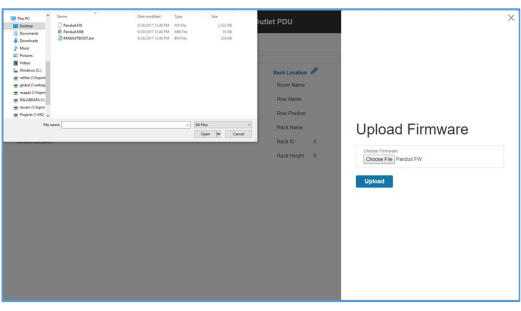 NOTE: The firmware file name must be retained as is.
 -
Select Upload. The system updates the newest firmware to the Intelligent Network Controller.
-
When the upload is finished, the system reboots automatically.
Additional Information
This KB applies to G5 and G6 PDUs.
https://www.panduit.com/content/dam/panduit/en/products/media/6/16/416/8416/111458416.pdf