NVE: rollup update fails at 4 of 18 "This package version YYYY-R#-v# is already installed"
Summary: Checking if the package being installed is the latest version (4 of 18) - This package version YYYY-R#-v# is already installed!
This article applies to
This article does not apply to
This article is not tied to any specific product.
Not all product versions are identified in this article.
Symptoms
NetWorker Virtual Edition (NVE) OS rollup fails at step 4 of 18 "This package version YYYY-R#-v# is already installed!"
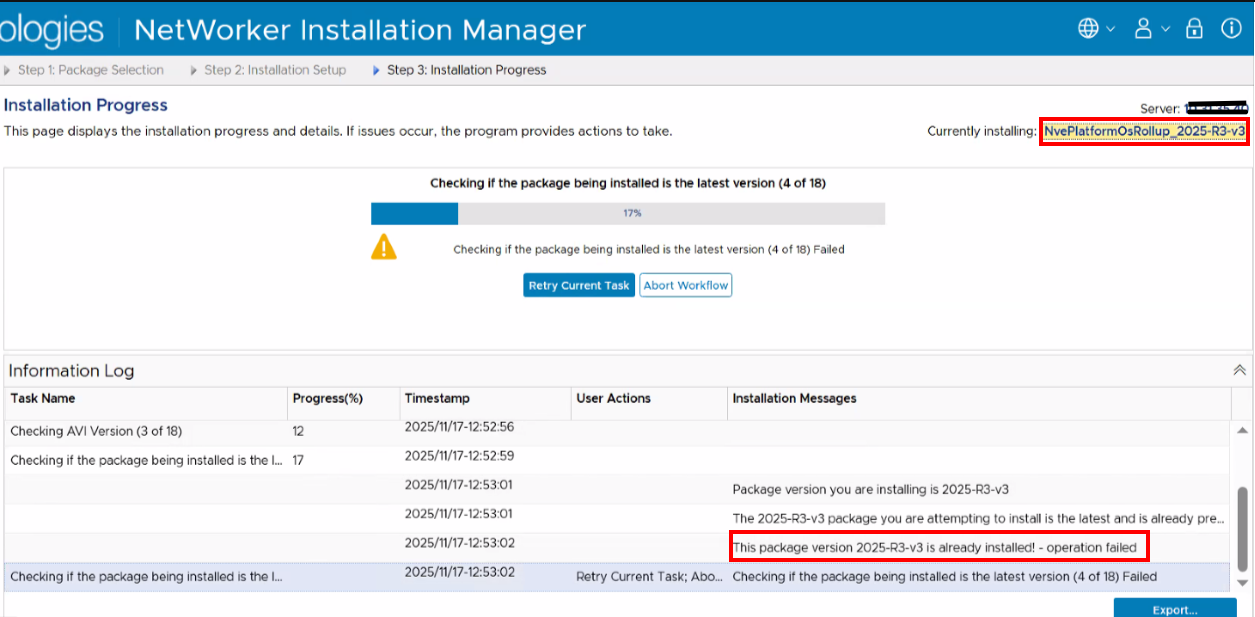
The /data01/avamar/repo/temp/*/tmp/workflow.log shows:
2025-12-08 12:28:08 (-0500) 47384385583780 INFO: Report home message: 2025-12-08 12:28:08 -0500|usdc1-nwrbkpv07.pbi.global.pvt|unknown|NveOsRollup|19.12.0.86|/space/avamar/repo/temp/NvePlatformOsRollup_2025-R2-v3.avp_1765214841316/tmp|AvPlatformOssuPackageVersionCheck|Checking if the package being installed is the latest version (4 of 18)|ERROR: AvPlatformOssuPackageVersionCheck::do  This package version 2025-R2-v3 is already installed! - operation failed
2025-12-08 12:28:08 (-0500) 47384385583780 ERROR: This package version 2025-R2-v3 is already installed! - operation failed
2025-12-08 12:28:08 (-0500) 47384385583780 INFO: post: This package version 2025-R2-v3 is already installed! - operation failed
Cause
An issue appeared during a previous rollup installation attempt, for example: NVE: AVI service failing to start post OS Update 2025 R2-v3
There is an issue with the post_errata_installation XML file associated with the previous rollup.
Resolution
- Open an SSH session to the NVE and login as admin.
- Switch to root:
sudo su - - Check if NVE latest installed Rollup:
avosrollup -V
nve:~ # avosrollup -V
Avamar Platform OS Security Rollup:
OS[SLES12.5] Version[2025-R2-v3] Installation Time[2025-10-17-13-01-37]
This indicates that the rollup is already installed on the system. However, it has not completed the process yet.
- Check if the rollup's
post_errata_installationXML file exists:grep package-survey /usr/local/avamar/var/package-survey-*-post_errata_installation*.xml
nve:~ # grep package-survey /usr/local/avamar/var/package-survey-*-post_errata_installation*.xml
:::::
/usr/local/avamar/var/package-survey-SLES12.5-post_errata_installation-2025-10-17-13-01-37.xml:<package-survey version="2025-R2-v3"/>
/usr/local/avamar/var/package-survey-SLES12.5-post_errata_installation-2025-10-17-13-01-37.xml:<package-survey>
/usr/local/avamar/var/package-survey-SLES12.5-post_errata_installation-2025-10-17-13-01-37.xml:</package-survey>
- Remove the xml files associated with the package it alerted as "already installed"
nve:~ # mv /usr/local/avamar/var/package-survey-SLES12.5-post_errata_installation-2025-10-17-13-01-37.xml /tmp
nve:~ # mv /usr/local/avamar/var/package-survey-SLES12.5-pre_errata_installation-2025-10-17-13-01-37.xml: /tmp
- Restart the AVI service:
avinstaller.pl --restart - Log in to the NetWorker Install Manager UI, continue the rollup update process by clicking "Retry Current Task."
Additional Information
Affected Products
NetWorker Family, NetWorkerArticle Properties
Article Number: 000403292
Article Type: Solution
Last Modified: 24 May 2026
Version: 4
Find answers to your questions from other Dell users
Support Services
Check if your device is covered by Support Services.