Dell Optimizer Does Not Respond to Maximize or Restore Window Taps
Summary: This article provides a solution to an issue where Dell Optimizer does not respond to maximize or restore taps.
This article applies to
This article does not apply to
This article is not tied to any specific product.
Not all product versions are identified in this article.
Symptoms
When Dell Optimizer is in windowed mode, tapping the maximize or restore button on the touchscreen does not change the window to the expected state. The action is unresponsive in both directions, and when the application is maximized, tapping the button does not return it to windowed mode.
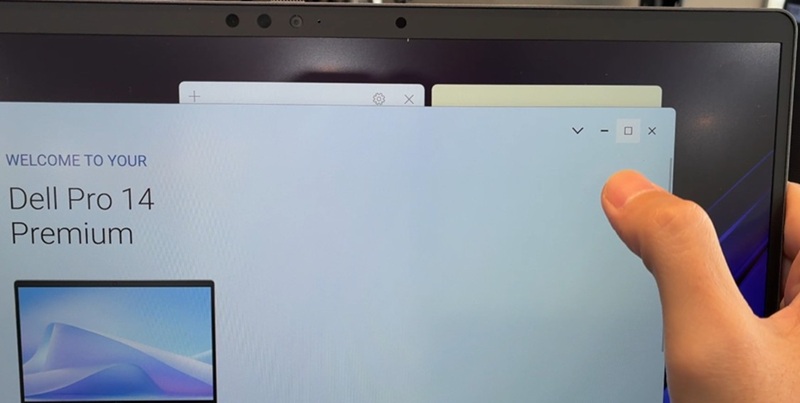
Affected Systems:
- Dell Pro 13 Plus PB13250
- Dell Pro 13 Plus PB13255
- Dell Pro 13 Plus PB13260
- Dell Pro 14 Plus PB14250
- Dell Pro 14 Plus PB14255
- Dell Pro 14 Plus PB14260
- Dell Pro 16 Plus PB16250
- Dell Pro 16 Plus PB16260
- Dell Pro 13 Premium PA13250
- Dell Pro 14 Premium PA14260
- Dell Pro Max 14 MC14250
- Dell Pro Max 14 Premium MA14250
- Dell Pro Max 16 MC16250
- Dell Pro Max 16 Premium MA16250
- Dell Pro Max 16 Plus MB16250
- Dell Pro Max 18 Plus MB18250
- Dell Pro Premium PA 14250
Cause
This behavior is caused by a Windows Management Instrumentation (WMI) issue.
Resolution
Note: This behavior only happens when using the touchscreen, if the system was ordered with a touchscreen.
The following workarounds can be used:
- Use the touchpad or mouse to click the maximize/restore button.
- Double tap the maximize/restore button.
Solution: A fix for this behavior will be in a new version of Dell Optimizer. The release for this new version will be in August 2026 (subject to change.)
Affected Products
Dell Optimizer, Dell Pro Max 14 Premium MA14250, Dell Pro Max 16 Premium MA16250, Dell Pro Max 16 Plus MB16250, Dell Pro Max 18 Plus MB18250, Dell Pro Max 14 MC14250, Dell Pro Max 16 MC16250, Dell Pro 13 Premium PA13250, Dell Pro 14 Premium PA14250
, Dell Pro 13 Plus PB13250, Dell Pro 13 Plus PB13255, Dell Pro 14 Plus PB14250, Dell Pro 14 Plus PB14255, Dell Pro 16 Plus PB16250
...
Article Properties
Article Number: 000427598
Article Type: Solution
Last Modified: 25 Jun 2026
Version: 3
Find answers to your questions from other Dell users
Support Services
Check if your device is covered by Support Services.