PowerVault Quarterly Highlights - January 2025
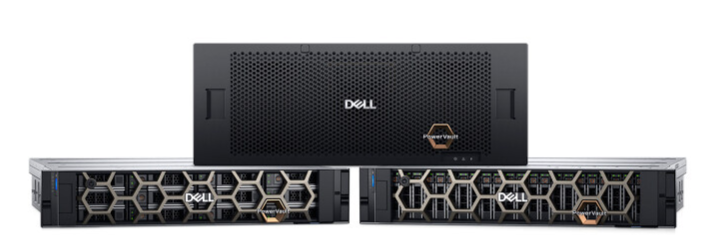
Summary: PowerVault ME5 series arrays. PowerVault ME5 is Simple, Fast, and Affordable. It is the gold standard for entry storage with blazing speed, higher capacity limits, and even greater simplicity. PowerVault MD24 series enclosures. PowerVault MD24 series PowerVault MD2412, MD2424, and MD2460 models are purpose-built and optimized for PowerEdge DAS configurations. Attaching PowerVault MD to PowerEdge previous and new server generations, simplifies the challenges of server capacity expansion. This ensures applications get high-speed access to their data – without compromise. ...
Instructions
Explore PowerVault
Table of contents
Latest controller firmware Released and Target code
Dell Technical Advisories (DTA) and Dell Security Advisories (DSA)
Dell SolVe procedure generator
Video guides for PowerVault ME series
Latest PowerVault ME5 update information
PowerVault ME4 & ME5 SupportAssist connectivity
APEX AIOps Observability Monitoring and Analytics
Latest Code Released and Target Code:
Customers on newer code enjoy greater functionality and fewer outages or service requests.
Updating to code levels released in the last 12 months ensures that you can take advantage of the newest features, functionality, fixes, and security enhancements.
For latest details go to Minimum, Recommended, and Latest Code Versions for Dell Technologies Servers, Storage, and Networking products document.
Recommended Drive Firmware Bundle
PowerVault ME4 and ME5 series administrators with SupportAssist enabled receive alerts in PowerVault Manager when latest firmware releases are available.
Download the latest Dell PowerVault ME Series Storage HDD/SSD Firmware package on dell.com/support.
Dell Technical Advisories (DTA) and Dell Security Advisories (DSA)
If you do not already have a Dell support business account see How to Register for Access to Dell Technologies Online Support or Upgrade an Existing Account
|
|
Dell Technical Advisories |
Date |
|
|
January 27, 2025 |
|
|
|
August 02, 2023 |
|
|
|
Dell Security Advisories |
Date |
|
|
DSA-2024-302: Dell PowerVault Security Update for ME5 Storage |
July 05, 2024 |
|
|
DSA-2023-083: Dell PowerVault ME5 Security Update for an OpenSSL Vulnerability |
February 22, 2023 |
|
|
DSA-2023-018: Dell PowerVault ME5 Security Update for a Client Desync Attack Vulnerability |
January 17, 2023 |
Access to SolVe
- The SolVe family of tools is used to access step-by-step dynamic procedures for activities such as installations, upgrades, and parts replacements.
- SolVe Online is a web application for instant access to SolVe content.
SolVe website here
IMPORTANT: Before you contact Dell Technologies support for fiber connectivity issues, review this document for common causes: Contaminants such as dust on fiber optic connector end face causes poor IO performance
Commonly Used How to Videos
The ME4/ME5/MD24xx Product information and part replacement videos located here:
|
Part type |
Part |
Time |
Video |
|
Drives |
ME4/ME5: Remove/Install 2.5” Hard Drive |
2:47 |
|
|
Drives |
ME4/ME5: Remove/Install 3.5” Hard Drive |
1:44 |
|
|
Drives |
ME4084/ME484 Remove and Install 2.5” Hard Drive |
1:51 |
|
|
Drives |
ME4084/ME484 Remove and Install 3.5” Hard Drive |
3:03 |
|
|
Drives |
ME4/ME5: Remove and Install Hard Drive DDIC 5U Chassis |
3:18 |
|
|
Power Supply |
ME4/ME5: Remove/Install Power Supply |
1:14 |
|
|
Power Supply |
ME4084/ME484: Remove and Install Power Supply |
0:55 |
|
|
Fan and Cooling |
ME4084/ME484: Remove and Install Fans |
0:35 |
|
|
I/O Module |
ME484: Remove and Install IOM |
0:38 |
|
|
Control Module |
ME4: Remove and Install Control Module |
1:21 |
|
|
Control Module |
ME5: Remove and Install Control Module |
2:28 |
|
|
Control Module |
ME4084: Remove and Install Control Module |
1:15 |
|
|
SFP+ Transceiver |
ME4/ME5: Remove and Install SFP+ Modules |
0:47 |
|
|
Drives |
MD2412/MD2424: How to replace a Hard Drive |
3:05 |
|
|
Power Supply |
MD2412/MD2424: Remove and Install Power Supply |
2:04 |
|
|
I/O Module |
MD2412/MD2424: Remove and Install EMM |
2:23 |
|
|
Fan and Cooling |
MD2412/MD2424: Remove and Install Fans |
2:51 |
Latest PowerVault ME5 update information
Changes and features in PowerVault ME5 series controller firmware ME5.1.2.1.1
- PowerVault Manager encryption protocol defaults to TLS 1.3.
- Configuring SupportAssist PowerVault Manager now includes a hyperlink to the online service https://apex-aiops.dell.com/. This is free to use for company administrators whose PowerVault ME and other systems are included with ProSupport or ProSupport+ warranty.
- Disk Group Scrub is no longer scheduled to run 360-hour intervals.
- Previous schedules are honored. In addition, Disk Scrub available in previous firmware versions has been removed.
- Creating a schedule for Disk Group Scrub is optional. Dell Technologies recommends that you allow the system to manage the task activity without a schedule.
- If Disk Group Scrub is enabled and a schedule is not created, the scrubbing process runs at the utility priority level in the background. The scrubbing process is designed to defer to I/O activity in order to avoid impacting system performance. A schedule can be created to further reduce the timeframe when scrubbing is active. The scrubbing task is visible as an in-progress activity on the Dashboard, but this process may only run within the schedule. It is possible that the scrub process may run outside the scheduled timeframe if an inadequate amount of time is allocated to complete the scrub within the system-determined timeframe. For more information, see PowerVault Manager online help.
- The system clock will automatically adjust for daylight saving time (DST).
- Administrators can now set the system's time zone region. Once done all system interfaces and logs display the local time according to the configured time zone.
- Access the "Date and Time" panel by selecting the date and time displayed in the banner or by selecting Settings > System > Date and Time.
PowerVault ME4 & ME5 SupportAssist connectivity
- SupportAssist provides an enhanced support experience for PowerVault ME4 & ME5 series storage arrays by sending configuration and diagnostic information to technical support at regular intervals. This connectivity greatly enhances problem detection and resolution.
- SupportAssist, when enabled, checks at intervals for the latest controller and disk drive firmware updates available for your system. When a disk or controller firmware update is detected, an event notification occurs to let you know that new Controller or Disk firmware is available in the event log.
- ME4: How to enable SupportAssist PowerVault ME4: How to enable SupportAssist
- ME5: How to enable SupportAssist PowerVault ME5: How to configure SupportAssist to Connect via Gateway Server
APEX AIOps Observability Monitoring and Analytics
- APEX AIOps Observability (formerly CloudIQ) - Users indicate that APEX AIOps Observability helps them resolve issues faster and save hours per week.
- APEX AIOps Observability is the cloud-native application included with Dell ProSupport and ProSupport Plus that monitors Dell storage, as well as Dell server, network, and hyperconverged infrastructure systems.
- APEX AIOps Observability reports storage:
- Health scores and recommended remediation
- Performance analytics including anomalies and impact
- Capacity analytics and capacity full projections
- Reclaimable storage
- Inventory data and more
- Watch our storage expert demonstrate some of APEX AIOps Observability features using a Dell Unity array HERE. APEX AIOps supports more products such as PowerEdge Servers and PowerVault storage and other Dell products.
- Follow the link on Dell infohub to learn more about APEX AIOps Observability
- PowerVault ME administrators onboard your array by following the instructions outlined in APEX AIOps Observability: General Procedures to Onboard PowerVault ME Series Arrays
End of Standard Support:
- For latest updates on the End of Standard Support (EOSS) for Dell products refer to Dell End-of-Life Product List for Converged Infrastructure and Storage document.
We want to hear from you!
Take a few minutes to fill out this short survey and let us know what you think of the Newsletter.
Proactive Newsletter Communication Survey (smartsheet.com)
Feel free to suggest any modifications.
Copyright © 2025 Dell Inc. or its subsidiaries
All Rights Reserved
Dell, Dell Technologies, and other trademarks are trademarks of Dell Inc. or its subsidiaries. Other trademarks may be trademarks of their respective owners.
Published February 2025
Dell believes that the information in this publication is accurate as of its publication date.
The information is subject to change without notice.
THE INFORMATION IN THIS PUBLICATION IS PROVIDED "AS-IS." DELL MAKES NO REPRESENTATIONS OR WARRANTIES OF ANY KIND WITH RESPECT TO THE INFORMATION IN THIS PUBLICATION AND SPECIFICALLY DISCLAIMS IMPLIED WARRANTIES OF MERCHANTABILITY OR FITNESS FOR A PARTICULAR PURPOSE USE, COPYING, AND DISTRIBUTION OF ANY DELL SOFTWARE DESCRIBED IN THIS PUBLICATION REQUIRES AN APPLICABLE SOFTWARE LICENSE.

Published in USA