NetWorker: Security Scanner Reports a Vulnerability on Ports 5432 and 5671 for a Windows Based NetWorker, NetWorker Management Console Server
Summary: Vulnerability on "TLS Version 1.1 Protocol Deprecated" and "TLS Version 1.0 Protocol Detection" for port 5432 and port 5671 on NetWorker Server having NetWorker version 19.7.0.1 installed on Windows Server 2016 ...
This article applies to
This article does not apply to
This article is not tied to any specific product.
Not all product versions are identified in this article.
Symptoms
The NetWorker server and NetWorker Management Console (NMC) server are deployed on a Windows based operating system.
A security scanner flags port 5671 and port 5432 as negotiating with TLS 1.0 and TLS 1.1.
A security scanner flags port 5671 and port 5432 as negotiating with TLS 1.0 and TLS 1.1.
Cause
The Windows operating system registry path Computer\HKEY_LOCAL_MACHINE\SYSTEM\CurrentControlSet\Control\SecurityProviders\SCHANNEL\Protocols is empty, which indicates that all TLS versions are enabled.
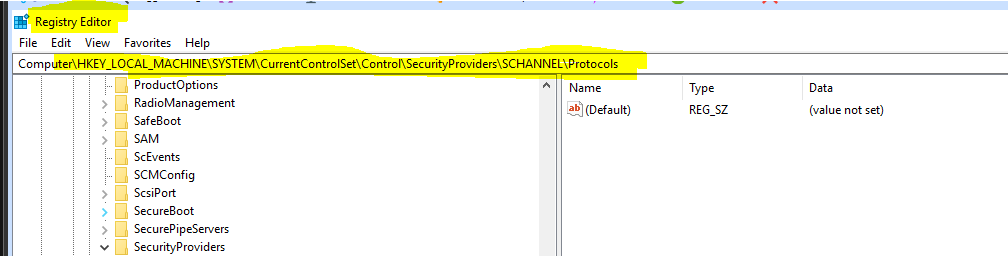
Figure 1: Windows Operating System Registry Screenshot
Since the old TLS versions are enabled, ports 5671 and 5432 used them during the negotiation.
Resolution
Mitigate this vulnerability by making the following changes to the RabbitMQ and Postgres configurations.
For RabbitMQ port 5671:
- On the NetWorker server, edit the "
C:\Program Files\EMC NetWorker\nsr\rabbitmq-server-#.#.#\etc\rabbitmq.conf" file with the following line.
NOTE: The RabbitMQ version varies depending on the NetWorker server version.
From:
% disable TLS 1.0, remove tlsv1.1 if it is not needed
                  {versions,   ['tlsv1.2', 'tlsv1.1']},
To:
% disable TLS 1.0, remove tlsv1.1 if it is not needed
                  {versions,   ['tlsv1.2']},
- Save the changes to the file.
NOTE: NetWorker services must be restarted for the changes to take effect. However, this can be done after the ciphers for port 5432 are modified as per the below steps.
For Postgres port 5432:
- On the NMC server, edit "
C:\Program Files\EMC NetWorker\Management\nmcdb\pgdata\postgresql.conf" file with the following line.
From:
ssl_ciphers = 'TLSv1.2:HIGH:!SSLv3:!NULL:!ADH:!MEDIUM:!LOW:!EXP:!MD5:!RC4:!3DES:@STRENGTH' #allowed SSL ciphers
To:
ssl_ciphers = 'TLSv1.2:!TLSv1.1:!TLSv1.0:HIGH:!SSLv3:!NULL:!ADH:!MEDIUM:!LOW:!EXP:!MD5:!RC4:!3DES:@STRENGTH' #allowed SSL ciphers
- Save the changes to the file.
Restart Services:
Restart the NetWorker server and NMC server services with the following command:
net stop nsrexecd /y
NOTE: This command stops all NetWorker and NMC services.
If the system is both a NetWorker server and NMC server, run the following commands:
net start nsrd
net start gstd
If the system is an NMC server only, run the following commands:
net start nsrexecd
net start gstd
Additional Information
Other references:
- How to enable or disable TLS from the Windows Registry
- TLS versions enabled or disabled on different Windows versions
- NetWorker: How to Import or Replace Certificate Authority Signed Certificates for NMC
- NetWorker: How to Import or Replace Certificate Authority Signed Certificates for "AUTHC" and "NWUI" (Windows)

Affected Products
NetWorker, NetWorker Management ConsoleProducts
NetWorker Family, NetWorker SeriesArticle Properties
Article Number: 000213153
Article Type: Solution
Last Modified: 27 مايو 2026
Version: 8
Find answers to your questions from other Dell users
Support Services
Check if your device is covered by Support Services.