PowerProtect: Die VM-Wiederherstellung reagiert bei 0 Prozent nicht mehr
Summary: VM-Wiederherstellungsjobs (virtuelle Maschinen) verbleiben in der Warteschlange mit 0 % Fortschritt.
Symptoms
Die PowerProtect-Lösung wird verwendet, um die vSphere-Umgebung zu schützen. VM-Wiederherstellungsjobs mit vollständigem und sofortigem Zugriff verbleiben im Status in der Warteschlange mit 0 % Fortschritt. Die VM-Backups werden erfolgreich abgeschlossen.
Bei der /var/log/brs/vmdm/vmdm.log Das Protokoll zeigt:
YYYY-MM-DD HH:MM:SS INFO [] [request-dispatch-service-1] [][][][][] [c.e.b.d.c.r.c.DdRestClient.dataDomainLogin(159)] - hostname=datadomain.domain.com username=sysadmin url=https://datadomain.domain.com:3009/rest/v1.0/auth
YYYY-MM-DD HH:MM:SS INFO [] [request-dispatch-service-1] [][][][][] [c.e.b.d.c.r.c.DdRestClient.executeDataDomainAuthRequest(198)] - Executed login to hostname: datadomain.domain.com, username: sysadmin
YYYY-MM-DD HH:MM:SS ERROR [] [request-dispatch-service-1] [][][][][] [c.e.b.d.c.r.c.DdRestClient.checkStatus(233)] - Return code = 401 UNAUTHORIZED, expected = 201 CREATED.
YYYY-MM-DD HH:MM:SS ERROR [] [request-dispatch-service-1] [][][][][] [c.e.b.d.c.r.c.DdRestClient.checkStatus(234)] - PowerProtect DD System Details = "**** Invalid user name or password.",  code = 5094
YYYY-MM-DD HH:MM:SS ERROR [] [request-dispatch-service-1] [][][][][] [c.e.b.d.c.r.c.DdRestClient.dataDomainLogin(164)] - Failed to login to PowerProtect DD System host datadomain.domain.com with user sysadmin
YYYY-MM-DD HH:MM:SS ERROR [] [request-dispatch-service-1] [][][][][] [c.e.b.d.c.u.DDCommonUtils.getRestConnectionFromCache(507)] - getRestConnectionFromCache failed
java.util.concurrent.ExecutionException: com.emc.brs.datadomain.common.rest.connection.DdRestClientException: "**** Invalid user name or password."
Cause
Die Data-Domain-Zugangsdaten wurden auf der Data Domain geändert und sind in PowerProtect nicht auf dem neuesten Stand.
Resolution
Aktualisieren Sie das Kennwort der Data-Domain-Zugangsdaten in PowerProtect unter Administration>Credentials. > Aktivieren Sie das Kontrollkästchen DATADOMAIN und klicken Sie auf Edit.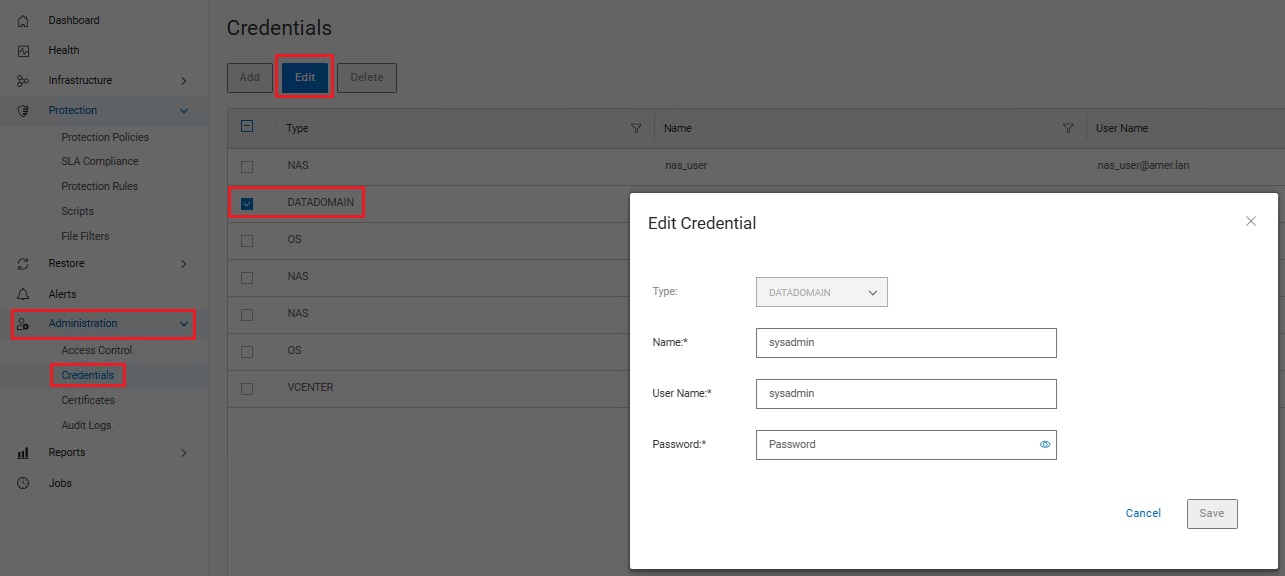
Additional Information
Ein ähnliches Symptom ist im Wissensdatenbankartikel PowerProtect dokumentiert: VM-Wiederherstellung bleibt in der Warteschlange mit null Prozent Fortschritt hängen.