PowerProtect: Virtual Machine Restore slutter å svare ved 0 prosent
Summary: Gjenopprettingsjobber for virtuell maskin (VM) forblir i køstatus med 0 % fremdrift.
This article applies to
This article does not apply to
This article is not tied to any specific product.
Not all product versions are identified in this article.
Symptoms
PowerProtect-løsningen brukes til å beskytte vSphere-miljøet. Gjenopprettingsjobber for VM med full og umiddelbar tilgang forblir i kø med 0 % fremgang. VM-sikkerhetskopieringene er fullført.
Informasjonen i /var/log/brs/vmdm/vmdm.log Loggen viser:
YYYY-MM-DD HH:MM:SS INFO [] [request-dispatch-service-1] [][][][][] [c.e.b.d.c.r.c.DdRestClient.dataDomainLogin(159)] - hostname=datadomain.domain.com username=sysadmin url=https://datadomain.domain.com:3009/rest/v1.0/auth
YYYY-MM-DD HH:MM:SS INFO [] [request-dispatch-service-1] [][][][][] [c.e.b.d.c.r.c.DdRestClient.executeDataDomainAuthRequest(198)] - Executed login to hostname: datadomain.domain.com, username: sysadmin
YYYY-MM-DD HH:MM:SS ERROR [] [request-dispatch-service-1] [][][][][] [c.e.b.d.c.r.c.DdRestClient.checkStatus(233)] - Return code = 401 UNAUTHORIZED, expected = 201 CREATED.
YYYY-MM-DD HH:MM:SS ERROR [] [request-dispatch-service-1] [][][][][] [c.e.b.d.c.r.c.DdRestClient.checkStatus(234)] - PowerProtect DD System Details = "**** Invalid user name or password.",  code = 5094
YYYY-MM-DD HH:MM:SS ERROR [] [request-dispatch-service-1] [][][][][] [c.e.b.d.c.r.c.DdRestClient.dataDomainLogin(164)] - Failed to login to PowerProtect DD System host datadomain.domain.com with user sysadmin
YYYY-MM-DD HH:MM:SS ERROR [] [request-dispatch-service-1] [][][][][] [c.e.b.d.c.u.DDCommonUtils.getRestConnectionFromCache(507)] - getRestConnectionFromCache failed
java.util.concurrent.ExecutionException: com.emc.brs.datadomain.common.rest.connection.DdRestClientException: "**** Invalid user name or password."
Cause
Data Domain-legitimasjonen er endret på Data Domain og er ikke oppdatert i PowerProtect.
Resolution
Oppdater legitimasjonspassordet for datadomenet i PowerProtect under Administrasjonslegitimasjon> Merk av for DATADOMAIN, > og klikk på Rediger.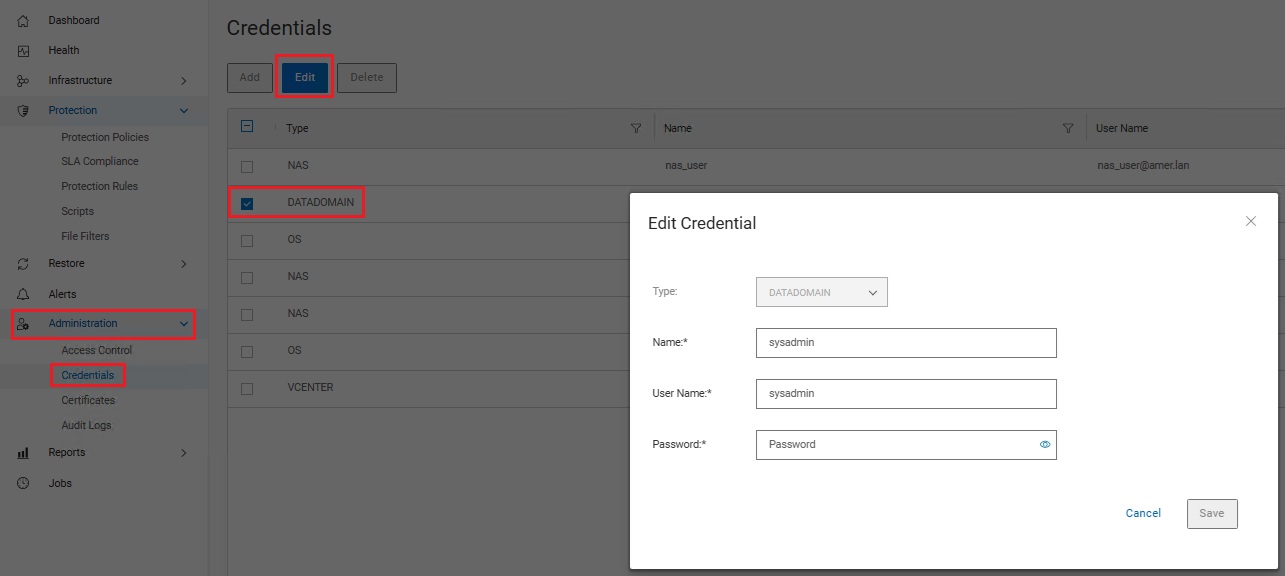
Additional Information
Et lignende symptom er dokumentert i KB-artikkelen PowerProtect: VM-gjenoppretting sitter fast i kø med null prosent fremgang.
Affected Products
PowerProtect Data ManagerArticle Properties
Article Number: 000415219
Article Type: Solution
Last Modified: 21 كانون الثاني 2026
Version: 1
Find answers to your questions from other Dell users
Support Services
Check if your device is covered by Support Services.