Dell EMC Unity: CIFS server is inaccessible due to error "No Response from KDC" (User Correctable)
Summary: This article covers the necessary steps to verify and address issues with the Kerberos Service response issues when trying to add or modify NAS servers in a LDAP environment.
Symptoms
When trying to run a task to add or modify a NAS server, an error message is received from the system indicating connection issues to the Kerberos service. The error message received should be the following:
WARNING: no response from KDC xx.xx.xx.xx
Within the log files of the Unity system, the following details can be located:
In the Unity Ktrace logs (Path: /EMC/C4Core/log/c4_safe_ktrace.log), the following errors can be located below:
2018/08/20-15:48:29.177142 10 7FF16C907703 sade:KERBEROS: 4:[VDM] WARNING: no response from KDC xx.xx.xx.xx
2018/08/20-15:48:29.532994 5540 7FF16C96D705 sade:SMB: 4:[VDM] Unsupported authentication mode: authMethod:4, kerberosSupport:1, negoMethod:0
2018/08/20-15:48:29.533033 40 7FF16C96D705 sade:SMB: 3:[VDM] OpenAndBind[NETLOGON] DC=xxx failed: Bind_OpenXFailed NO_SUCH_PACKAGE
2018/08/20-15:48:29.533042 10 7FF16C96D705 sade:SMB: 3:[VDM] Can't open NETLOGON file for DC=xxx
2018/08/20-15:48:29.760148 6 7FF16C96D703 sade:KERBEROS: 3:[VDM] krb5_sendto_kdc: udp RecvFromStream from addr xx.xx.xx.xx failed 91
In the Unity EMCSystemLogFile.log (Path: /EMC/backend/log_shared) the system will report the following message:
"2018-08-20T15:50:53.588Z" "xxx_spa" "Kittyhawk_safe" "356" "unix/spa/root" "WARN" "13:10380008" :: "For the NAS server xxx in the domain xxx, the DC xxxhas the following error: compname xxx DC=xxx Step='Logon IPC$' get Kerberos credential failed, gssError=Miscellaneous failure. Cannot contact any KDC for requested realm. . compname xxx DC=xxx Step='Open NETLOGON Secure Channel' ' ' 'DC cannot open NETLOGON pipe: status=DOMAIN_CONTROLLER_NOT_FOUND '. " :: Category=Audit Component=DART_SMB
Cause
- Firewall / Network configuration issues, causing the traffic to be blocked.
- Mismatching MTU size settings in the environment configuration (Domain Controllers, Switch and Dell EMC Unity device).
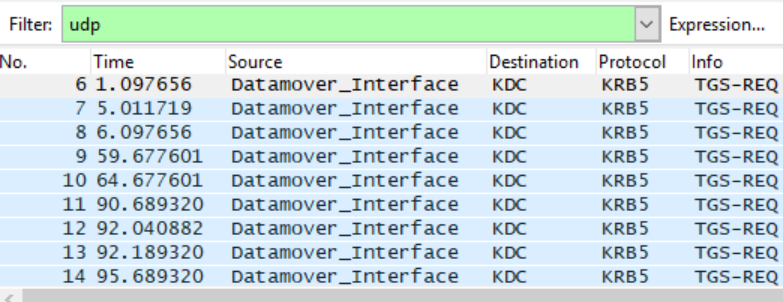
As a result, the Kerberos ticket from the Domain Controller cannot be delivered to the Datamover/SP Interface via UDP. From the network trace, there is only TGS-REQ but no TGS-REP.
Resolution
If the Dell EMC Unity system is running OE 4.2.x or above, the NAS server parameter changes can be done via the following service command: svc_nas
If running an older Dell EMC Unity OE version (4.0.x or 4.1.x), the recommendation is to upgrade the Unity OE to target or latest OE version available. Please refer to KB 000489694 (Dell EMC Unity OE revision Matrix).
To run this task please use the following steps:
- Run the command svc_nas ALL -param -f security -info kerbTcpProtocol to verify the current status of the Kerberus TCP Protocol status for the NAS servers.
service@(none) spa:~# svc_nas ALL -param -f security -info kerbTcpProtocol
SPA :
name = kerbTcpProtocol
facility_name = security
default_value = 0
current_value = 0
configured_value = 0
param_type = global
user_action = none
change_effective = immediate
range = (0,1)
description = 1=Kerberos will only use TCP, 0=Kerberos will try UDP, then TCP
SPB :
name = kerbTcpProtocol
facility_name = security
default_value = 0
current_value = 0
configured_value = 0
param_type = global
user_action = none
change_effective = immediate
range = (0,1)
description = 1=Kerberos will only use TCP, 0=Kerberos will try UDP, then TCP
- Upon the verification of the current status of the kerbTcpProtocol service, the following command can be used to modify the protocol settings:
SPA : done
SPB : done
- Once the above modification is performed, run the first command once more svc_nas ALL -param -f security -info kerbTcpProtocol to validate that the settings were applied to all NAS servers:
service@(none) spa:~# svc_nas ALL -param -f security -info kerbTcpProtocol
SPA :
name = kerbTcpProtocol
facility_name = security
default_value = 0
current_value = 1
configured_value = 1
param_type = global
user_action = none
change_effective = immediate
range = (0,1)
description = 1=Kerberos will only use TCP, 0=Kerberos will try UDP, then TCP
SPB :
name = kerbTcpProtocol
facility_name = security
default_value = 0
current_value = 1
configured_value = 1
param_type = global
user_action = none
change_effective = immediate
range = (0,1)
description = 1=Kerberos will only use TCP, 0=Kerberos will try UDP, then TCP
IMPORTANT NOTE: This change takes effect immediately, and it needs to be applied to the entire system. No reboot is required to fully apply the settings.