Dell Security Management Server管理コンソールで多要素認証を管理する方法
Summary: Dell Security Management Serverは、管理コンソールにログインするために二要素認証(2FA)を要求するように設定できます。
This article applies to
This article does not apply to
This article is not tied to any specific product.
Not all product versions are identified in this article.
Instructions
多要素認証は、Dell Security Management ServerまたはDell Security Management Server Virtualで管理できます。
対象製品:
- Dell Security Management Server
- Dell Security Management Server Virtual
影響を受けるバージョン:
- 11.4.0以降
多要素認証は、ユーザー グループまたは個々のユーザーのいずれかのレベルで管理できます。詳細については、次の適切なセクションを選択してください。
ユーザーグループ
- アカウント管理者のロールを持つアカウントを使用して、Dell Data Security管理コンソールにログインします。詳細については、「 Dell Data Security Server管理コンソールにアクセスする方法」を参照してください。
メモ: 管理者役割の詳細については、「 Dell Encryptionマニュアルおよび文書のサポート」にある『AdminHelp - Security Management Server』PDFの「管理者の役割」セクションを参照してください。
- 左側のメニュー ペインから、[ Populations ]タブを展開し、[ User Groups]をクリックします。

- リストから 編集するユーザー グループ を選択します。
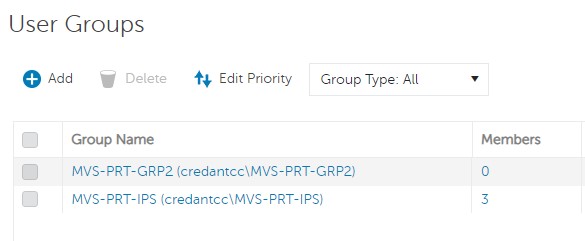 メモ: このリスト内のグループの位置によって、グループの優先度が決まります。詳細については、「 Dell Encryptionマニュアルおよび文書のサポート」にある『AdminHelp - Security Management Server』PDFの「Edit User Group Priority」セクションを参照してください。
 - [Admin]タブを選択します。
![[Admin]タブ](https://supportkb.dell.com/img/ka0Do0000005tybIAA/ka0Do0000005tybIAA_ja_3.jpeg)
- [MFA Configuration]から、次の手順を実行します。
- 有効 を選択します。
- [Email]または[Google Authenticator]のいずれかを選択します。
- [Update]ボタンをクリックします。

個々のユーザー
- アカウント管理者のロールを持つアカウントを使用して、Dell Data Security管理コンソールにログインします。詳細については、「 Dell Data Security Server管理コンソールにアクセスする方法」を参照してください。
メモ: 管理者役割の詳細については、「 Dell Encryptionマニュアルおよび文書のサポート」にある『AdminHelp - Security Management Server』PDFの「管理者の役割」セクションを参照してください。
- 左側のメニュー ペインから、[ Populations]タブを展開し、[Users]をクリックします。

- リストから 編集するユーザー を選択します。
- [Admin]タブを選択します。
![[Admin]タブ](https://supportkb.dell.com/img/ka0Do0000005tybIAA/ka0Do0000005tybIAA_ja_6.jpeg)
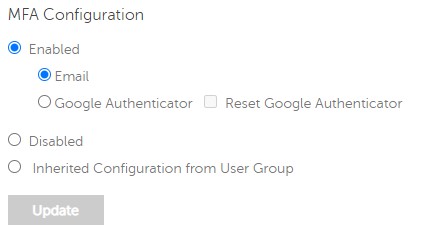
- [MFA Configuration]から、次の手順を実行します。
- 有効 を選択します。
- [Email]、[Google Authenticator]、または[Inherited Configuration from User Group]のいずれかを選択します。
- アップデート ボタンをクリックします。
Affected Products
Dell EncryptionArticle Properties
Article Number: 000200440
Article Type: How To
Last Modified: 21 يوليو 2026
Version: 7
Find answers to your questions from other Dell users
Support Services
Check if your device is covered by Support Services.