VxRail: Ereigniscode VXR0140A4
Summary: Ereignis-VXR0140A4 wird gemeldet, wenn die Core- und Bestandsfestplattenkapazität 90 % erreichen.
This article applies to
This article does not apply to
This article is not tied to any specific product.
Not all product versions are identified in this article.
Symptoms
Schweregrad: Fehler
: Es tritt VXR0140A4 ein VxRail-Ereignis auf und ein roter Alarm wird im vCenter-Portal angezeigt.
: Es tritt VXR0140A4 ein VxRail-Ereignis auf und ein roter Alarm wird im vCenter-Portal angezeigt.
Cause
Der Storage der Core- und Bestandsfestplatte (/storage/db/) auf vCenter hat 90 % der Kapazität erreicht.
Resolution
Melden Sie sich über SSH oder die Konsole der virtuellen vCenter-Maschine als Root bei der vCenter Server Appliance an.
Wenn SSH auf Ihrem vCenter Server nicht aktiviert ist, führen Sie die folgenden Schritte aus, um es zu aktivieren:
- Gehen Sie zu
https://[vCenter_url]:5480(die vCenter Server-Management-Benutzeroberfläche) und melden Sie sich als root an. - Klicken Sie auf Access und dann auf Edit , um vCenter SSH zu aktivieren.

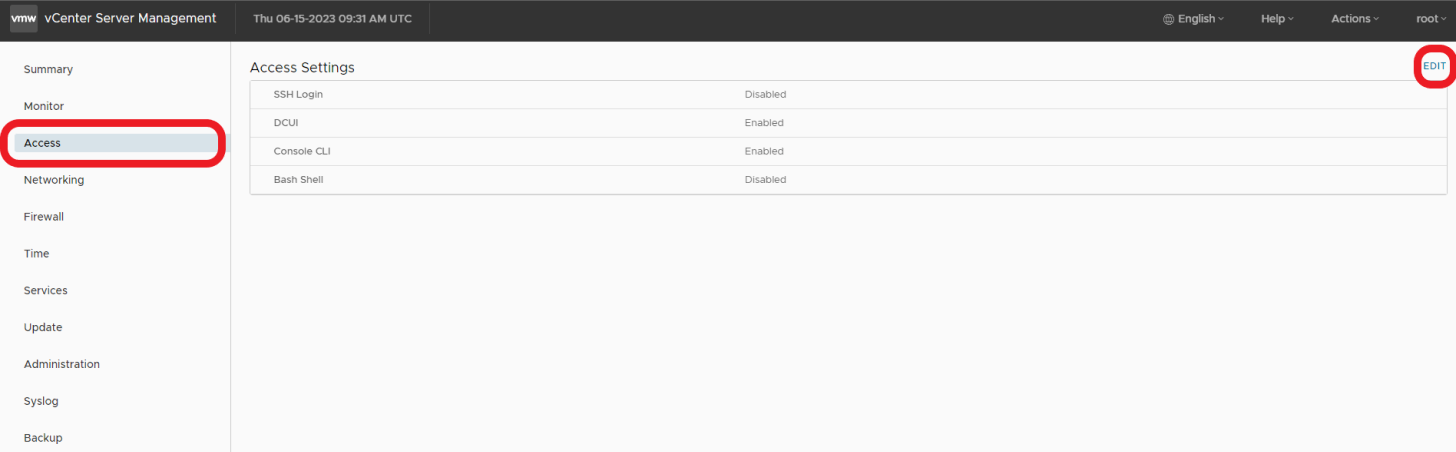

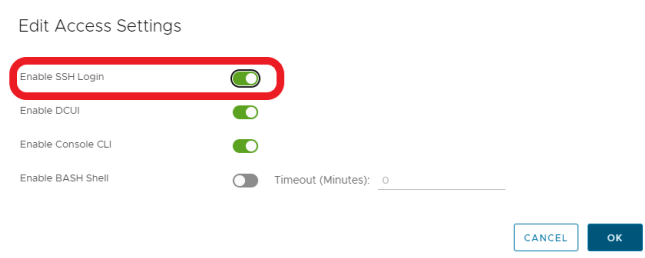
- SSH zu vCenter
ssh root@[vcenter ip or fqdn]
Um das Problem zu beheben, befolgen Sie bitte die Schritte, die in diesen VMware KB-Artikeln beschrieben sind.

Affected Products
VxRail, VxRail Appliance Series, VxRail SoftwareArticle Properties
Article Number: 000214541
Article Type: Solution
Last Modified: 22 مايو 2026
Version: 2
Find answers to your questions from other Dell users
Support Services
Check if your device is covered by Support Services.