Avamar: Period Lock Backups
Summary: Period lock allows the locking of the backups residing on a Data Domain.
Instructions
Overview:
-
Available from Avamar 19.9+
-
Avamar immutable backups must be enabled BEFORE the Data Domain Retention Lock Compliance Mode
-
Data Domain Retention Lock Compliance Mode must be enabled
- If there are multiple Data Domains attached, the Data Domain Retention Lock MUST be the same on all Data Domains.
-
Period lock allows the locking of backups residing on a Data Domain for several weeks ranging from minimum 1 week to maximum 31 weeks.
-
The backup can be locked for a specified time instead of being locked up until the expiration date.
-
The period lock duration must be less than the backup retention period.
- Backups already residing on the Avamar server WILL NOT have period lock enabled. Only NEW backups going forward will have the imulock retention set.
-
Available from Avamar 19.10+
-
Avamar governance mode must be enabled BEFORE enabling Data Domain Retention Lock Governance Mode
-
Immutable Backups cannot be enabled
-
Data Domain Retention Lock Governance Mode must be enabled
- If there are multiple Data Domains attached, the Data Domain Retention Lock MUST be the same on all Data Domains.
-
Period lock allows the locking of backups residing on a Data Domain for several weeks ranging from minimum 1 week to maximum 31 weeks.
-
The backup can be locked for a specified time instead of being locked up until the expiration date.
-
The period lock duration must be less than the backup retention period.
- Backups already residing on the Avamar server WILL NOT have period lock enabled. Only NEW backups going forward will have the imulock retention set.
The Avamar Administrator Guides on the Dell Support Website (v19.9+) also describes the period lock feature.
-
Data Domain Retention Lock (DDRL) is used on Data Domain to prevent modification and deletion of files for a defined time period only.
-
The retention locked files are read-only until their retention period expires.
-
Avamar immutable backup feature locks the backup data on the Avamar server.
-
When the backup is locked, there is no way to modify or delete the locked backup data until the backup reaches its expiry.
-
This immutable backup feature helps to prevent unexpected modification or deletion of existing backup data, which brings an extra layer of secure data protection for user data.
-
The immutable backup feature protects and locks backup data on the Avamar server only.
-
Backups cannot have no expiry (No end date) or fall outside the minimum and maximum Data Domain retention lock periods, otherwise they fail.
-
Carefully consider that this feature is right for your environment as this is NOT REVERSIBLE
Configuring Period Lock:
Carefully evaluate each mode before enabling it, specifically compliance mode, which is irreversible.
1. Set up for the required mode (compliance or governance):
- Compliance Mode: Immutable Backups (aka limited backups) must be enabled:
avmaint config --ava immutablebackups=true --confirmthisisnotreversible
- Governance Mode: Governance Mode must be set to true:
avmaint config governancemode=true --ava
2. Period lock backups must then be enabled as admin:
avmaint config periodimmutablebackups=true --ava
3. Verify:
avmaint config --ava |grep "immutable\|governancemode"
4. Set up MTree retention lock on the Data Domain.
Review the Dell Avamar and Data Domain Integration Guide on the Dell Support Website for instructions on how to do this.
Period Lock Options:
The values within the backup policy, the immutable backup feature can be overridden:
| Key | Value |
[avtar]imulock |
Enable this feature (true or false). |
[avtar]imulock-weeks |
Number of weeks (Range 1-31 weeks) |
[avtar]force-no-imulock |
Allows backups to be deleted at any time (true or false) |
- If all three options are enabled, the
[avtar]force-no-imulockoption holds the highest precedence. - When the
[avtar]force-no-imulockoption is set to true, the backup is no longer immutable and can be deleted. - These settings must be set per backup policy, and per plugin type.
- The Avamar User Web Interface (AUI) is the only interface able to delete backups that have the
[avtar]force-no-imulockflag set.
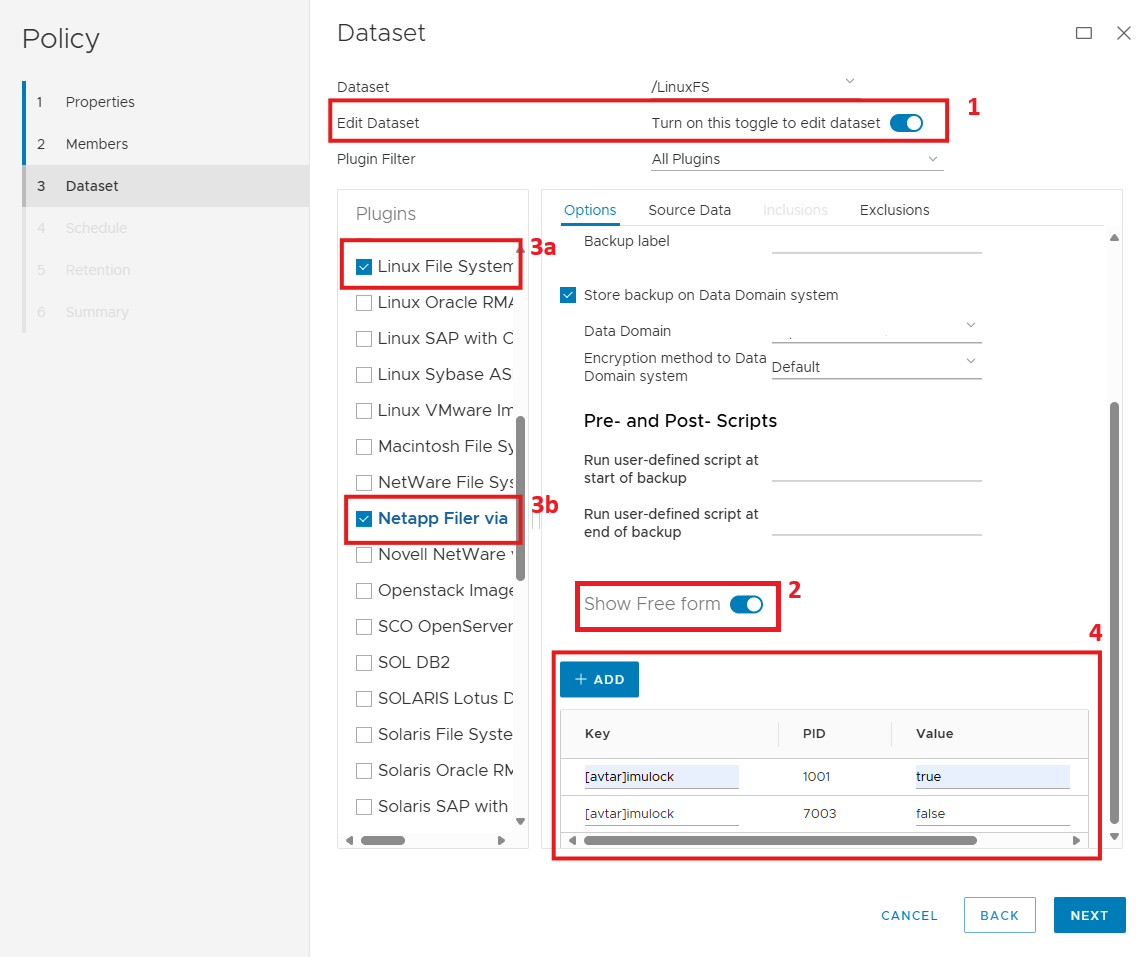
Go to the Backup Policy.
Enable the "Edit Dataset" button (1).
Go to the bottom right and enable the "Free Form" section where the flags are added (2).
On the left pane, select the wanted plugin (3a).
After selecting the plugin, click the +ADD in the Free Form section and add the wanted flag for the plugin (4).
Repeat for any other plugins in the dataset (3b and 4).
In the example above, both the Linux File System (1001) and the NetApp Filer via NDMP (7003) plugins have been individually selected and added. You will see two entries in the right pane under the Show Free form section for each plugin.
If only one plugin ID (PID) is seen in the "Free form" section, but multiple plugins are in the dataset, that means the +ADD WAS NOT selected for the second (or more) plugins. If you have more than one plugin in the dataset, and each one needs an imulock flag, each time you select a "new" plugin you have to select the +ADD so a NEW line for the imulock flag is added.
For example: If you have 4 plugins in a dataset, and you only see ONE line in the Show Free form section, then the other THREE plugins DO NOT have the imulock flags enabled and you missed step 3b and 4 in the instructions above.
Period Lock Examples:
The Examples below assume that immutable backups, period lock backups, and DD retention locks have already been set.
-
Default backup retention 60 days
-
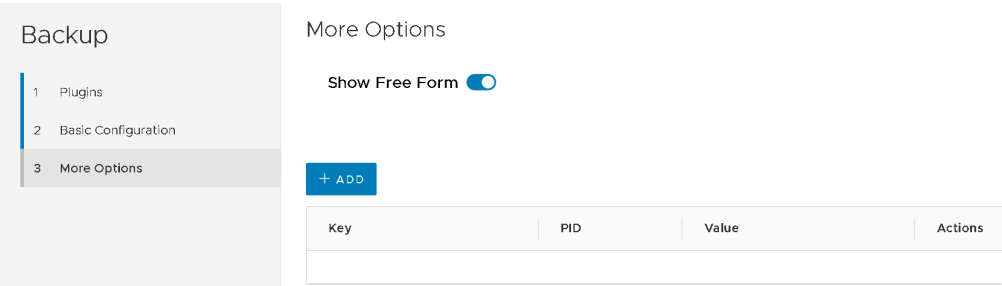
No options set
Result: Backup will expire after 60 days.
-
Default backup retention 60 days
-
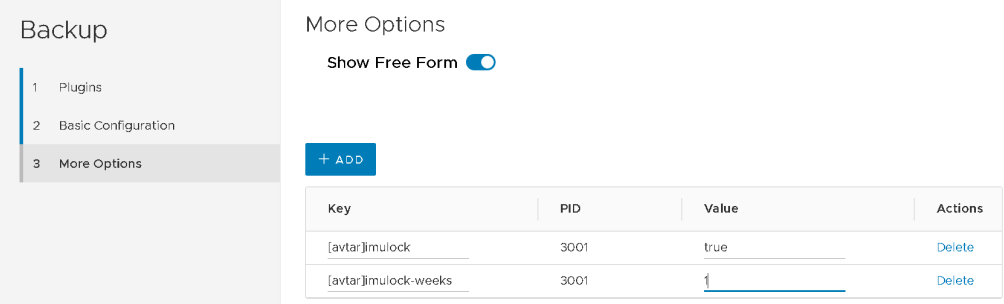
imulockset to true,imulock-weeksset to 1
Result: Backup will expire after 60 days but can be deleted after 1 week.
-
Default backup retention 60 days
-
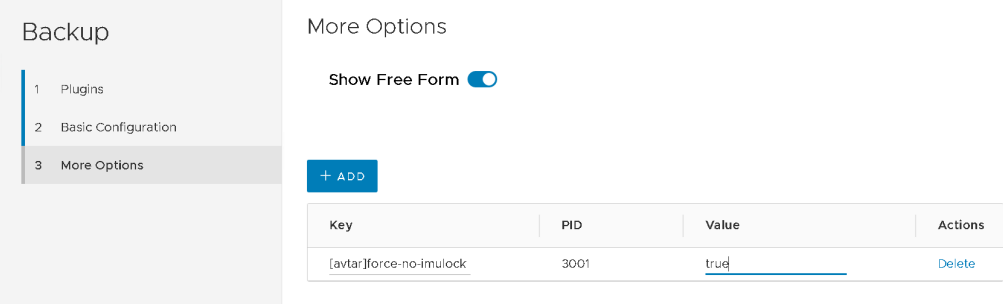
force-no-imulockset to true
Result: Backup will expire after 60 days but can be deleted at any time.
Period Lock use case examples:
-
Daily backups expire after 30 days.
-
Weekly backups expire after 5 weeks.
-
Monthly backups expire after 12 months.
-
Yearly backups expire after 7 years.
Suggested configuration:
1. Set the Data Domain mtree retention lock minimum to 1 day.
2. Set the Data Domain mtree retention lock maximum to 7 years, 2 months.
-
Daily backups expire after 30 days.
-
Weekly backups expire after 5 weeks.
-
Monthly backups expire after 12 months.
-
Yearly backups expire after 7 years.
-
Backups must be locked for 3 weeks regardless of expiration.
Suggested configuration:
1. Set the Data Domain mtree retention lock minimum to 1 day.
2. Set the Data Domain mtree retention lock maximum to 7 years, 2 months.
3. Set the backup policy for the backups:
a. Ensure that the key "[avtar]imulock" is set to true.
b. Ensure that the key "[avtar]imulock-weeks" is set to 3 (to allow manual deletion after 3 weeks).
-
All backups expire after 30 days with no exception.
Suggested configuration:
1. Set the Data Domain mtree retention lock minimum to 1 day.
2. Set the Data Domain mtree retention lock maximum to 35 days.
-
All backups expire after 30 days with no exception.
-
Backups must be locked for 2 weeks.
Suggested configuration:
1. Set the Data Domain mtree retention lock minimum to 1 day.
2. Set the Data Domain mtree retention lock maximum to 35 days.
3. Set the backup policy for the backups:
a. Set the expiry to 30 days.
b. Ensure that the key "[avtar]imulock" is set to true.
c. Ensure that the key "[avtar]imulock-weeks" is set to 2 (to allow manual deletion after 2 weeks).
-
Most backups expire after 14 days.
-
Some backups are deleted manually as required.
Suggested configuration:
1. Set the Data Domain mtree retention lock minimum to 1 day.
2. Set the Data Domain mtree retention lock maximum to 15 days.
(Note: This option requires an RPQ).
3. Set the backup policy for the 14-day backups to expire after 14 days.
4. Set the backup policy for the "manual-expiry" backups:
a. Set the expiry to a predetermined time period (for example 2 years).
b. Ensure that key "[avtar]force-no-imulock" is set to true (to allow manual deletion when required).
Additional Information
-
The allowable backup retention periods are those that fall within the minimum and maximum retention lock periods set on the Data Domain.
-
Any Avamar backups that are initiated with expirations outside of this range, such as those initiated with no expiration (also known as "keep backup forever"), fail.
Data Domain MTree retention lock for Avamar 19.9 and prior:
By default, on the DD, the minimum retention period is 12 hours and the maximum retention period is 5 years.
-
Keep the minimum retention period set to the minimum allowable 12 hours because some system backups (such as
cpbackups) are retained for shorter durations (such as 6 days) -
Reduce the maximum retention period to slightly greater (one or more days) than the longest wanted retention period to avoid situations where backups are inadvertently retained for long periods of time, such as 3 years when the maximum wanted backup retention period is 3 months.
Also see: Avamar: Immutable Backup aka Limited Backup Management Feature