Dell Technologies Remote Proactive SMP Customer Requirements

Summary: The elements below are required to perform a Remote Proactive SMP (RPS) System Maintenance Plan Activity in the most efficient manner. Work with your Remote Proactive engineer to stage these tools and collect the needed info. If these requirements are not met, the activity cannot begin or completed successfully. It is recommended that these requirements be accounted for prior to the start of the System Maintenance Plan Data Collection stage. ...

This article applies to This article does not apply to This article is not tied to any specific product. Not all product versions are identified in this article.

Instructions

The elements below are required to perform an RPS System Maintenance Plan Activity in the most efficient manner. Work with your Remote Proactive engineer to stage these tools and collect the needed info. If these requirements are not met, the activity cannot begin or completed successfully. It is recommended that these requirements be accounted for prior to the start of the System Maintenance Plan Data Collection stage.

  • Jump Station
Zoom remote access to a Windows Virtual Machine resident on the Integrated Management (AMP) stack is preferred. Typically, the "Array Management" virtual machine is ideal.
  • Credentials
Administrative access to each system component is required. Upgrade Engineers need IPs and credentials to all relevant components of the System. Validation of these credentials prior to the scheduled activity increases efficiency. The Configuration Reference Guide (CRG) provided at implementation, updated with any recent changes, is helpful as well.
  • SCR Tool
The DELL SCR tool is run on the VxBlock or PowerFlex Rack System for proceeding the System Maintenance Activity. This tool performs a collection of all the version and configuration information and compiles the data into a single excel file providing a consolidated view allowing for analysis. This proprietary tool is supplied and performed by Remote Proactive Engineer. The SCR tool requires prerequisite utilities to be installed on the "jump" machine being used for access to the system. These utilities are provided as necessary if they are not present. Utilities may include; (VMware PowerCLI, NaviCLI/UNICLI, Cisco Power Tools, Windows Powershell 3.0, so forth)
  • Misc. Tools and Utilities
Depending on the customer’s specific environment, other tools may be necessary. These tools may include "Putty," "WinSCP," FTP Upload Sites, so forth. The Remote Proactive Engineer works with the customer on an as needed basis for these additional tools.
 
Important Note: Data collection may not be possible unless the customer disables all anti-virus and anti-malware services, if running on the jump box host during collection. It is the customers responsibility to validate the jump hosts status prior to engagement, to ensure that no AV agents or services are running for a successful engagement.


System Maintenance Plan Jump Host and Connectivity Requirements

Jump Host:

The System Maintenance Activity can be run on any system that complies with the below system requirements.

System Hardware Requirements

CPU

4 vCPU’s or higher

RAM

8 GB or higher

Hard drive

Local storage only, shares or mapped drives are not supported. The amount of storage required varies based on the size of the component logs.

Operating Systems Supported

Microsoft Windows

Windows 10 or higher (64 bit)

Windows Server 2012 or higher (64 bit)

Additional Requirements

  • Remote access over Zoom or some other method

  • The user running the tool must have local Windows administrator permissions

  • C++ Redistributable for 2005, 2008, and 2010

  • VMware PowerCLI version 6.5 or higher

  • Network access to all Vblock, VxBlock, or PowerFlex Rack components

  • Antivirus Security software, or Active Directory GPO that prevents the execution of third-party .exe files or PowerShell activity may be required to be bypassed or disabled while the tool is running

  • Open TCP port 22 for Inbound traffic to the SCR Tool


Connectivity:
Data collection is performed with a direct SSH connection and using the SCR Tool, to be installed by the RPS Engineer. Configuration information is pulled for the Compute, Network, Storage, and Virtualization elements for your system.

The table below lists the ports used as well as any other additional connectivity-related requirements.

Default Port Number

Component

SSH - TCP 22

  • Cisco Nexus, MDS, and Catalyst (bidirectional)

  • Cisco C-series Servers (bidirectional)

  • VNX Array

  • XIO Array

  • VPLEX Array

  • PowerPath vApp

  • Secure Remote Services vApp

HTTPS - TCP 443

  • Cisco UCSM/B-series Servers

  • VMware vCenter

  • DELL PowerEdge Server iDRAC

Additional Requirements

Cisco Nexus, MDS, and Catalyst

  • Cisco switches must not have "terminal color persist" set on the switch. If it is set this, must be disabled by running "no terminal color persist"

Cisco UCSM/B-series

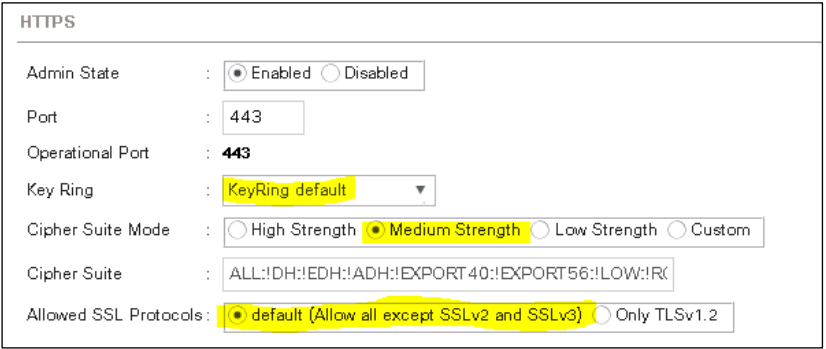
  • Cisco UCS HTTPS settings should be set to default. If other settings are in place, they may have to be changed temporarily to the default settings shown below during data collection, then changed back to the customers specified settings.

SMP requirements

Cisco C-series

  • C-series servers must be running firmware version 2.x or higher. For older revision, the tech-support bundles must be collected manually.

Unity and VNXe Arrays

  • SSH must be enabled on Unity and VNXe arrays using the UI system settings. The "service" account credential is required to collect logs.

Affected Products

VxBlock and Vblock Systems, PowerFlex rack, ScaleIO
Article Properties
Article Number: 000225458
Article Type: How To
Last Modified: 26 مارس 2026
Version:  10
Find answers to your questions from other Dell users
Support Services
Check if your device is covered by Support Services.