PowerProtect Data Manager: PowerProtect Interface account lockout configuration
Summary: PowerProtect user interface (UI) accounts are allowed five attempts, and then they are locked for five minutes. Users are automatically unlocked after five minutes and can authenticate with the correct password. ...
This article applies to
This article does not apply to
This article is not tied to any specific product.
Not all product versions are identified in this article.
Instructions
In PowerProtect 19.19.0-15 and earlier, account lockout settings cannot be modified; they are fixed to a five-minute lockout after five failed login attempts. Starting with PowerProtect 19.20.0-11, administrators can customize these settings in the user interface by navigating to Administration > Access Control > Password Policy.
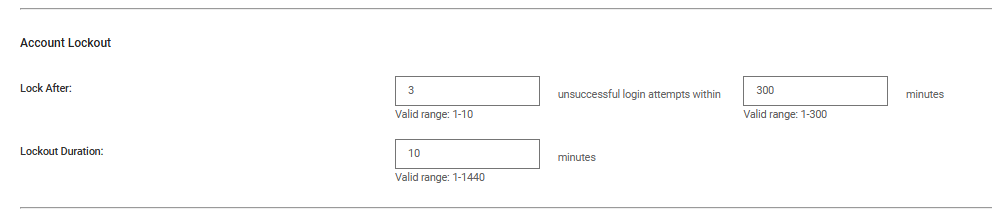
Figure 1. Password UI
Products
PowerProtect Data ManagerArticle Properties
Article Number: 000328057
Article Type: How To
Last Modified: 12 مايو 2026
Version: 3
Find answers to your questions from other Dell users
Support Services
Check if your device is covered by Support Services.