PowerEdge: SYS565 Memory Module Temperature Warnings with Power Supply Cold Redundancy Enabled
Summary: Dell PowerEdge 17G servers added MEMHOT error monitoring in iDRAC10 firmware version 1.20.80.50 combined with supported Field-Programmable Gate Array (FPGA) firmware. Servers configured with Power Supply Cold Redundancy feature enabled can record random SYS565 memory temperature warning events. ...
This article applies to
This article does not apply to
This article is not tied to any specific product.
Not all product versions are identified in this article.
Symptoms
Cold Redundancy and Cold Redundancy Power Supply Unit (PSU) Rotation policies are set to optimize input power consumption without jeopardizing the redundancy policy. The Cold Redundancy policy allows the backup PSU to remain inactive until the primary PSU fails. The
Cold Redundancy PSU Rotation policy switches between the cold redundant PSU and the active PSU every 24 hours. SYS565 events can occur during server cold boot or during Cold Redundancy PSU Rotation while the Cold Redundancy feature is enabled.
Lifecycle log example:
2025-10-22 17:15:35 SYS566 The memory module temperature has returned to its normal value.
2025-10-22 17:13:44 SYS565 The memory module temperature has exceeded the warning threshold value.
System event log example:
The memory module temperature has returned to its normal value. Wed Oct 22 2025 17:15:34
The memory module temperature has exceeded the warning threshold value. Wed Oct 22 2025 17:13:44
MEMHOT sensor support was added to Dell 17G PowerEdge Intel servers in the following firmware releases:
R470/R570 FPGA Version: 107.132.000R670/R770 FPGA Version: 108.124.104iDRAC10 Version: 1.20.70.50
Cause
After updating to the supported firmware versions to support MEMHOT, the cold redundancy traffic to PSUs may inadvertently trigger the MEMHOT sensor to assert.
Resolution
The March 2026 firmware versions of FPGA and iDRAC10 correct the conditions that trigger these false MEMHOT assertions.
R470/R570 FPGA Version: 109.142.000R670/R770 FPGA Version: 109.126.104iDRAC10 Version: 1.30.10.50
Workaround:
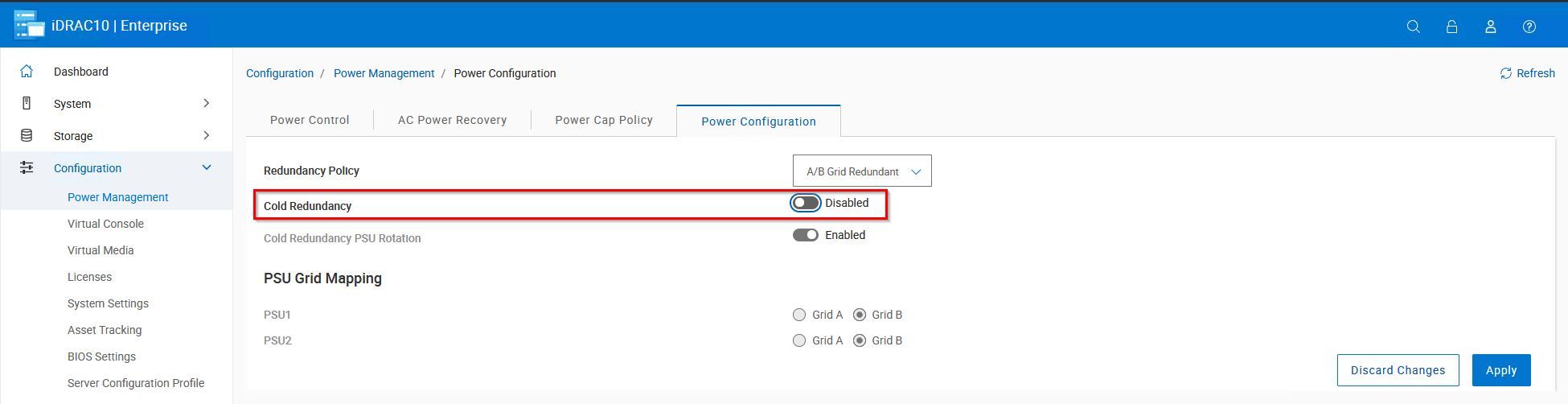
Disabling Power Supply Cold Redundancy within the iDRAC10 controller prevents these false positive SYS565 events from occurring.
iDRAC10 UI > Configuration > Power Management > Power Configuration
Example:
RACADM Example:
racadm>>racadm set system.serverpwr.coldredundancy False
Object value modified successfully
REDFISH PATCH Example:
curl -sk -X PATCH -H "Content-Type: application/json" -u 'root:calvin' https://iDRAC_IP/redfish/v1/Chassis/System.Embedded.1/PowerSubsystem -d '{"Oem" :{"Dell" :{"PowerSubsystemColdRedundancy": {"ColdRedunancyEnable": false}}}}'
Affected Products
iDRAC10 - 1.20.xx Series, OEMR XL R470, OEMR XL R570, OEMR XL R670, OEMR XL R770, PowerEdge R470, PowerEdge R570, PowerEdge R670, PowerEdge R770, PowerEdge R770AP, Dell vSAN R670 Ready Node, Dell vSAN R770 Ready NodeArticle Properties
Article Number: 000388703
Article Type: Solution
Last Modified: 24 مايو 2026
Version: 6
Find answers to your questions from other Dell users
Support Services
Check if your device is covered by Support Services.