NetWorker:NMCサーバー ソフトウェアをWindows NetWorkerサーバーまたは専用NMCサーバーにインストールできない
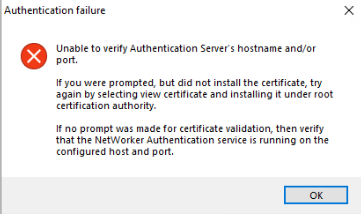
Summary: WindowsホストにNMC(NetWorker管理コンソール)サーバーをインストールまたはアップグレードできません。NMCインストール ウィザードに「認証サーバーのホスト名やポートを検証できません」と表示されます。
This article applies to
This article does not apply to
This article is not tied to any specific product.
Not all product versions are identified in this article.
Symptoms
- NetWorker管理コンソール(NMC)がWindowsホストにインストールされている(またはインストール中である)。
- インストール ウィザードは、NetWorker認証に使用されるNetWorker認証サーバーを検証しようとします。
- インストールで認証サーバーの検証に失敗します。
Unable to verify Authentication Server's hostname and/or port.

If you were prompted, but did not install the certificate, try again by selecting view certificate and installing it under root certification authority.

In no prompt was made for certificate validation, then verify that the NetWorker Authentication service is running on the configured host and port.
NMCサーバは認証サーバを解決し、認証ポート(デフォルトは9090)に接続できます。Powershellコマンド:
tnc AUTHC_HOSTNAME -p 9090
AUTHCサーバー証明書を手動でインストールしても、問題は解決しません。NMC: インストールが「認証サーバーのホスト名またはポートを確認できません」というエラーで失敗する
認証サーバーの authc-server.log 示します:
- Linuxの場合
/nsr/authc/logs/authc-server.log - Windows(デフォルト):
C:\Program Files\EMC NetWorker\nsr\authc-server\tomcat\logs\authc-server.log
ERROR Context initialization failed org.springframework.beans.factory.BeanCreationException: Error creating bean with name 'dataSourceInitializer' defined in class path resource [serviceConfig.xml]: Invocation of init method failed; nested exception is org.h2.jdbc.JdbcSQLNonTransientConnectionException: Unsupported database file version or invalid file header in file "C:/Program Files/EMC NetWorker/nsr/authc-server/tomcat/data/authcdb.mv.db"
Cause
NetWorker AUTHCの破損。authc-server.logで確認された特定のエラーは、「upgrade」オプションを使用するのではなく、アンインストールを実行してから新しいバージョンをインストールすることによってNetWorkerをアップグレードした場合に発生する可能性があります。このアップグレード方法では、AUTHCファイルのアップグレードが正しく処理されませんでした。
メモ:このシナリオでは、他の問題は発生しない可能性があります。たとえば、NetWorkerが動作しており、NetWorker Webユーザー インターフェイス(NWUI)がインストールされ、認証が正常に行われている場合などです。唯一の影響は、NMCのインストールが認証サーバーの検証に失敗することです。
Resolution
新しいAUTHCフォルダーを使用してNetWorkerを再インストールし、既存のフォルダーを強制的に置き換えます。
これらの手順 では 、NetWorker構成またはデータベースは削除されないため、履歴バックアップに対するリスクはありません。
- NetWorkerのシャットダウン:
net stop nsrexecd /y - NetWorker(および同じサーバー上にある場合はNMC)のアンインストール
- 名前を
C:\Program Files\EMC NetWorker\nsr\authc-serverフォルダー - NetWorkerをインストールします(これにより、新しいAUTHC構成が作成されます)
- NMCのインストール
完了すると、サービスが開始され、NMCログインをテストできるようになります。
以前のNMC管理者パスワードが機能しない場合は、「」の手順に従ってパスワードをリセットします。NetWorker:管理者パスワードをリセットする方法
Additional Information
以前にAUTHC証明書または統合AD/LDAPをAUTHCサーバーに置き換えた場合は、次の設定を再構成する必要があります。
Affected Products
NetWorker, NetWorker Management ConsoleProducts
NetWorker FamilyArticle Properties
Article Number: 000452997
Article Type: Solution
Last Modified: 15 أبريل 2026
Version: 1
Find answers to your questions from other Dell users
Support Services
Check if your device is covered by Support Services.