NetWorker: Windows NetWorker Server 또는 전용 NMC 서버에 NMC 서버 소프트웨어를 설치할 수 없음
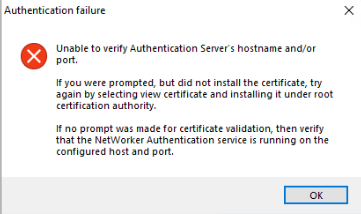
Summary: Windows 호스트에 NMC(NetWorker Management Console) 서버를 설치하거나 업그레이드할 수 없습니다. NMC 설치 마법사에 "인증 서버의 호스트 이름 및/또는 포트를 확인할 수 없습니다"라는 메시지가 표시됩니다.
This article applies to
This article does not apply to
This article is not tied to any specific product.
Not all product versions are identified in this article.
Symptoms
- Windows 호스트에 NMC(NetWorker Management Console)가 설치되어 있거나 설치 중입니다.
- 설치 마법사는 NetWorker 인증에 사용할 NetWorker Authentication Server를 확인하려고 시도합니다.
- 설치 시 인증 서버를 검증하지 못합니다.
Unable to verify Authentication Server's hostname and/or port.

If you were prompted, but did not install the certificate, try again by selecting view certificate and installing it under root certification authority.

In no prompt was made for certificate validation, then verify that the NetWorker Authentication service is running on the configured host and port.
NMC 서버는 인증 서버를 확인하고 인증 포트(기본값 9090)에 연결할 수 있습니다. Powershell 명령:
tnc AUTHC_HOSTNAME -p 9090
AUTHC 서버 인증서를 수동으로 설치해도 문제가 해결되지 않습니다. NMC: 설치가 실패하고 "인증 서버의 호스트 이름 또는 포트를 확인할 수 없습니다" 오류가 표시됨
인증 서버의 authc-server.log 보여 줍니다:
- Linux:
/nsr/authc/logs/authc-server.log - Windows(기본값):
C:\Program Files\EMC NetWorker\nsr\authc-server\tomcat\logs\authc-server.log
ERROR Context initialization failed org.springframework.beans.factory.BeanCreationException: Error creating bean with name 'dataSourceInitializer' defined in class path resource [serviceConfig.xml]: Invocation of init method failed; nested exception is org.h2.jdbc.JdbcSQLNonTransientConnectionException: Unsupported database file version or invalid file header in file "C:/Program Files/EMC NetWorker/nsr/authc-server/tomcat/data/authcdb.mv.db"
Cause
NetWorker AUTHC가 손상되었습니다. authc-server.log에서 관찰되는 특정 오류는 NetWorker가 "업그레이드" 옵션을 사용하는 대신 제거를 수행한 다음 새 버전을 설치하여 업그레이드되는 경우에 발생할 수 있습니다. 이 업그레이드 방법을 사용하여 AUTHC 파일의 업그레이드가 올바르게 처리되지 않았습니다.
참고:이 시나리오에서는 다른 문제가 관찰되지 않을 수 있습니다. 예를 들어 NetWorker가 작동 중이고 NWUI(NetWorker Web User Interface) 설치 및 인증이 성공합니다. 유일한 영향은 NMC 설치 시 인증 서버를 검증하지 못한다는 것입니다.
Resolution
NetWorker를 새 AUTHC 폴더로 다시 설치하여 기존 폴더를 강제로 교체합니다.
이 단계를 수행해도 NetWorker 구성 또는 데이터베이스가 제거되지 않으며 기간별 백업에 대한 위험은 없습니다.
- NetWorker를 종료합니다.
net stop nsrexecd /y - NetWorker(및 동일한 서버에 있는 경우 NMC) 제거
- 이름 바꾸기
C:\Program Files\EMC NetWorker\nsr\authc-server폴더 - NetWorker를 설치합니다(새 AUTHC 구성 생성
- NMC 설치
완료되면 서비스가 시작되고 NMC 로그인을 테스트할 수 있습니다.
이전 NMC 관리자 암호를 사용할 수 없는 경우 의 단계에 따라 재설정합니다. NetWorker: 관리자 암호를 재설정하는 방법
Additional Information
이전에 AUTHC 인증서 또는 통합 AD/LDAP를 AUTHC 서버로 교체한 경우 다음 설정을 다시 구성해야 합니다.
Affected Products
NetWorker, NetWorker Management ConsoleProducts
NetWorker FamilyArticle Properties
Article Number: 000452997
Article Type: Solution
Last Modified: 15 أبريل 2026
Version: 1
Find answers to your questions from other Dell users
Support Services
Check if your device is covered by Support Services.