NetWorker:無法在 Windows NetWorker 伺服器或專用 NMC 伺服器上安裝 NMC 伺服器軟體
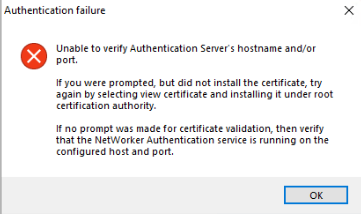
Summary: 無法在 Windows 主機上安裝或升級 NetWorker Management Console (NMC) 伺服器。NMC 安裝精靈顯示「無法驗證驗證伺服器的主機名稱和/或連接埠」。
This article applies to
This article does not apply to
This article is not tied to any specific product.
Not all product versions are identified in this article.
Symptoms
- NetWorker Management Console (NMC) 已安裝 (或正在安裝) Windows 主機上。
- 安裝精靈會嘗試驗證用於 NetWorker 認證的 NetWorker 認證伺服器。
- 安裝無法驗證身份驗證伺服器。
Unable to verify Authentication Server's hostname and/or port.

If you were prompted, but did not install the certificate, try again by selecting view certificate and installing it under root certification authority.

In no prompt was made for certificate validation, then verify that the NetWorker Authentication service is running on the configured host and port.
NMC 伺服器可以解析身份驗證伺服器並連接到身份驗證埠(預設為 9090)。Powershell 命令:
tnc AUTHC_HOSTNAME -p 9090
手動安裝 AUTHC 伺服器憑證無法解決問題:NMC:安裝失敗,並顯示錯誤「無法驗證伺服器的主機名稱或連接埠」
驗證伺服器的 authc-server.log 顯示:
- Linux:
/nsr/authc/logs/authc-server.log - Windows (預設):
C:\Program Files\EMC NetWorker\nsr\authc-server\tomcat\logs\authc-server.log
ERROR Context initialization failed org.springframework.beans.factory.BeanCreationException: Error creating bean with name 'dataSourceInitializer' defined in class path resource [serviceConfig.xml]: Invocation of init method failed; nested exception is org.h2.jdbc.JdbcSQLNonTransientConnectionException: Unsupported database file version or invalid file header in file "C:/Program Files/EMC NetWorker/nsr/authc-server/tomcat/data/authcdb.mv.db"
Cause
NetWorker AUTHC 損毀。如果 NetWorker 是透過執行解除安裝,然後安裝新版本,而非使用「升級」選項來升級,authc-server.log中可能會發生在中觀察到的特定錯誤。使用此升級方法無法正確處理 AUTHC 檔案的升級。
注意:在這種情況下,不會發現其他問題。例如,NetWorker 可正常運作,NetWorker Web 使用者介面 (NWUI) 安裝和驗證成功。唯一的影響是 NMC 安裝無法驗證驗證伺服器。
Resolution
使用新的 AUTHC 資料夾重新安裝 NetWorker,強制其取代現有的資料夾。
這些步驟 不會 移除 NetWorker 組態或資料庫,因此不會對歷史備份造成任何風險。
- 關閉 NetWorker:
net stop nsrexecd /y - 解除安裝 NetWorker (和 NMC,如果在同一伺服器上)
- 重新命名
C:\Program Files\EMC NetWorker\nsr\authc-server資料夾 - 安裝 NetWorker (這會建立新的 AUTHC 組態
- 安裝 NMC
完成後,服務應會啟動,且可測試 NMC 登入。
如果先前的 NMC 管理員密碼無法運作,請依照中的步驟重設。NetWorker:如何重設系統管理員密碼
Additional Information
如果您之前將 AUTHC 憑證或整合式 AD/LDAP 更換為 AUTHC 伺服器,則必須重新設定以下設定:
Affected Products
NetWorker, NetWorker Management ConsoleProducts
NetWorker FamilyArticle Properties
Article Number: 000452997
Article Type: Solution
Last Modified: 15 أبريل 2026
Version: 1
Find answers to your questions from other Dell users
Support Services
Check if your device is covered by Support Services.