CyberSense: Invalid username and password validation
Summary: Unable to log in with "admin/admin" account after installing CyberSense Non-Docker.
This article applies to
This article does not apply to
This article is not tied to any specific product.
Not all product versions are identified in this article.
Symptoms
After installing CyberSense, it is necessary to log in to the Index Engine's UI using Firefox or Internet Explorer.
https://<cybersense_hostname or IP_address>
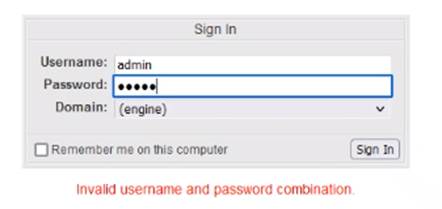
The following error occurs after inserting the default username and password (admin/admin):
"Invalid username and password validation."
https://<cybersense_hostname or IP_address>
The following error occurs after inserting the default username and password (admin/admin):
"Invalid username and password validation."
Cause
During installation, the sudoers file is not updated.
Resolution
Check the password for the admin account.
From the command line, run
You are prompted for the password for the admin account. If the password entered (admin) is OK, you see the following:

If it is incorrect, you see this:
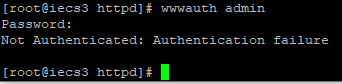
If the password is incorrect, you can reset it by running
After the password has been changed, log in again.
If the password is correct, you can check to see if the /etc/sudoers file was properly updated during the installation.
Look for this line in the /etc/sudoers file:
#includedir /etc/sudoers.d

If the line is NOT there, add it to the end of the file (the line MUST include the # sign-in front).
Try logging in after it has been added.
If the line is there, check to see that the "indexengines" file is present in the /etc/sudoers.d directory:

Try to log in again.
From the command line, run
wwwauth admin
You are prompted for the password for the admin account. If the password entered (admin) is OK, you see the following:
If it is incorrect, you see this:
If the password is incorrect, you can reset it by running
setup_users -change admin
You are prompted for a new password.
After the password has been changed, log in again.
If the password is correct, you can check to see if the /etc/sudoers file was properly updated during the installation.
Look for this line in the /etc/sudoers file:
#includedir /etc/sudoers.d
If the line is NOT there, add it to the end of the file (the line MUST include the # sign-in front).
Try logging in after it has been added.
If the line is there, check to see that the "indexengines" file is present in the /etc/sudoers.d directory:
Try to log in again.
Affected Products
CyberSenseArticle Properties
Article Number: 000194234
Article Type: Solution
Last Modified: 25 ذو القعدة 1447
Version: 3
Find answers to your questions from other Dell users
Support Services
Check if your device is covered by Support Services.