Avamar: Checkpoint creation for Virtual machine has failed and will be skipped from backup
Summary: This knowledge article provides solutions for resolving Hyper-V checkpoint creation errors for virtual machine (VM) backup failures.
Symptoms
Hyper-V backups of VMs using application-consistent snapshot in the dataset may fail with errors similar to the following:
avhypervvss Error <43426>: Checkpoint creation for Virtual machine 'AVAMARPROD01v<GUID>' has failed and will be skipped from backup. For details, please check 'winclustersvc.log'.
avhypervvss Error <43426>: Checkpoint creation for Virtual machine 'DELLVM<GUID>' has failed and will be skipped from backup. For details, please check 'winclustersvc.log'.
From the winclustersvc.log file, the following errors might be displayed:
The log file is located in the C:\Program Files\avs\var folder on the active node of the DELL Avamar Backup Agent service.
(The active node that owns that service can be determined from the Failover Cluster Management tool.)
winclustersvc ERROR<0000>: Failed to execute CreateSnapshot method: Failed to create checkpoint on collection 'AvamarBackup_HVSVR02-03-app-20220503000228-0' (AEE36BC1-A2AD-4682-A71A-80B127A6839F).
winclustersvc ERROR<0000>: Failed to execute CreateSnapshot method: Not found .
Cause
These checkpoint creation failures may occur if the Hyper-V Manager is unable to create Production checkpoints for the affected VMs. Production checkpoints are equivalent to application-consistent snapshot for Hyper-V backups)
The VMs may have their Volume Shadow Copy Service (VSS) writers in a failed state.
The VMs might not have enough free disk space available on their individual volumes to create the VSS snapshot. Anywhere from 10% to 20% free capacity on each of the hard drive volumes is advisable.
The affected VMs may not have the latest Integration Services or Windows operating system (OS) updates and patches.
If many VMs are failing with these errors, then the host servers or cluster nodes might not be updated with the latest Windows OS updates. This may cause both application-consistent and crash-consistent backups to fail.
Resolution
1. Test the VM by taking manual checkpoints using Hyper-V Manager and selecting only Production checkpoints using the following settings:
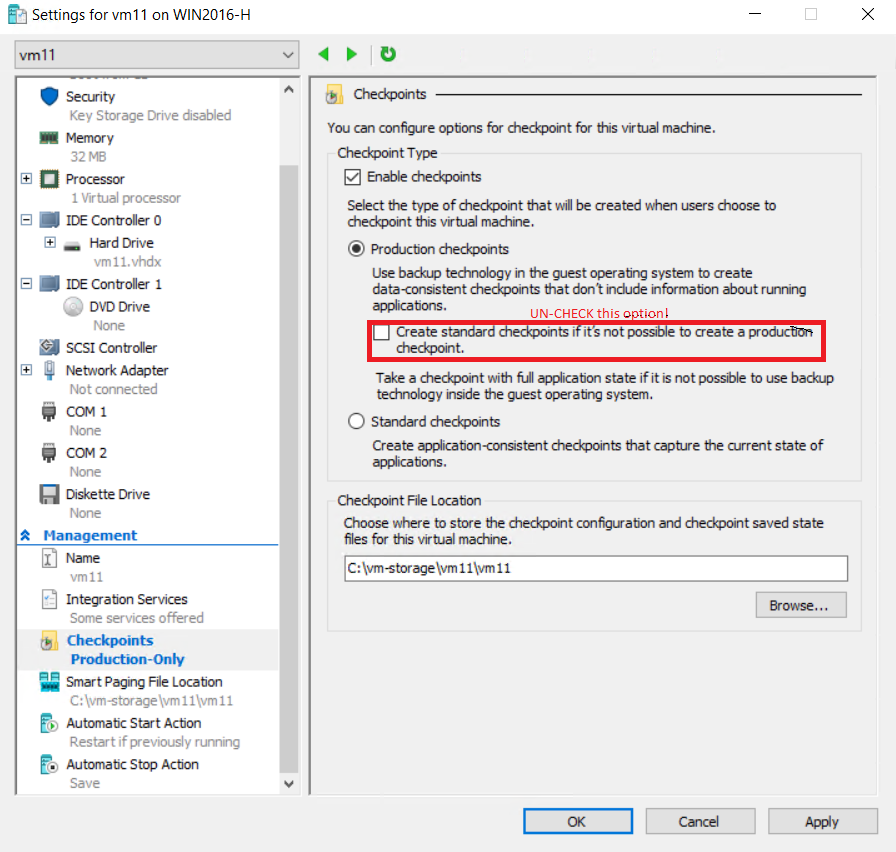
IMPORTANT: Clear the "Create standard checkpoints" option. This forces Hyper-V Manager to create Production checkpoints instead of Standard checkpoints. Production checkpoints simulate Avamar Hyper-V backups using application-consistent snapshot.
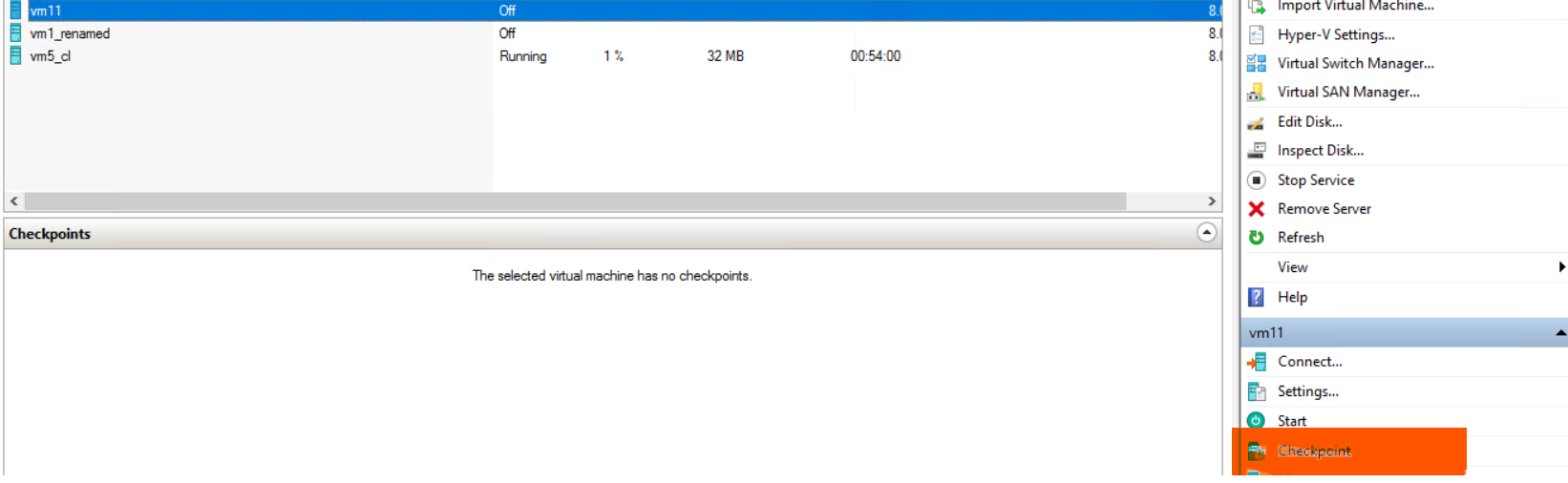
If checkpoint creation using Hyper-V Manager fails to use either Production or Standard, then engage Microsoft support if necessary.
If the Production checkpoint fails, then edit the settings and change to Standard checkpoints option and retry the procedure.
If Production checkpoint creation fails but the Standard checkpoint works, create a separate dataset and policy and backup the VMs using crash-consistent snapshot-level in the dataset. Crash-consistent snapshot correlates to the Standard checkpoint creation using Hyper-V Manager.
2. Log in to the failed VMs and open either PowerShell or Windows command prompt. Run the following command to check the VSS writers' state:
vssadmin list writersIf they are in a failed state, either restart the relevant services or reboot the VMs to put the writers back into a good state.
Reference: https://campus.barracuda.com/product/ISBKB/doc/93197282/the-vss-writer-is-in-a-bad-state/ (External Link)
3. Log in to the failed VMs and check to see if the hard disk volumes have at least 10-15% free disk space.
Go to Windows Administrative Tools -> Computer Management -> Disk Management -> disk volume -> Right-click -> Select Properties -> Shadow Copies tab -> Settings.
If the storage area limit is configured, increase the maximum size if necessary. Or change it to 'No Limit' since VSS snapshots created using the Avamar plug-in are temporary:
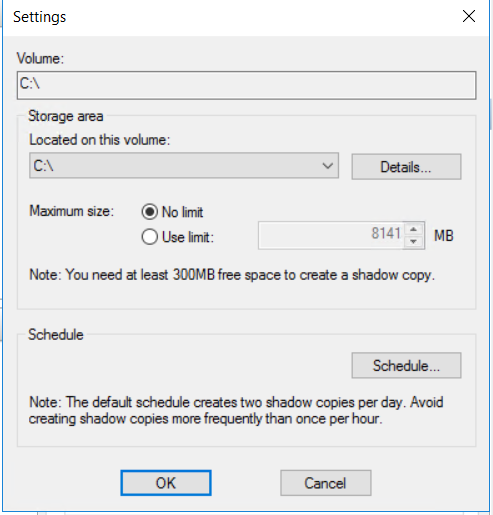
4. Verify that the Integration Services on the Windows virtual machines are up to date. For Windows Server 2016 and 2019 operating systems, this is done using Windows Update feature.
For Windows Server 2012 and 2012 R2, this can be done manually: https://www.zubairalexander.com/blog/how-to-update-integration-services-in-windows-server-2012-r2/ (External Link)
5. Verify that all Hyper-V cluster nodes have the latest Windows OS updates. This can be verified using Windows Update feature.
6. Remove any orphaned checkpoints on the VM. Orphaned checkpoints left over from an Avamar backup have the syntax "AvamarBackup_<<Avamar policy name>>-<<snapshot consistency level>>-<<backup job timestamp>>"
Example:
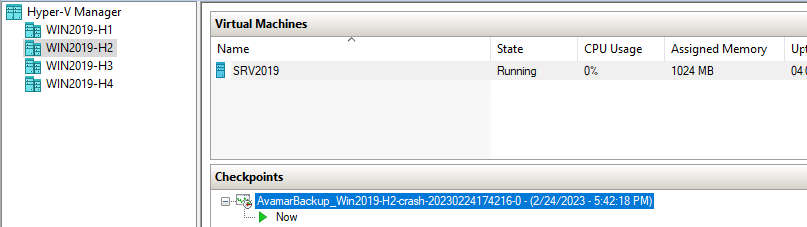
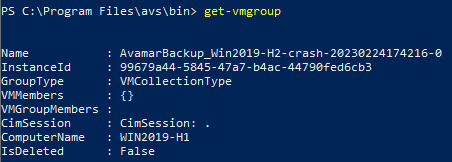
These are the "recovery" checkpoints created during the Avamar backup but failed to merge back into the parent Virtual Hard Disk v2 (VHDX) files afterwards. They cannot be deleted using the normal methods in Hyper-V Manager.
Right-clicking the checkpoint does NOT have the option "Delete Checkpoint."
In order to delete the Avamar recovery checkpoints, highlight the checkpoint in Hyper-V Manager and press the Del (Delete) key on the keyboard. The orphaned recovery checkpoint gets merged into the main VHDX file:

However, manually deleting the Avamar checkpoints may fail with an open message "The operation cannot be performed while the object is in its current state."
In this scenario, reference the following article for detailed procedures and scripts for removing stale checkpoints and vmgroups on all cluster nodes: Windows Server: Hyper-V Live Migration may fail as a result of recovery checkpoints.t of recovery checkpoints
7. Apply the latest hotfixes for the version of the Avamar Hyper-V VSS plug-in being used. The following article provides the hotfix numbers and locations to download: Avamar Hyper-V Incremental RCT backup fail with "Failed to get RCT extents for the disk file" or "Reference point creation for Virtual machine failed"
(Otherwise, the VMs may not be able to do application-consistent snapshots/checkpoints.)
8. Create a separate policy and dataset for the problematic VMs, edit the dataset and change the snapshot level from "application" to "crash."
Additional Information
Related article: Avamar: Hyper-V 2016 backups fail "Checkpoint creation for Virtual machine has failed and will be skipped from backup