Jak se přihlásit k odběru technických zpravodajů (DTA) a bezpečnostních zpravodajů (DSA) společnosti Dell
Shrnutí: Jak se přihlásit nebo odhlásit z odběru smluv DTA nebo DSA společnosti Dell.
Tento článek se vztahuje na
Tento článek se nevztahuje na
Tento článek není vázán na žádný konkrétní produkt.
V tomto článku nejsou uvedeny všechny verze produktu.
Pokyny
Společnost Dell Technologies vydává doporučení pro produkty Dell, aby vás upozornila na kritické problémy a potenciální dopady na jejich prostředí. Nastavte si automatická e-mailová oznámení vždy, když je vydáno bezpečnostní nebo technické doporučení společnosti Dell, nebo pouze v případě, že je vydáno doporučení pro konkrétní produkt.
Postup nápravy doporučení najdete v tématu Správa bezpečnostních a technických doporučení v nástroji MyService360. Pro nástroj MyService360 je vyžadováno přihlášení.
1. Přihlaste se na stránce https://www.dell.com/support.
2. Najeďte myší na položku Dell Preferences a klikněte na ni v pravém horním rohu. Zobrazí se stránkaNastavení a předvolby počtu účtů .
3. Klikněte na kartu OZNÁMENÍ A VÝSTRAHY a poté na kartu Produktová zpravodaje .
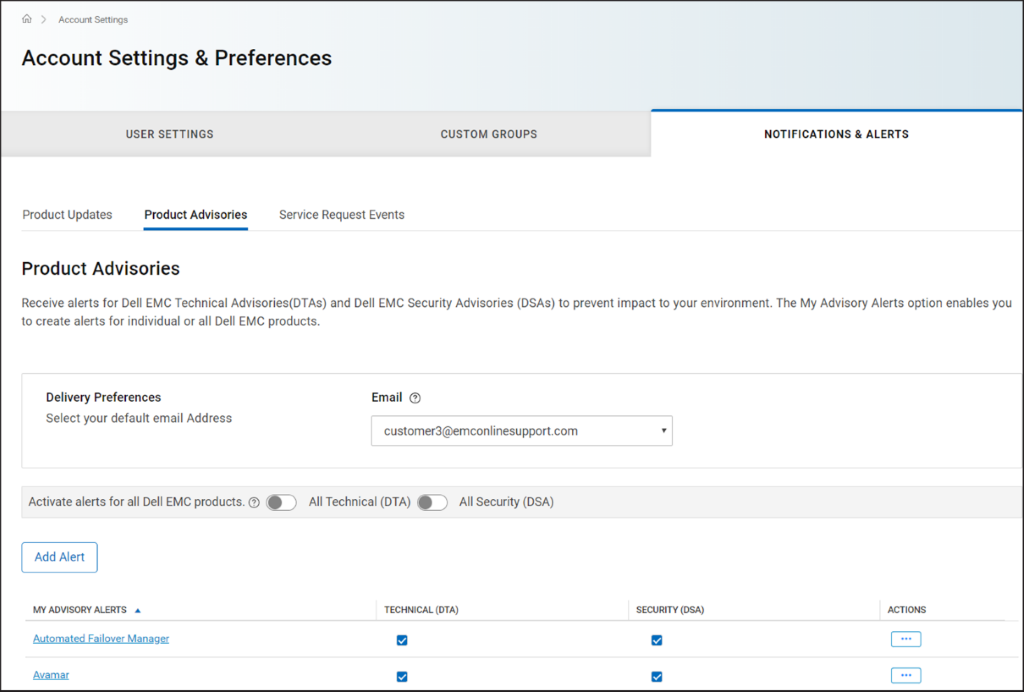
Obrázek 1 Karta
Produktové zpravodaje 4. V podokně Předvolby doručení vyberte e-mailovou adresu, na kterou chcete dostávat oznámení.
5. Chcete-li dostávat e-mailová upozornění při každém vydání informačního zpravodaje, postupujte takto:
POZNÁMKA: Ve výchozím nastavení se e-mailová oznámení odesílají s technickými i bezpečnostními doporučeními. V závislosti na vašich požadavcích můžete zrušit zaškrtnutí políček ve sloupcích TECHNICKÉ (DTA) nebo ZABEZPEČENÍ (DSA).
Postup nápravy doporučení najdete v tématu Správa bezpečnostních a technických doporučení v nástroji MyService360. Pro nástroj MyService360 je vyžadováno přihlášení.
1. Přihlaste se na stránce https://www.dell.com/support.
2. Najeďte
myší na položku Dell Preferences a klikněte na ni v pravém horním rohu. Zobrazí se stránkaNastavení a předvolby počtu účtů .
3. Klikněte na kartu OZNÁMENÍ A VÝSTRAHY a poté na kartu Produktová zpravodaje .
Obrázek 1 Karta
Produktové zpravodaje 4. V podokně Předvolby doručení vyberte e-mailovou adresu, na kterou chcete dostávat oznámení.
5. Chcete-li dostávat e-mailová upozornění při každém vydání informačního zpravodaje, postupujte takto:
- V případě technických doporučení zapněte přepínač Všechny technické (DTA).
- V případě bezpečnostních doporučení zapněte přepínač All Security (DSA).
- Klikněte na možnost Add Alert.
- Zadejte název produktu a klikněte na možnost Add Product.
- Výstraha se vytvoří a zobrazí na stránce Produktové zpravodaje .
Vlastnosti článku
Číslo článku: 000113250
Typ článku: How To
Poslední úprava: 18 dub 2026
Verze: 8
Najděte odpovědi na své otázky od ostatních uživatelů společnosti Dell
Služby podpory
Zkontrolujte, zda se na vaše zařízení vztahují služby podpory.