Connectrix B-Series: The Web Browsers Report "Cipher Mismatch, No Matching Ciphers" When Accessing WebTools UI Using HTTPS
Shrnutí: AES256-SHA256 (0x3d) and AES128-SHA256 (0x3c) is blocked for TLS.
Tento článek se vztahuje na
Tento článek se nevztahuje na
Tento článek není vázán na žádný konkrétní produkt.
V tomto článku nejsou uvedeny všechny verze produktu.
Příznaky
The web browsers (Chrome, New Edge, or Firefox) refused to open the WebTools using HTTPS.
The error message contains "Cipher Mismatch" or "No Matching Ciphers."
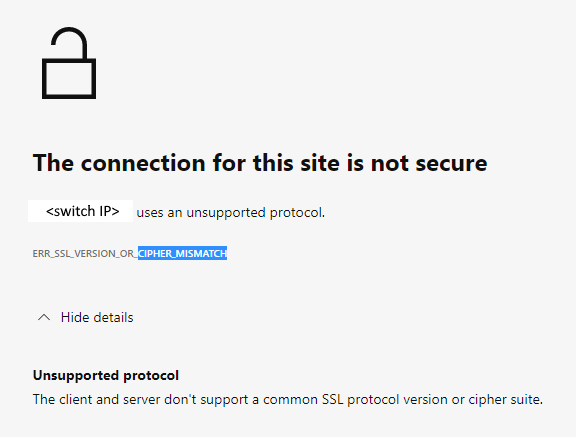
Figure 1: Screenshot of Error Message Showing Connection Not Secure, Unsupported Protocol
The switch is running in FOS 8.1 or 8.2 firmware.
The error message contains "Cipher Mismatch" or "No Matching Ciphers."
Figure 1: Screenshot of Error Message Showing Connection Not Secure, Unsupported Protocol
The switch is running in FOS 8.1 or 8.2 firmware.
Příčina
The switch HTTPS cipher setting only allows AES256-SHA256 and AES128-SHA256 for TLS 1.2 (the "default_generic" or "default_strong templates" of FOS 8.1 or 8.2).
The Wireshark dump shows that the client does not accept AES256-SHA256 (0x3d) or AES128-SHA256 (0x3c), hence the TLS handshake fails.
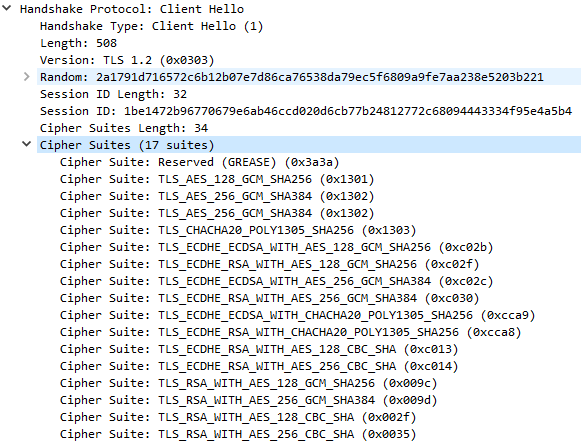
Figure 2: Screenshot of Wireshark Dump Showing Handshake Failure
<switchname>:root> seccryptocfg --show | grep HTTPS
HTTPS                    : !ECDH:!DH:HIGH:-MD5:!CAMELLIA:!SRP:!PSK:!AESGCM:!SSLv3
HTTPS                    : TLSv1.2

<switchname:root> openssl ciphers -v '!ECDH:!DH:HIGH:-MD5:!CAMELLIA:!SRP:!PSK:!AESGCM:!SSLv3'
AES256-SHA256           TLSv1.2 Kx=RSA      Au=RSA  Enc=AES(256)  Mac=SHA256
AES128-SHA256           TLSv1.2 Kx=RSA      Au=RSA  Enc=AES(128)  Mac=SHA256
The Wireshark dump shows that the client does not accept AES256-SHA256 (0x3d) or AES128-SHA256 (0x3c), hence the TLS handshake fails.
Figure 2: Screenshot of Wireshark Dump Showing Handshake Failure
Řešení
Modify the switch HTTPS cipher setting to cover the client.
Example:
In this example, the current HTTPS cipher setting is "!ECDH:!DH:HIGH:-MD5:!CAMELLIA:!SRP:!PSK:!AESGCM:!SSLv3"
To enable AES256-GCM-SHA384 (0x9d) and AES128-GCM-SHA256 (0x9c), remove "!AESGCM" from the setting with the command:
Example:
In this example, the current HTTPS cipher setting is "!ECDH:!DH:HIGH:-MD5:!CAMELLIA:!SRP:!PSK:!AESGCM:!SSLv3"
To enable AES256-GCM-SHA384 (0x9d) and AES128-GCM-SHA256 (0x9c), remove "!AESGCM" from the setting with the command:
seccryptocfg --replace -type https -cipher '!ECDH:!DH:HIGH:-MD5:!CAMELLIA:!SRP:!PSK:!SSLv3'
Další informace
Map OpenSSL cipher names (displayed in the OpenSSL command) with IANA cipher names (displayed in Wireshark dump) using the Mozilla document, Security/Cipher Suites - MozillaWiki

Dotčené produkty
Connectrix B-SeriesVlastnosti článku
Číslo článku: 000213633
Typ článku: Solution
Poslední úprava: 18 kvě 2026
Verze: 6
Najděte odpovědi na své otázky od ostatních uživatelů společnosti Dell
Služby podpory
Zkontrolujte, zda se na vaše zařízení vztahují služby podpory.