Cartella ECS GeoDrive mancante
Shrnutí: Cartella ECS GeoDrive mancante sull'unità locale.
Tento článek se vztahuje na
Tento článek se nevztahuje na
Tento článek není vázán na žádný konkrétní produkt.
V tomto článku nejsou uvedeny všechny verze produktu.
Příznaky
L'utente vedrà la cartella GeoDrive o una sottocartella mancante sull'unità locale sull'host.
La cartella avrà i dati, ma sarà invisibile/nascosta.
- Ad esempio, in GeoDrive manca una cartella "folder1".

- Provare a creare una nuova cartella con lo stesso nome. Verrà visualizzato il messaggio che indica che la cartella esiste effettivamente.
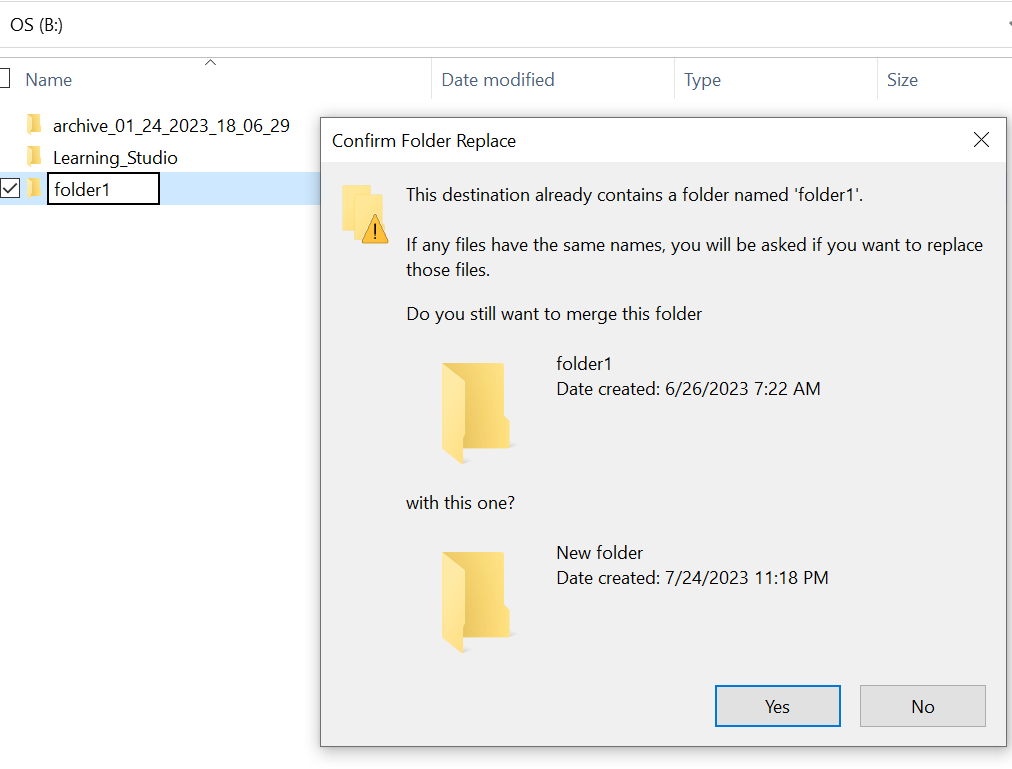
- Cercare con il percorso della cartella mancante in Esplora risorse. Dovremmo essere in grado di visualizzare i contenuti.

Příčina
Ciò è dovuto agli attributi HIDDEN e SYSTEM impostati nella cartella.
Řešení
Attenersi alla seguente procedura.
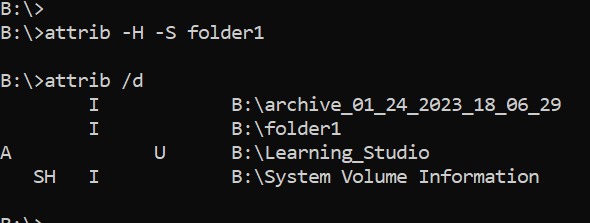
Dopo aver eseguito questo comando, controllare nuovamente l'unità locale. La cartella mancante tornerà alla normalità.
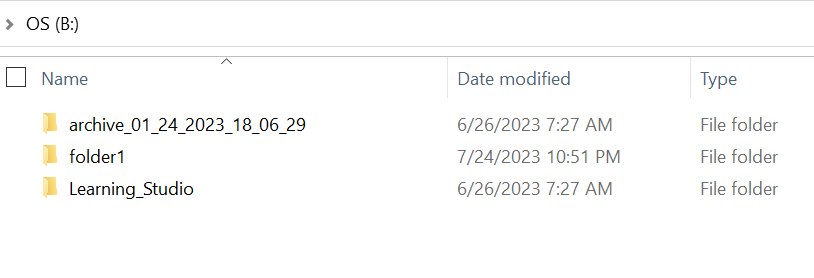
- Accedere al prompt dei comandi di Windows sul sistema host.
- eseguire il comando cd nella directory padre in cui la cartella è mancante ed eseguire "attrib /d".
- Viene visualizzato un elenco di directory e la cartella mancante dovrebbe essere presente nell'elenco.
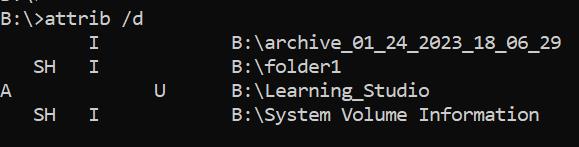
- Le lettere prima di indicare gli attributi. Si dovrebbe visualizzare SH prima del file (SYSTEM e HIDDEN).
- Quindi eseguire questo comando per rimuovere i due attributi precedenti: attrib -H -S folder_name
Další informace
Sono disponibili numerose altre opzioni per il comando attrib.
B:\>attrib /?
Displays or changes file attributes.

ATTRIB [+R | -R] [+A | -A] [+S | -S] [+H | -H] [+O | -O] [+I | -I] [+X | -X] [+P | -P] [+U | -U]
       [drive:][path][filename] [/S [/D]] [/L]

  +   Sets an attribute.
  -   Clears an attribute.
  R   Read-only file attribute.
  A   Archive file attribute.
  S   System file attribute.
  H   Hidden file attribute.
  O   Offline attribute.
  I   Not content indexed file attribute.
  X   No scrub file attribute.
  V   Integrity attribute.
  P   Pinned attribute.
  U   Unpinned attribute.
  B   SMR Blob attribute.
  [drive:][path][filename]
      Specifies a file or files for attrib to process.
  /S  Processes matching files in the current folder
      and all subfolders.
  /D  Processes folders as well.
  /L  Work on the attributes of the Symbolic Link versus
      the target of the Symbolic Link
Dotčené produkty
ECS, Elastic Cloud StorageVlastnosti článku
Číslo článku: 000215245
Typ článku: Solution
Poslední úprava: 18 kvě 2026
Verze: 4
Najděte odpovědi na své otázky od ostatních uživatelů společnosti Dell
Služby podpory
Zkontrolujte, zda se na vaše zařízení vztahují služby podpory.