Flickering or Video Distortion on a Laptop with an OLED Panel
Shrnutí: Learn about flickering or video distortion issues seen on some laptops with OLED panel when the displayed screen changes.
Tento článek se vztahuje na
Tento článek se nevztahuje na
Tento článek není vázán na žádný konkrétní produkt.
V tomto článku nejsou uvedeny všechny verze produktu.
Příznaky
The laptop with an OLED panel may flicker or have video distortion when the changing the displayed screen or moving the mouse.
Affected Platforms:
- Alienware M15
- Alienware M15 R2
- Dell G5 15 5590
- Dell G7 15 7500
- Dell G7 15 7590
- Inspiron 5400 2-in-1
- Inspiron 7500 2-in-1
- Precision 5540
- XPS 13 9340
- XPS 14 9440
- XPS 15 7590
- XPS 16 9640
Příčina
This is because the OLED panel tries to enter the Panel Self-Refresh (PSR) to save the power, and exits the PSR when it detects the displayed content changed. This repeated action causes the display flickering.
Řešení
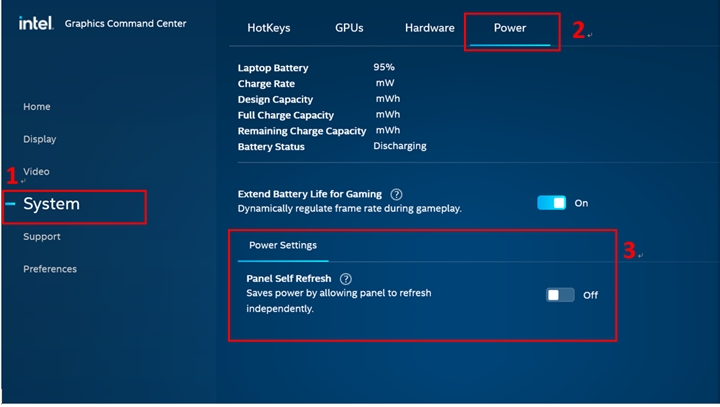
Perform the following steps to disable the PSR:
- Open Intel Graphics Settings by right clicking desktop or from the start menu.
- Go to System in the left pane and select Power.
- Click Disable Panel Self-Refresh on the On Battery page and then click Apply. Or, remove the AC adapter from the laptop, click Disable in Panel Self-Refresh, and then click Apply.
- Click Disable Panel Self-Refresh on the Plugged In page and then click Apply. Or, attach the AC adapter to the laptop, click Disable in Panel Self-Refresh, and then click Apply.
Dotčené produkty
Alienware M15, Alienware M15 R2, Dell G5 15 5590, Dell G7 15 7500, Dell G7 15 7590, Inspiron 5400 2-in-1, Inspiron 7500 2-in-1 Black, Inspiron 7500 2-in-1 Silver, Precision 5540, XPS 13 9340, XPS 14 9440, XPS 15 7590, XPS 16 9640Vlastnosti článku
Číslo článku: 000132185
Typ článku: Solution
Poslední úprava: 19 Apr 2026
Verze: 11
Najděte odpovědi na své otázky od ostatních uživatelů společnosti Dell
Služby podpory
Zkontrolujte, zda se na vaše zařízení vztahují služby podpory.