How to access Storage Center Web Interface when Java certificate is expired
Shrnutí: Visual guide and steps to access Storage Center when the Java certificate is expired
Tento článek se vztahuje na
Tento článek se nevztahuje na
Tento článek není vázán na žádný konkrétní produkt.
V tomto článku nejsou uvedeny všechny verze produktu.
Příznaky
If the Storage Center version has an expired Java security certificate, you will not be able to log into the Web UI, unless the Storage Center OS is upgraded to newer version that has a current certificate or the management IP is added to the Java Exception Site List.
Dell Storage Manager (DSM) is the preferred management interface for managing Storage Center arrays and is not impacted by an expired Java security certificate.
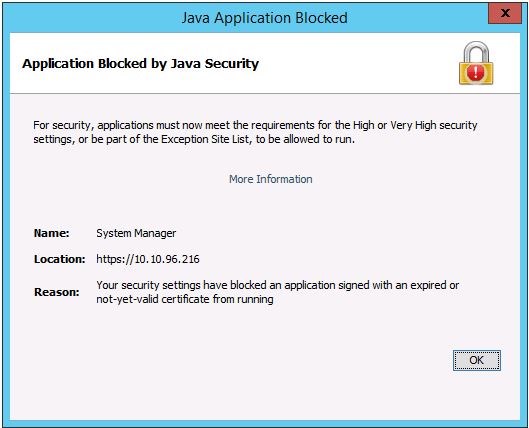
Below is sample error message when the Java security certificate is expired
Dell Storage Manager (DSM) is the preferred management interface for managing Storage Center arrays and is not impacted by an expired Java security certificate.
Below is sample error message when the Java security certificate is expired
Řešení
To add the management IP to the Exception Site List, refer to this article or follow the steps below.
https://www.java.com/en/download/faq/exception_sitelist.xml
1. Open the Java Control Panel on management system
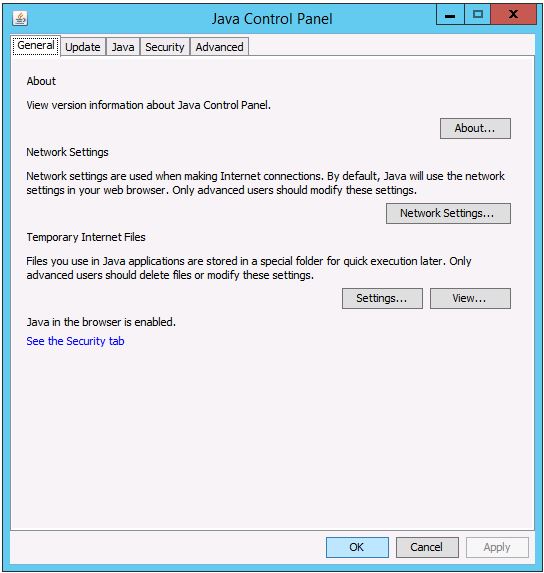
2. Click on the Security tab.
Click on Edit Site List.
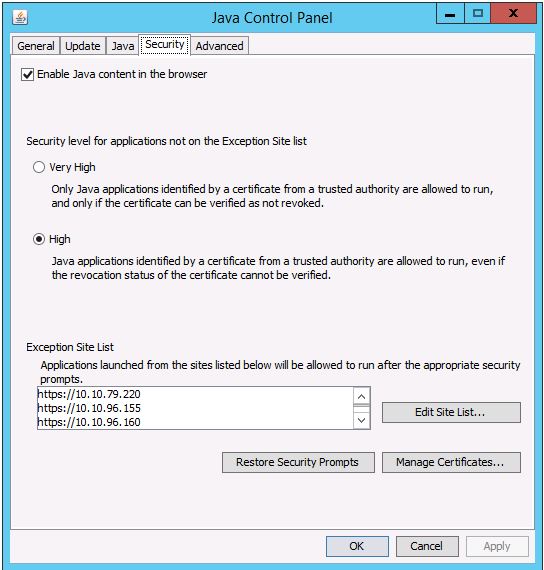
3. Enter the Storage Center’s management IP address in this format: https://x.x.x.x
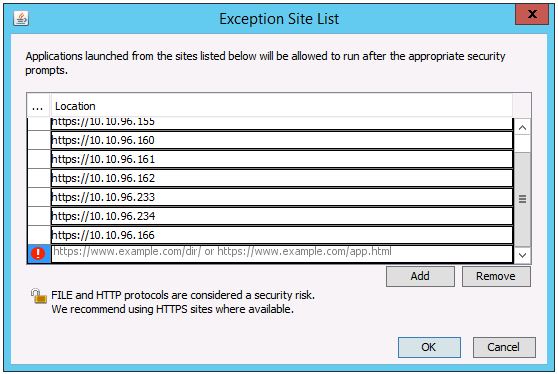
https://www.java.com/en/download/faq/exception_sitelist.xml
1. Open the Java Control Panel on management system
2. Click on the Security tab.
Click on Edit Site List.
3. Enter the Storage Center’s management IP address in this format: https://x.x.x.x
Dotčené produkty
Compellent (SC, SCv & FS Series), Dell Compellent SC4020, Dell Storage SC8000, Dell Compellent Series 40, Dell Storage SC9000Vlastnosti článku
Číslo článku: 000142151
Typ článku: Solution
Poslední úprava: 01 May 2026
Verze: 4
Najděte odpovědi na své otázky od ostatních uživatelů společnosti Dell
Služby podpory
Zkontrolujte, zda se na vaše zařízení vztahují služby podpory.