AppSync: How to determine the version in use
Shrnutí: How to determine the version of AppSync in use.
Tento článek se vztahuje na
Tento článek se nevztahuje na
Tento článek není vázán na žádný konkrétní produkt.
V tomto článku nejsou uvedeny všechny verze produktu.
Pokyny
To determine the current version of AppSync software in use, follow one of the methods listed below:
AppSync UI:
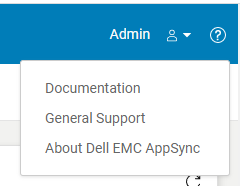
Fig.2
AppSync Logs:
Note: The version of AppSync displayed in "Control Panel\Programs\Programs and Features" is not sufficient as it does not confirm whether AppSync hotfixes have been installed.
AppSync UI:
- Open the AppSync UI and login.
- Click on "?" in the top right of the window. (Fig.1)
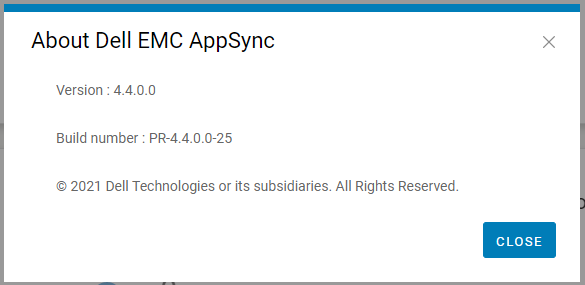
- Click on "About Dell EMC Appsync". (Fig.2)
- Quote this version and build number displayed to Dell AppSync technical support.
Fig.2
AppSync Logs:
- On the AppSync server, navigate to the logs directory in the install location (typically C:\EMC\AppSync\jboss\logs).
- Open server.log using a text editor.
- The first two line indicates the version of AppSync in use and whether any hotfixes are installed.
e.g. Sample server.log snippet (version = 4.3.0.0 & hotfix 3315_R1 is installed)
The current version of AppSync Server is 4.3.0.0_3315_R1
4. Quote this version and hotfix status displayed to Dell AppSync technical support.
The current version of AppSync Server is 4.3.0.0_3315_R1
Note: The version of AppSync displayed in "Control Panel\Programs\Programs and Features" is not sufficient as it does not confirm whether AppSync hotfixes have been installed.
Dotčené produkty
AppSync, AppSyncVlastnosti článku
Číslo článku: 000199464
Typ článku: How To
Poslední úprava: 14 May 2026
Verze: 7
Najděte odpovědi na své otázky od ostatních uživatelů společnosti Dell
Služby podpory
Zkontrolujte, zda se na vaše zařízení vztahují služby podpory.