Data Domain: How to change the sync alert threshold
Shrnutí: This article explains how to change the sync alert threshold using the command line. By default, the sync alert threshold is set to 24 hours. However, based on specific requirements, it may need to be adjusted for a particular mtree to prevent the error: “Sync-as-of time is more than 24 hours ago.” ...
Tento článek se vztahuje na
Tento článek se nevztahuje na
Tento článek není vázán na žádný konkrétní produkt.
V tomto článku nejsou uvedeny všechny verze produktu.
Pokyny
- Use SSH to connect to the PowerProtect Data Domain with the admin privilege.
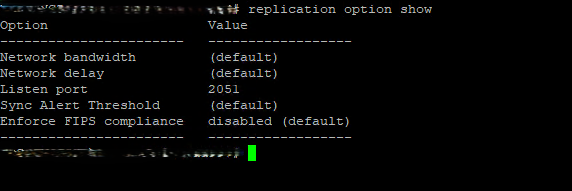
- Run the "replication option show" command to check the sync alert threshold.
- To change the default value to different hours we need to use command "replication option set default-sync-alert-threshold <value>"
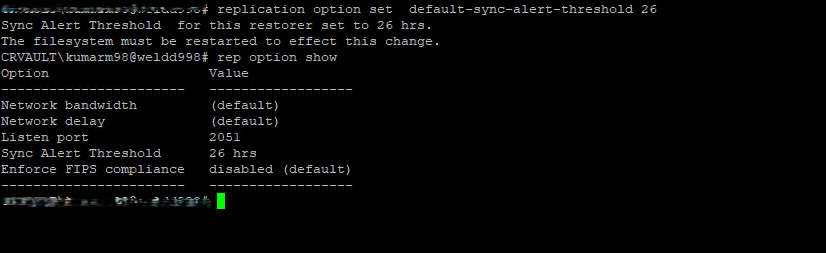
- The filesystem must be restarted to effect this change.
filesys restart
Dotčené produkty
Data DomainVlastnosti článku
Číslo článku: 000462922
Typ článku: How To
Poslední úprava: 11 May 2026
Verze: 1
Najděte odpovědi na své otázky od ostatních uživatelů společnosti Dell
Služby podpory
Zkontrolujte, zda se na vaše zařízení vztahují služby podpory.