Avamar: VM image backups fail with "No Proxy" because vCenter proxy is powered off
Zusammenfassung: Avamar VM image backups fail with "No Proxy" because the proxy is powered off in vCenter.
Dieser Artikel gilt für
Dieser Artikel gilt nicht für
Dieser Artikel ist nicht an ein bestimmtes Produkt gebunden.
In diesem Artikel werden nicht alle Produktversionen aufgeführt.
Symptome
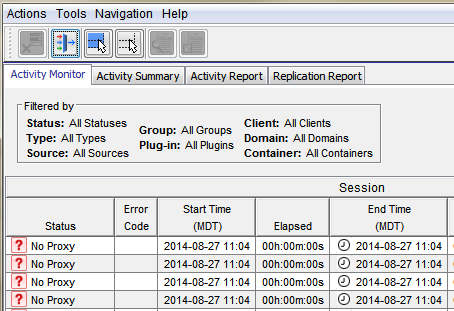
The Activity Monitor in the Avamar UI shows 'No Proxy'.
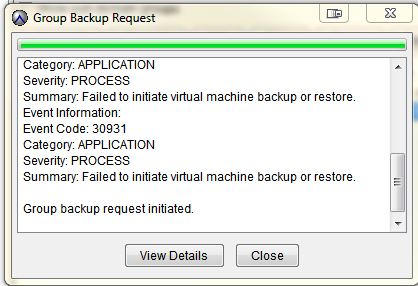
On-demand VMware Image backup fails with the following:
Category: APPLICATION
Severity: PROCESS
Summary: Failed to initiate virtual machine backup or restore.
Event Information:
Event Code: 30931
Category: APPLICATION
Severity: PROCESS
Summary: Failed to initiate virtual machine backup or restore.
If a group backup request is initiated.
Ursache
The proxy is powered off in vCenter.
Lösung
- Open vCenter and check if the proxy is powered off.
- If the proxy is powered off, power on the proxy.
Weitere Informationen
The following articles discuss issues which have the same generic "No Proxy" error.
- Avamar VM image backups fail with "No Proxy" because no proxy servers are configured to protect the datastore holding the client’s VMDKs
- Avamar VM image backups fails with "No Proxy" error due to an interruption to the vCenter connection
- Avamar VM image backups fails with "No Proxy" error due to the VM not having any hard disks
- Avamar VM image backups fails with "No Proxy" error due to the proxy being powered off in vCenter
- Avamar VM image backups fail with "No Proxy" error due to proxies not resolving in DNS
Betroffene Produkte
AvamarProdukte
AvamarArtikeleigenschaften
Artikelnummer: 000033569
Artikeltyp: Solution
Zuletzt geändert: 05 Feb. 2025
Version: 4
Antworten auf Ihre Fragen erhalten Sie von anderen Dell NutzerInnen
Support Services
Prüfen Sie, ob Ihr Gerät durch Support Services abgedeckt ist.