NetWorker: File-system recovery is failing with error "file Index is missing"
Zusammenfassung: File system recovery is failing with error "file Index is missing Please contact the system administrator to recover or re-create the index."
Dieser Artikel gilt für
Dieser Artikel gilt nicht für
Dieser Artikel ist nicht an ein bestimmtes Produkt gebunden.
In diesem Artikel werden nicht alle Produktversionen aufgeführt.
Symptome
An error is returned stating that the file index is missing when performing file level recovery of a NetWorker client from the NetWorker Management Console (NMC):
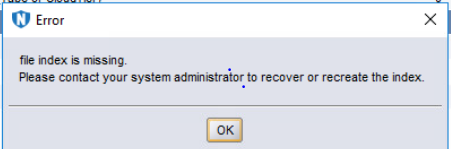
Figure 1: Error Message: File Index is Missing.
Ursache
The client file index folder is missing or empty:
Linux: /nsr/index/CLIENT-NAME
Windows: C:\Program Files\EMC NetWorker\nsr\index\CLIENT-NAME
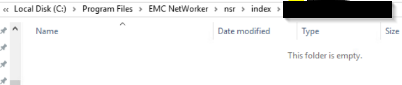
Figure 2: Screenshot of Missing Client File Index Folder
Lösung
On the NetWorker server, open an admin prompt and run as root:
nsrck -L7 client-name
NOTE: Client-name should match how the client name is specified in Clients tab of NetWorker Management Console; optionally the nsraldb on the NetWorker client also shows this. On the NetWorker client, open an admin prompt and run as root:
nsradmin -p nsrexecd "nsrla"
Monitor the nsrck command output for any errors. Once completed, the client index folder should be repopulated and the data restore can be performed.
Weitere Informationen
This is not applicable to file level recoveries of VMware Virtual Machines backed up using the NetWorker VMware Protection (NVP) vProxy appliance.
Betroffene Produkte
NetWorker FamilyArtikeleigenschaften
Artikelnummer: 000200061
Artikeltyp: Solution
Zuletzt geändert: 19 März 2025
Version: 4
Antworten auf Ihre Fragen erhalten Sie von anderen Dell NutzerInnen
Support Services
Prüfen Sie, ob Ihr Gerät durch Support Services abgedeckt ist.