Dell ESA 7.0 PAK Manager PAK file DellEMCEnterpriseStorageAnalytics-7.0.0-build-2260_signed.pak is not in zip format.
Zusammenfassung: PAK Manager PAK file DellEMCEnterpriseStorageAnalytics-7.0.0-build-2260_signed.pak is not in zip format.
Dieser Artikel gilt für
Dieser Artikel gilt nicht für
Dieser Artikel ist nicht an ein bestimmtes Produkt gebunden.
In diesem Artikel werden nicht alle Produktversionen aufgeführt.
Symptome
In VMware vRealize Operations (vROps), when trying to upload this PAK file DellEMCEnterpriseStorageAnalytics-7.0.0-build-2260_signed.pak, keep seeing a message appear:
PAK Manager: PAK file DellEMCEnterpriseStorageAnalytics-7.0.0-build-2260_signed.pak is not in zip format.OR
PAK Manager: PAK file reservedTemp_2696460655826554461.pak is not in zip format

Ursache
The downloaded pak file was corrupted.
Lösung
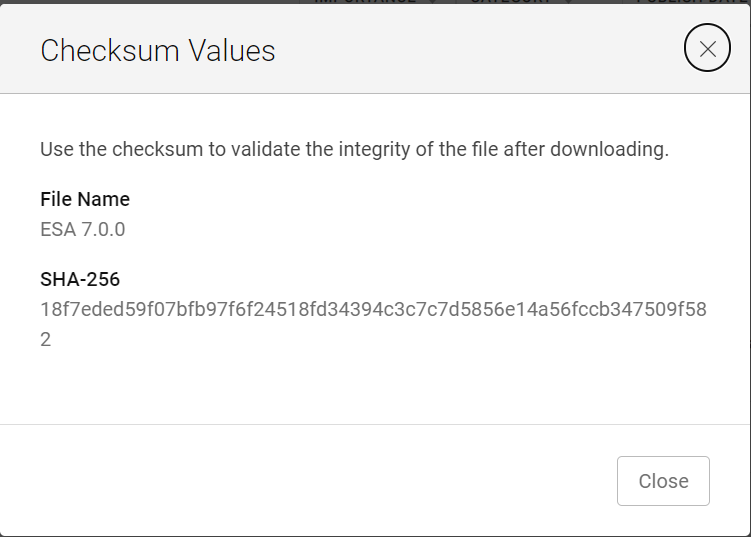
Before using the downloaded file, it is always good practice to run a checksum to confirm the integrity of the file.
1. Download the ESA 7.0 file (DellEMCEnterpriseStorageAnalytics-7.0.0-build-2260_signed.pak) and get its checksum value.
2. Invoke PowerShell
3. Run the checksum to verify that the alphanumeric checksum value of the downloaded file matches the one stated on its website.

4. Select a solution to install

5. Click "UPLOAD" and see that the validated file upload successfully.

1. Download the ESA 7.0 file (DellEMCEnterpriseStorageAnalytics-7.0.0-build-2260_signed.pak) and get its checksum value.
2. Invoke PowerShell
Input:
Press winkey+ R.
Type cmd.
The command prompt is opened.
Type PowerShell and press enter.
3. Run the checksum to verify that the alphanumeric checksum value of the downloaded file matches the one stated on its website.
4. Select a solution to install
5. Click "UPLOAD" and see that the validated file upload successfully.
Artikeleigenschaften
Artikelnummer: 000204311
Artikeltyp: Solution
Zuletzt geändert: 12 März 2024
Version: 2
Antworten auf Ihre Fragen erhalten Sie von anderen Dell NutzerInnen
Support Services
Prüfen Sie, ob Ihr Gerät durch Support Services abgedeckt ist.