NetWorker: How to Enable Client File Index Backups During Data Backups
Zusammenfassung: This article provides instructions to enable Client File Indexes (CFI) backups in the same policy data backups are performed.
Dieser Artikel gilt für
Dieser Artikel gilt nicht für
Dieser Artikel ist nicht an ein bestimmtes Produkt gebunden.
In diesem Artikel werden nicht alle Produktversionen aufgeführt.
Weisungen
The NetWorker server backs up Client File Indexes (CFI) during the Server Protection -> Server backup action. This is the default approach for backing up CFI.
NetWorker provides an internal "action" setting to enable CFI backups in the same action that client-based backups are performed.
When a client-based backup workflow is CFI enabled, the index backup is performed after a client's save set backups complete:
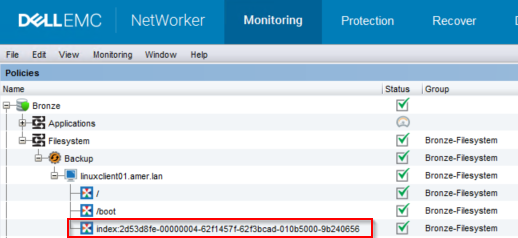
Figure 1: The client's index save set is backed up after the save set data
root@linux1:~# mminfo -avot -t today
 volume        type   client           date     time         size ssid      fl   lvl name
ClientBackupPool.001 Data Domain linux1.amer.lan 02/27/2023 12:38:30 PM 74 MB 4277998791 cr 9 index:linuxclient01.amer.lan
ClientBackupPool.001 Data Domain linuxclient01.amer.lan 02/27/2023 12:39:32 PM 13 MB 16585916 cb incr /
ClientBackupPool.001 Data Domain linuxclient01.amer.lan 02/27/2023 12:39:37 PM 4  B 4294776000 cb incr /boot
NOTE: Enabling this functionality does not exclude clients who perform their index backup in a data protection policy from the Server Protection Policy. When the Server Protection Policy is run, the index backup is performed again.
There are two methods for enabling this feature.
Nsradmin CLI:
- From a root or admin command prompt on the NetWorker server, run the command:
nsradmin
- From the
nsradminprompt, use the following command syntax to print the backup action details:
nsradmin> show Enable Cfi
nsradmin> print type: nsr protection policy action; name: ACTION_NAME; policy name: POLICY_NAME; workflow name: WORKFLOW_NAME
Example:
nsradmin> show Enable Cfi
nsradmin> print type: nsr protection policy action; name: backup; policy name: Bronze; workflow name: Filesystem
Enable Cfi: No;
nsradmin>
- To enable CFI backups in the backup action, enter the following command from the
nsradminprompt:
nsradmin> update Enable Cfi: Yes
- Rerun the print command to display the changes:
nsradmin> print type: nsr protection policy action; name: backup; policy name: Bronze; workflow name: Filesystem
                  Enable Cfi: Yes;
Nsrpolicy CLI:
- From an elevated prompt on the NetWorker server, run the following
nsrpolicycommand to display the backup action attributes:
nsrpolicy action display -p POLICY_NAME -w WORKFLOW_NAME -A ACTION_NAME
OR:
nsrpolicy action display --policy_name POLICY_NAME --workflow_name WORKFLOW_NAME --action_name ACTION_NAME
Example:
root@linux1:~# nsrpolicy action display -p Bronze -w Filesystem -A backup
{
    "actionName": "Backup",
    "actionSpecific": {
        "actions": {
            "actionType": "backup",
            "actionBackupSubtypeSpecific": {
                "backupSubtypes": {
                    "abBackupSubtype": "traditional",
                    "abtDestinationPool": "ClientBackupPool",
                    "abForceBackupLevel": "",
                    "abtBrowsePeriod": "1 Months",
                    "abtDDRetentionLockTime": "",
                    "abtEnableCfiBackup": false,
                    "abtEnableDDRetentionLock": false,
                    "abtEstimate": false,
                    "abtFileInactivityAlertThreshold": 0,
                    "abtFileInactivityThreshold": 0,
                    "abtRevertToFullWhenSyntheticFullFails": true,
                    "abtTimestampFormat": "none",
                    "abtVerifySyntheticFull": true
                }
...
...
- To enable CFI backups, run the following
nsrpolicycommand against the backup action:
nsrpolicy action update backup traditional -p POLICY_NAME -w WORKFLOW_NAME -A ACTION_NAME --enable_cfi yes
OR:
nsrpolicy action update backup traditional --policy_name POLICY_NAME --workflow_name WORKFLOW_NAME --action_name ACTION_NAME --enable_cfi yes
Example:
root@linux1:~# nsrpolicy action update backup traditional -p Bronze -w Filesystem -A backup --enable_cfi yes
128947:nsrpolicy: Action 'backup' was successfully updated
- To confirm the changes, rerun the
nsrpolicydisplay command:
root@linux1:~# nsrpolicy action display -p Bronze -w Filesystem -A backup
{
    "actionName": "Backup",
    "actionSpecific": {
        "actions": {
            "actionType": "backup",
            "actionBackupSubtypeSpecific": {
                "backupSubtypes": {
                    "abBackupSubtype": "traditional",
                    "abtDestinationPool": "ClientBackupPool",
                    "abForceBackupLevel": "",
                    "abtBrowsePeriod": "1 Months",
                    "abtDDRetentionLockTime": "",
                    "abtEnableCfiBackup": true,
                    "abtEnableDDRetentionLock": false,
                    "abtEstimate": false,
                    "abtFileInactivityAlertThreshold": 0,
                    "abtFileInactivityThreshold": 0,
                    "abtRevertToFullWhenSyntheticFullFails": true,
                    "abtTimestampFormat": "none",
                    "abtVerifySyntheticFull": true
                }
...
...
Betroffene Produkte
NetWorkerProdukte
NetWorker FamilyArtikeleigenschaften
Artikelnummer: 000210224
Artikeltyp: How To
Zuletzt geändert: 16 Mai 2026
Version: 8
Antworten auf Ihre Fragen erhalten Sie von anderen Dell NutzerInnen
Support Services
Prüfen Sie, ob Ihr Gerät durch Support Services abgedeckt ist.