PowerEdge: C6520 E810 Link Loss After Firmware Updates
Zusammenfassung: During the simultaneous update of the BIOS and Broadcom network firmware, using the Intel E810 for iDRAC communication, the link is dropped and does not recover.
Dieser Artikel gilt für
Dieser Artikel gilt nicht für
Dieser Artikel ist nicht an ein bestimmtes Produkt gebunden.
In diesem Artikel werden nicht alle Produktversionen aufgeführt.
Symptome
During the simultaneous update of the BIOS and Broadcom embedded network firmware, using the E810 for iDRAC communication, the connection to the iDRAC is dropped. It does not recover until a virtual or physical reseat is performed.
Example of iDRAC Link State in SupportAssist Collection:
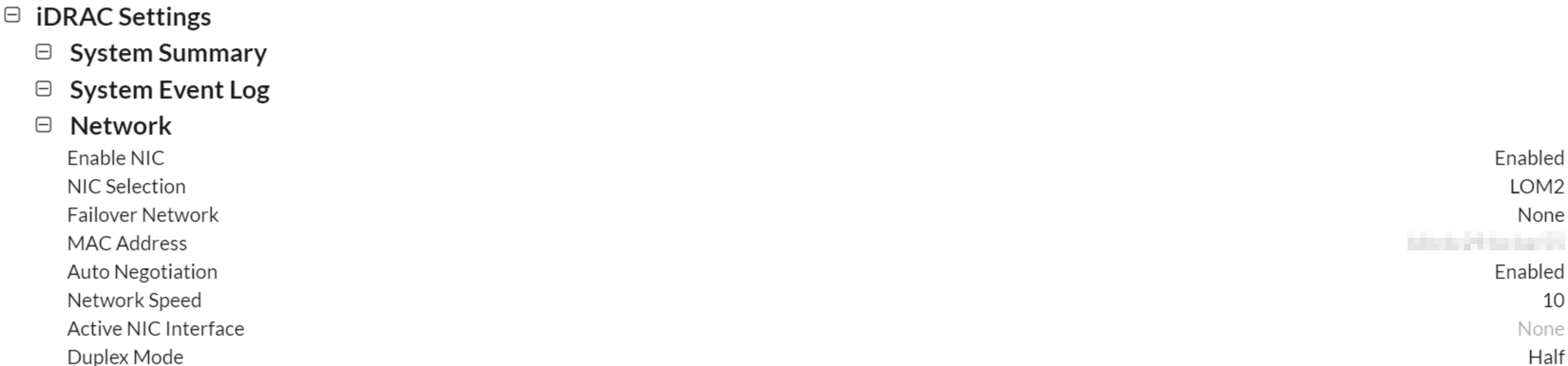
Example of iDRAC Link Loss in Lifecycle Log:
2024-04-04 19:22:55 |
6532 |
IPA0100 |
The iDRAC IP Address changed from 0.0.0.0 to X.X.X.X |
2024-04-04 19:22:10 |
6530 |
DIS002 |
Auto Discovery feature disabled |
2024-04-04 19:22:10 |
6529 |
RAC0182 |
The iDRAC firmware was rebooted with the following reason: ac |
2024-04-04 19:16:04 |
6528 |
SYS1001 |
System is turning off |
2024-04-04 19:16:04 |
6527 |
SYS1003 |
System CPU Resetting |
2024-04-04 19:16:04 |
6526 |
SYS1005 |
The server power action is initiated because the host device initiated a power-down operation |
2024-04-04 18:14:26 |
6521 |
JCP037 |
The (installation or configuration) job JID_122719380242 is successfully completed |
2024-04-04 18:14:26 |
6520 |
JCP037 |
The (installation or configuration) job JID_122719218038 is successfully completed |
2024-04-04 18:14:05 |
6519 |
PR36 |
Version change detected for BIOS firmware. Previous version:1.9.2, Current version:1.11.1 |
2024-04-04 18:14:03 |
6518 |
PR36 |
Version change detected for Broadcom NetXtreme Gigabit Ethernet Adapter - B8:CB:29:BC:D9:19 firmware. Previous version:22.00.6, Current version:22.20.11 |
2024-04-04 18:11:41 |
6513 |
SYS1003 |
System CPU Resetting |
2024-04-04 18:11:37 |
6512 |
IPA0100 |
The iDRAC IP Address changed from X.X.X.X to 0.0.0.0 |
Ursache
Upon server reboot, the E810 link is brought down by clearing EMP_LINK_ON through the Reset or Disabled Channel. Therefore, the network interface controller (NIC) itself goes down during the reboot as per the update and does not recover.
Lösung
This issue is fixed in the Intel E810 Q3 2024 firmware update.
The resolution is to change the firmware to enable EMP_LINK_ALWAYS_ON. This keeps the link up and online mitigating the loss of the card on reboots during updates.
There are several workarounds available.
- Reseat the node in the chassis to recover.
- Connect to the iDRAC though iDRAC Direct Port and perform a Virtual AC Cycle.
- Set Embedded NIC 1 to Disabled in BIOS to stop updates.
- Enable a Failover Network for the iDRAC.
Betroffene Produkte
Intel PRO Family of Adapters, PowerEdge C6520Produkte
Dell EMC XC Core XC6520Artikeleigenschaften
Artikelnummer: 000226568
Artikeltyp: Solution
Zuletzt geändert: 21 Mai 2026
Version: 3
Antworten auf Ihre Fragen erhalten Sie von anderen Dell NutzerInnen
Support Services
Prüfen Sie, ob Ihr Gerät durch Support Services abgedeckt ist.