Efeitos do Windows Studio ausentes em um notebook Dell
Zusammenfassung: Saiba como restaurar o Windows Studio Effects ausente em um notebook Dell.
Dieser Artikel gilt für
Dieser Artikel gilt nicht für
Dieser Artikel ist nicht an ein bestimmtes Produkt gebunden.
In diesem Artikel werden nicht alle Produktversionen aufgeführt.
Symptome
As opções do Windows Studio Effects podem estar ausentes na seção Dispositivo de vídeo USB em Configurações.
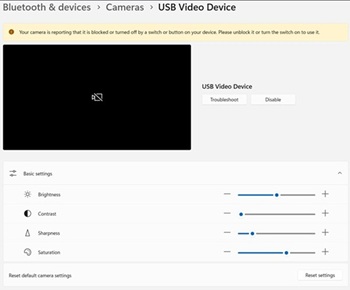
Plataformas afetadas:
- Dell 14 DC14255
- Dell Pro 14 Essential PV14255
- Dell Pro 14 PC14255
- Dell Pro 16 PC16255
Ursache
Nenhuma informação de causa disponível.
Lösung
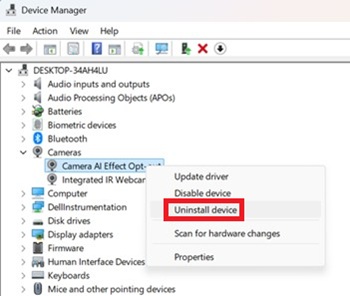
- Abra o Gerenciador de Dispositivos. Clique com o botão direito em Camera AI Effect Opt-out e selecione Desinstalar dispositivo.
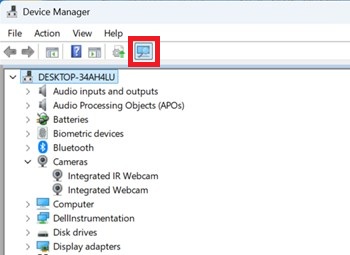
- Pressione o botão de digitalização para garantir que a webcam com infravermelho integrada exista.
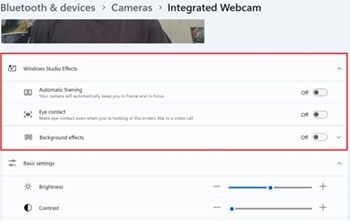
- Confirme se as opções do Windows Studio Effects estão disponíveis em Settings.
Betroffene Produkte
Dell 14 DC14255, Dell Pro 14 PC14255, Dell Pro 16 PC16255, Dell Pro 14 Essential PV14255Artikeleigenschaften
Artikelnummer: 000407521
Artikeltyp: Solution
Zuletzt geändert: 24 Mai 2026
Version: 2
Antworten auf Ihre Fragen erhalten Sie von anderen Dell NutzerInnen
Support Services
Prüfen Sie, ob Ihr Gerät durch Support Services abgedeckt ist.