Windows Studio Effects Missing on a Dell Laptop
Zusammenfassung: Learn how to restore Windows Studio Effects that is missing on a Dell laptop.
Dieser Artikel gilt für
Dieser Artikel gilt nicht für
Dieser Artikel ist nicht an ein bestimmtes Produkt gebunden.
In diesem Artikel werden nicht alle Produktversionen aufgeführt.
Symptome
Windows Studio Effects options may be missing from the USB Video Device section in Settings.
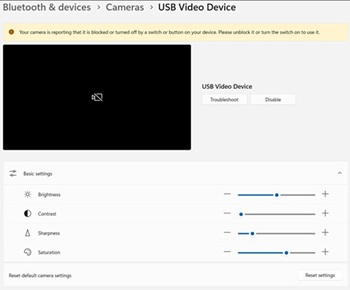
Affected Platforms:
- Dell 14 DC14255
- Dell Pro 14 Essential PV14255
- Dell Pro 14 PC14255
- Dell Pro 16 PC16255
Ursache
No cause information is available.
Lösung
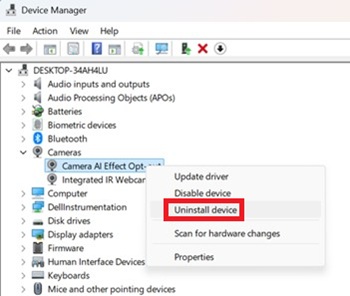
- Open Device Manager. Right click Camera AI Effect Opt-out and select Uninstall device.
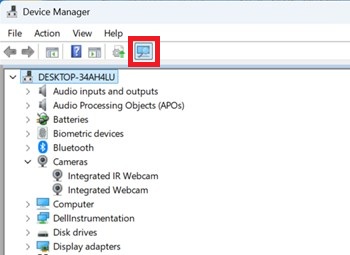
- Press the scan button to ensure Integrated IR Webcam exists.
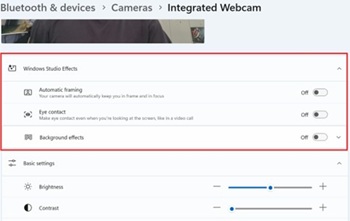
- Confirm if the Windows Studio Effects options are available in Settings.
Betroffene Produkte
Dell 14 DC14255, Dell Pro 14 PC14255, Dell Pro 16 PC16255, Dell Pro 14 Essential PV14255Artikeleigenschaften
Artikelnummer: 000407521
Artikeltyp: Solution
Zuletzt geändert: 24 Mai 2026
Version: 2
Antworten auf Ihre Fragen erhalten Sie von anderen Dell NutzerInnen
Support Services
Prüfen Sie, ob Ihr Gerät durch Support Services abgedeckt ist.