VPLEX:HTML5 GUI 阻止用户在新的启动器名称中使用下划线字符
Summary: 本文讨论了 HTML5 GUI 中的一个问题,该问题会阻止用户在新的启动器名称中使用下划线字符。虽然下划线字符“_”是启动器名称的有效字符,但此问题仅发生在“Register Initiator Manually”掩码中。
This article applies to
This article does not apply to
This article is not tied to any specific product.
Not all product versions are identified in this article.
Symptoms
在“Register Initiator Manually”掩码的 Provision Storage 屏幕中,用户无法键入字符“_”。 即使用户复制和粘贴包含“_”的名称,“OK”按钮也将保持灰色且无法使用。
“Provision Storage”和“View By:”下的问题示例,其中“Initiators”处于选中状态,然后单击了“REGISTER INITIATOR MANUALLY”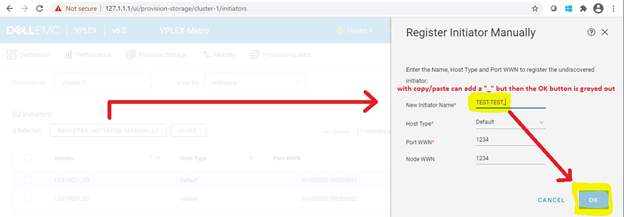
即使您复制和粘贴已包含下划线的名称,也无法保存新名称,“OK”按钮灰显。
Cause
这是代码的 HTML5 部分中的问题。
Resolution
解决方案:
Dell EMC VPLEX 工程部门目前正在调查此问题。修复程序发布后,将更新此文章。
要解决此问题,您可以不使用字符下划线“_”命名启动器,然后,您可以通过启动器属性掩码使用“_”重命名启动器: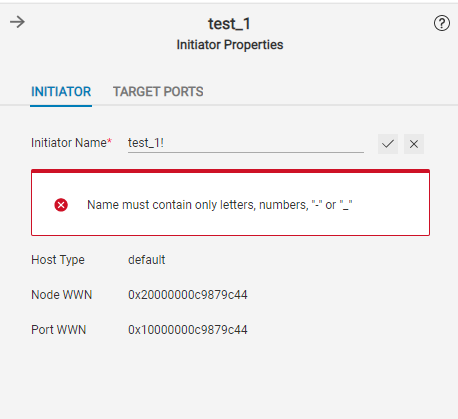
Affected Products
VPLEX Series, VPLEX VS2, VPLEX VS6Article Properties
Article Number: 000184557
Article Type: Solution
Last Modified: 29 Aug 2022
Version: 9
Find answers to your questions from other Dell users
Support Services
Check if your device is covered by Support Services.