PowerFlex 3.6 Missing puppet-certificate for PowerFlex Gateway in device_config
Summary: This article to explains how to identify and fix the issues caused by missing puppet-cert for PowerFlex Gateway in the device_config table in the database.
Symptoms
-
Service-related operations such as RCM/IC upgrade, entering or exiting service mode etc… will fail.
-
The deployment.log contains similar to the below error.
-
VXOS REST API error encountered in post_request: Undefined method `[]' for nil:NilClass
-
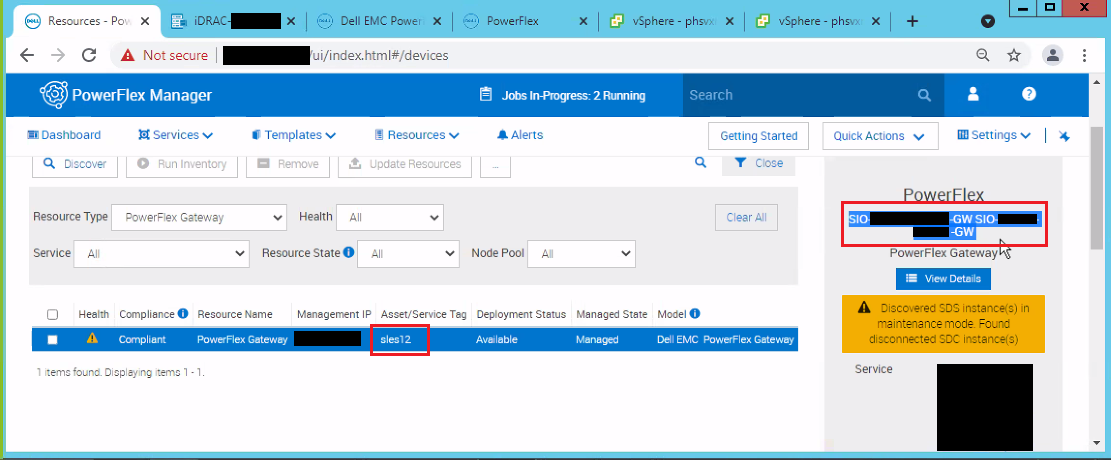
We can notice two different names listed for PowerFlex gateway under resources in PowerFlex Manager.
Example:
Cause
The way PFxM retrieves device configuration information in 3.7.x and later is changed to use the database entries that are keyed off the puppet certificate name.
Some operation caused the reported name of the gateway to change in PFxM, either the gateway is reinstalled with a different hostname or the SSL cert is changed.
The Database table only had an entry for the current PowerFlex Gateway name, but the services see the old PowerFlex Gateway name.
Resolution
Verification:
1) Go to the job id under /opt/Dell/ASM/deployments/Job-<xxx> where the service-related operations for the node are failed.
Example: cd /opt/Dell/ASM/deployments/Job-<xxx>
2) Run the below command to identify which puppet certificate the service is trying to use.
cat deployment.json|grep -i cert|grep scaleio
Example: [delladmin@pfxm-jade Job-913d3f1a-b7cd-4fe9-a4b5-2085d8034d17-0-0]$ cat deployment.json|grep -i cert|grep scaleio.
"puppetCertName": "scaleio-sio_gw",
"puppetCertName": "scaleio-sio_gw",
[delladmin@pfxm-jade Job-913d3f1a-b7cd-4fe9-a4b5-2085d8034d17-0-0]$
3) Connect to the asm_dev database and check for the certnames that are present for scaleio gateway.
psql -U orion asm_dev
asm_dev=> select certname from device_config where certname like 'scaleio-%';
Example:
asm_dev=> select certname from device_config where certname like 'scaleio-%';
certname
----------------------
scaleio-powerflex_gw
(1 row)
4) Make sure that the puppet cert we noticed from the deployment.jason file is missing in the database. In this example it is "scaleio-sio_gw" and it is missing in the database.
Only proceed with the below steps if step 4 is true.
1) Take a snapshot of PowerFlex Manager VM.
2) Run the below query and note down the values for fields (certname, host, provider, scheme, credential_id) for the current Gateway In this example, the current gateway is scaleio-powerflex_gw.
asm_dev=> select * from device_config were certname like 'scaleio-%';
id | certname | host | port | path | provider | scheme | credential_id | os_credential_id | svm_os_credential_id | os_type | svm_os_connect_ip | svm_os_type | update_time | svm_name | os_connect_ip
----+-------------------------+-----------------+------+--------------------------+----------+--------+----------------------------------+------------------+----------------------+---------+-------------------+-------------+-------------------------------+----------+---------------
49 | scaleio-powerflex_gw | 192.168.150.100 | | scaleio/bin/discovery.rb | script | script | ff8080816e8e8257016e8e96df6d00e5 | | | | | | 2022-04-13 07:01:26974846-04 | |
.
3) Run the below query to add a new entry in the device_config table for the missing cert.
Note:-In the below command replace the VALUES fields with the proper value.
INSERT INTO device_config (certname, host, provider, scheme, credential_id) VALUES('<Missing cert name>', '<Value from current gateway noted down in previous step>', '<Value from current gateway noted down in previous step>', '<Value from current gateway noted down in previous step>', '<Value from current gateway noted down in previous step>');
Example: asm_dev=> INSERT INTO device_config (certname, host, provider, scheme, credential_id) VALUES('scaleio-sio_gw', '192.168.150.100', 'script', 'script', 'ff8080816e8e8257016e8e96df6d00e5');
INSERT 0 1
4) Run below query to confirm that the new entry for missing cert is added.
Select certname from device_config where certname like 'scaleio-%';
Example:
asm_dev=> select certname from device_config where certname like 'scaleio-%';
certname
----------------------
scaleio-powerflex_gw
scaleio-sio_gw
(two rows)
asm_dev-> \q
[delladmin@pfxm-jade ~]$
5) Retry the operation in PowerFlex Manager.