PowerVault ME4-ME5:使用 SAS 附加陣列的 PowerEdge 診斷程式回報的 ePSA 錯誤代碼 2000-0151
Summary: 針對連接 SAS 的 PowerVault ME 系列陣列執行的 Dell 增強型開機前系統評估 (ePSA) 或 Dell 開機前系統評估 (PSA) 診斷程式回報偽陽性錯誤。 使用 PowerVault Manager 或 CLI 評估 PowerVault ME 系列 SAN 的健全狀況。
This article applies to
This article does not apply to
This article is not tied to any specific product.
Not all product versions are identified in this article.
Instructions
ePSA 診斷程式可能會傳 回錯誤代碼:2000-0151 ,針對使用 SAS 纜線連接至 Dell PowerEdge 伺服器的 PowerVault ME 系列陣列執行至 Dell 12 Gb SAS HBA 或 Dell HBA355e。
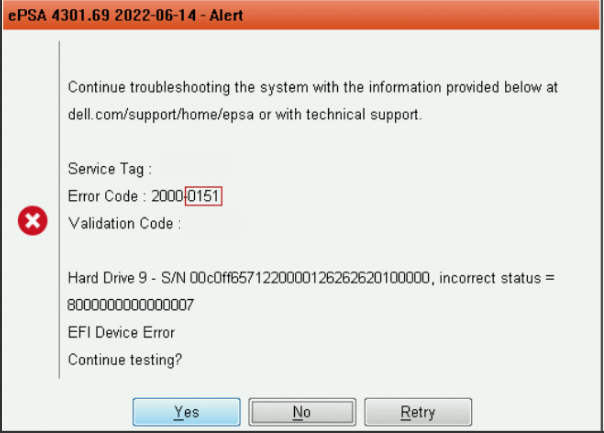
若為外部 SAS 連接的 SAN,可忽略此警示,可使用 PowerVault Manager 和 PowerVault ME 事件記錄來判斷 PowerVault ME 系列中的磁碟機狀態。請參閱 PowerVault ME 儲存系統管理員指南,您型號的說明文件可在 dell.com/support 上取得。
此問題已在 ePSA 應用程式版本組建 4301.77 及更新版本中解決。 您可以在 dell 找到更新的套件。部分 PowerEdge 機型的「驅動程式與下載」區段下的「com/support」。Dell 64 位元 UEFI Diagnostics 位於 Diagnostics 類別下。
Affected Products
Dell EMC PowerVault ME4012, Dell EMC PowerVault ME4024, Dell EMC PowerVault ME4084, PowerVault ME5012, PowerVault ME5024, PowerVault ME5084Article Properties
Article Number: 000202362
Article Type: How To
Last Modified: 18 Feb 2026
Version: 5
Find answers to your questions from other Dell users
Support Services
Check if your device is covered by Support Services.