PowerVault ME4-ME5:带有 SAS 连接阵列的 PowerEdge 诊断程序报告 ePSA 错误代码 2000-0151
Summary: 针对 SAS 连接的 PowerVault ME 系列阵列运行的 Dell 增强型启动前系统评估 (ePSA) 或戴尔启动前系统评估 (PSA) 诊断程序报告误报错误。 使用 PowerVault Manager 或 CLI 评估 PowerVault ME 系列 SAN 运行状况。
This article applies to
This article does not apply to
This article is not tied to any specific product.
Not all product versions are identified in this article.
Instructions
当针对使用戴尔 12Gb SAS HBA 或戴尔 HBA355e 的 SAS 线缆连接到戴尔 PowerEdge 服务器的 PowerVault ME 系列阵列运行时,ePSA 诊断程序可能会返回错误代码:2000-0151 (针对使用 SAS 线缆连接到戴尔 12 Gb SAS HBA 或戴尔 HBA355e 的 Dell PowerVault ME 系列阵列连接到 Dell PowerEdge 服务器时)运行。
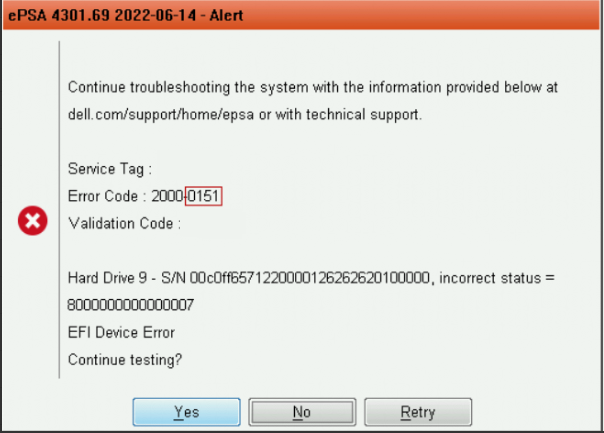
对于外部 SAS 连接的 SAN,可以忽略此警报。通过使用 PowerVault Manager 和 PowerVault ME 事件日志,可确定 PowerVault ME 系列中的磁盘驱动器状态。请参阅 PowerVault ME 存储系统管理员指南,该型号的文档可在 dell.com/support 上找到 。
此问题在 ePSA 应用程序版本(内部版本 4301.77)及更高版本中得到解决。 更新后的软件包可以在戴尔上找到。com/support,位于某些PowerEdge型号的“驱动程序和下载”部分下。戴尔 64 位 uEFI 诊断程序 位于诊断程序类别下。
Affected Products
Dell EMC PowerVault ME4012, Dell EMC PowerVault ME4024, Dell EMC PowerVault ME4084, PowerVault ME5012, PowerVault ME5024, PowerVault ME5084Article Properties
Article Number: 000202362
Article Type: How To
Last Modified: 18 Feb 2026
Version: 5
Find answers to your questions from other Dell users
Support Services
Check if your device is covered by Support Services.