VxRail: Deployment Robo cluster failing with error "The provided host x.x.x.x is not a witness node"
Summary: Dell VxRail: " Deployment Robo cluster failing with error The provided host x.x.x.x is not a witness node" Unable to verify network connection between the witness node and the data node ...
This article applies to
This article does not apply to
This article is not tied to any specific product.
Not all product versions are identified in this article.
Symptoms
Error as below: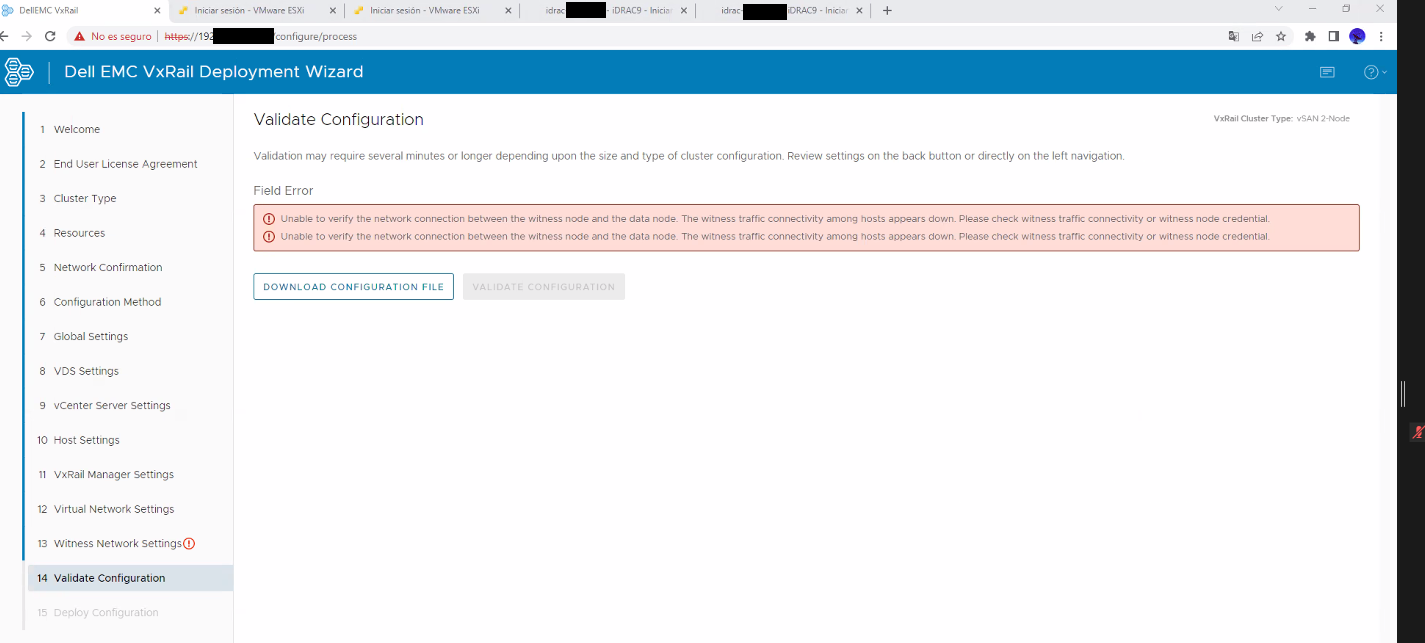
In dayone.log
023-04-12-07:39:44 microservice.wfservice "INFO [wfengine.status] notify {'level': 'step', 'id': 'general_thorough_validation.network_prepare_aware_foreach_validator.1.witness_host_validator', 'state': 'COMPLETED', 'progress': 31, 'stat
us': {'id': 'witness_host_validator', 'internal_id': 'general_thorough_validation.network_prepare_aware_foreach_validator.1.witness_host_validator_False____2ac1d5d0_8d5d_4f_9c56f2f831', 'internal_family': 'general_thorough_validation.net
work_prepare_aware_foreach_validator.1.witness_host_validator', 'status': 'COMPLETED', 'startTime': 1681285172066, 'stage': '1', 'endTime': 1681285184310, 'params': {'host_conn_info': {'host': 'xxxx::6a05:xxxx:xxxx:42b3%eth1', 'username'
: 'root', '****** 'port': 443}, 'robo_cluster': True, 'vc_conn_info': {'host': 'xxxxxxx.domain.com', 'username': 'admintmp@vsphere.local', '****** 'port': 443}, 'witness_info': {'management_ip': 'x.x.x.x', 'witness_ip': 'x.x.x.x
6', 'gateway': 'x.x.x.x', 'netmask': 'x.x.x.x', 'username': 'root', '****** 'invalid_fields': ['vcenter.accounts.management.username'], 'network_prepare_params': {'vxm_ip': 'x.x.x.x', 'vxm_netmask': '255.255.255.0', 'vxm_
gateway': 'x.x.x.x', 'tld': 'xxxx.domain.com', 'is_internal_dns': False, 'dns_servers': ['x.x.x.x', 'x.x.x.x'], 'vlanid': 40, 'host_conn_info': {'host': 'xxxx::6a05:xxxx:xxxx:3568%eth1', 'username': 'root', '****** 'port': 443}}}, '
result': {'result': {'result': 'FAILED', 'raw_result': None, 'name': 'WitnessHostValidator', 'context': {'invalid_fields': ['vcenter.accounts.management.username', 'witness_node.management_ip']}, 'errors': [{'type': 'THOROUGH-VALIDATOR',
'field': 'witness_node.management_ip', 'code': 'E3100_VAL_15', 'placeholders': ['*.*.*.*'], 'message': 'The provided host x.x.x.x is not a witness node.'}], 'warnings': []}}, 'error': None}}"
2023-04-12-07:39:44 microservice.ms-day1-bringup "2023-04-12 07:39:44,351 [INFO] <Dummy-1968:140167207234888> wfservice.py get_status_from_wf() (607): Get workflow status from workflow engine for instance: 2ac1d5d0-8d5d-4f36-9aa4-2f52691
8873a..."
2023-04-12-07:39:44 microservice.ms-day1-bringup "2023-04-12 07:39:44,351 [INFO] <Dummy-1968:140167207234888> wfservice.py get_status_from_wf() (609): GET http://api-gateway:8080/rest/vxm/internal/engine/v1/instance/2ac1d5d0-8d5d-4f36-9a
a4-2f526918873a"

'message': 'The provided host x.x.x.x is not a witness node.
Cause
Port 443 is not available between nodes/witness.
Resolution
To resolve this issue, check that port 443 is enabled between the VxRail and witness IP on the customer network.
'message': 'The provided host x.x.x.x is not a witness node.
From VxRail Manager run the following command:
# curl -v telnet://x.x.x.x:443
The IP should be the witness IP which appear in the logs.
Affected Products
VxRail, VxRail Appliance Series, VxRail SoftwareArticle Properties
Article Number: 000213599
Article Type: Solution
Last Modified: 05 Sept 2025
Version: 3
Find answers to your questions from other Dell users
Support Services
Check if your device is covered by Support Services.