由於 SMB 版本不相符,無法加入 Active Directory 網域
Summary: 嘗試加入 Active Directory 網域會導致錯誤,指出檔案共用和「過時的 SMB1 通訊協定」。如果在域控制器上禁用了較新版本的伺服器消息塊 (SMB),則會發生這種情況。
This article applies to
This article does not apply to
This article is not tied to any specific product.
Not all product versions are identified in this article.
Symptoms
將電腦加入域時出現以下錯誤消息:
無法連接到文件共用,因為它不安全。此共用需要過時的SMB1協定,該協定不安全,可能會使系統受到攻擊。您的系統需要 SMB2 或更高版本。
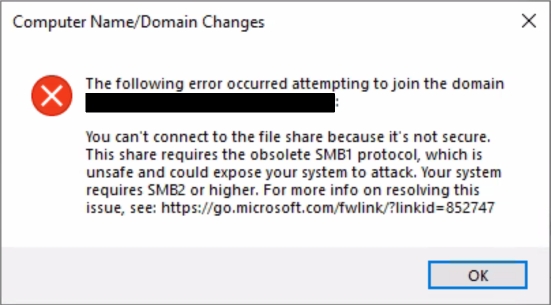
此狀況會阻止加入網域。
無法連接到文件共用,因為它不安全。此共用需要過時的SMB1協定,該協定不安全,可能會使系統受到攻擊。您的系統需要 SMB2 或更高版本。
此狀況會阻止加入網域。
Cause
如錯誤所示,如果加入域的系統需要SMB2或更高版本,但域控制器(DC)僅支援SMB1,則會出現此問題。所有支援的 Windows Server 版本都包含對 SMB2 及更高版本的支援,因此只有在明確禁用這些版本時,才應執行此操作。
Resolution
不建議在任何 Windows 機器上停用 SMB2 及更高版本,因為 SMB1 是一種舊舊且不安全的協定。相反,應在域中的DC上啟用SMB2和SMB3。若要執行此操作,請遵循以下步驟:
- 從提升權限的 PowerShell 提示字元中,執行
Get-SmbServerConfiguration並檢查輸出中的 EnableSMB2Protocol 值。如果顯示 為停用,則 SMB2 和 SMB3 皆已停用。 - 若要啟用 SMB2 (也可啟用 SMB3),請執行
Set-SmbServerConfiguration -EnableSMB2Protocol $true。 - 嘗試再次加入網域。問題應該已解決,但可能需要在其他 DC 上啟用 SMB2 和 SMB3。
Affected Products
Microsoft Windows Server 2016, Microsoft Windows Server 2019, Microsoft Windows Server 2022, Microsoft Windows 2012 Server, Microsoft Windows 2012 Server R2Article Properties
Article Number: 000216676
Article Type: Solution
Last Modified: 18 Dec 2024
Version: 3
Find answers to your questions from other Dell users
Support Services
Check if your device is covered by Support Services.