由于 SMB 版本不匹配,无法加入 Active Directory 域
Summary: 尝试加入 Active Directory 域会导致出现提及文件共享和“过时的 SMB1 协议”的错误。如果在域控制器上禁用了较新版本的服务器消息块 (SMB),则会发生这种情况。
This article applies to
This article does not apply to
This article is not tied to any specific product.
Not all product versions are identified in this article.
Symptoms
将计算机加入域时出现以下错误消息:
无法连接到文件共享,因为它不安全。此共享需要过时的 SMB1 协议,该协议不安全,并且可能会使您的系统受到攻击。您的系统需要 SMB2 或更高版本。
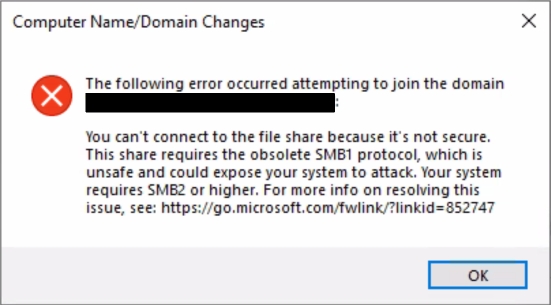
此条件会阻止加入域。
无法连接到文件共享,因为它不安全。此共享需要过时的 SMB1 协议,该协议不安全,并且可能会使您的系统受到攻击。您的系统需要 SMB2 或更高版本。
此条件会阻止加入域。
Cause
如错误所示,如果加入域的系统需要 SMB2 或更高版本,但域控制器 (DC) 仅支持 SMB1,则会出现此问题。所有受支持的 Windows Server 版本都包括对 SMB2 及更高版本的支持,因此仅当显式禁用这些版本时,才应发生这种情况。
Resolution
不建议在任何 Windows 计算机上禁用 SMB2 及更高版本,因为 SMB1 是一种旧的不安全协议。相反,应在域中的 DC 上启用 SMB2 和 SMB3。为此,请按照以下步骤操作:
- 在提升的 PowerShell 提示符下,运行
Get-SmbServerConfiguration并检查输出中 EnableSMB2Protocol 的值。如果显示 已禁用,SMB2 和 SMB3 均处于禁用状态。 - 要启用 SMB2(也启用 SMB3),请运行
Set-SmbServerConfiguration -EnableSMB2Protocol $true。 - 尝试再次加入域。该问题应该已解决,但可能还需要在其他 DC 上启用 SMB2 和 SMB3。
Affected Products
Microsoft Windows Server 2016, Microsoft Windows Server 2019, Microsoft Windows Server 2022, Microsoft Windows 2012 Server, Microsoft Windows 2012 Server R2Article Properties
Article Number: 000216676
Article Type: Solution
Last Modified: 18 Dec 2024
Version: 3
Find answers to your questions from other Dell users
Support Services
Check if your device is covered by Support Services.