No Post with Error Code 36 on Latitude 7230 Rugged Extreme Tablet
Summary: This article provides information about how to recover your Latitude 7230 Rugged Extreme Tablet from No Post issue.
This article applies to
This article does not apply to
This article is not tied to any specific product.
Not all product versions are identified in this article.
Symptoms
Latitude 7230 Rugged Extreme Tablet may not Post with error code 36.
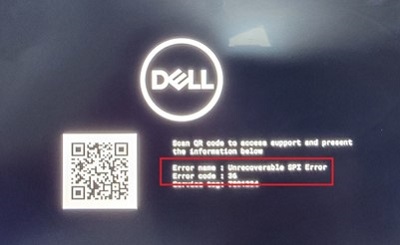
Affected Platforms:
- Latitude 7230 Rugged Extreme Tablet
Cause
BIOS update is incomplete.
Resolution
Perform the following steps to trigger BIOS recovery:
- Download the latest BIOS for the Latitude 7230 Rugged Extreme Tablet from Dell Support Website, rename it to BIOS_IMG.rcv and copy it in the USB disk. To download the BIOS, reference BIOS Update Guide.
- Turn off the computer.
- Press and hold the volume down key on the keyboard, then connect the power adapter.
- Press and hold the ctrl + Esc keys, then release the volume down key.
- When the keyboard backlight blinks, release the ctrl + Esc keys.
- The computer automatically powers on and boots to the BIOS recovery interface.
- Select Load a BIOS from a USB key and press Continue.
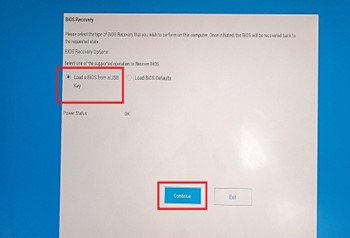
- Press Confirm.
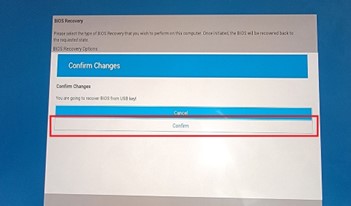
- The computer reboots and flashes BIOS for recovery. Do not power off or remove the power adapter while flashing BIOS.
For more information about BIOS recovery, see How to Recover the BIOS on a Dell Computer or Tablet.
Affected Products
Latitude 7230 Rugged Extreme TabletArticle Properties
Article Number: 000217123
Article Type: Solution
Last Modified: 18 May 2026
Version: 6
Find answers to your questions from other Dell users
Support Services
Check if your device is covered by Support Services.