Dell G5 5590 Alienware Command Center Application Fusion Tab Does Not Show Memory Information
Summary: Information about why the Alienware Command Center application not showing memory information for the Dell G5 5590.
This article applies to
This article does not apply to
This article is not tied to any specific product.
Not all product versions are identified in this article.
Symptoms
The Alienware Command Center application will only show the processor (CPU) and the graphics processor (GPU) information in the Fusion tab. It will not show memory information for the Dell G5 5590.
Cause
This is due to Intel's patch update (IPU support) to fix their security vulnerability - where they removed the XTU SMI interface and caused no access to get memory-related information through the XTU SDK.
Resolution
The Alienware Command Center application is working as designed, it only shows CPU and GPU information (Figure 1).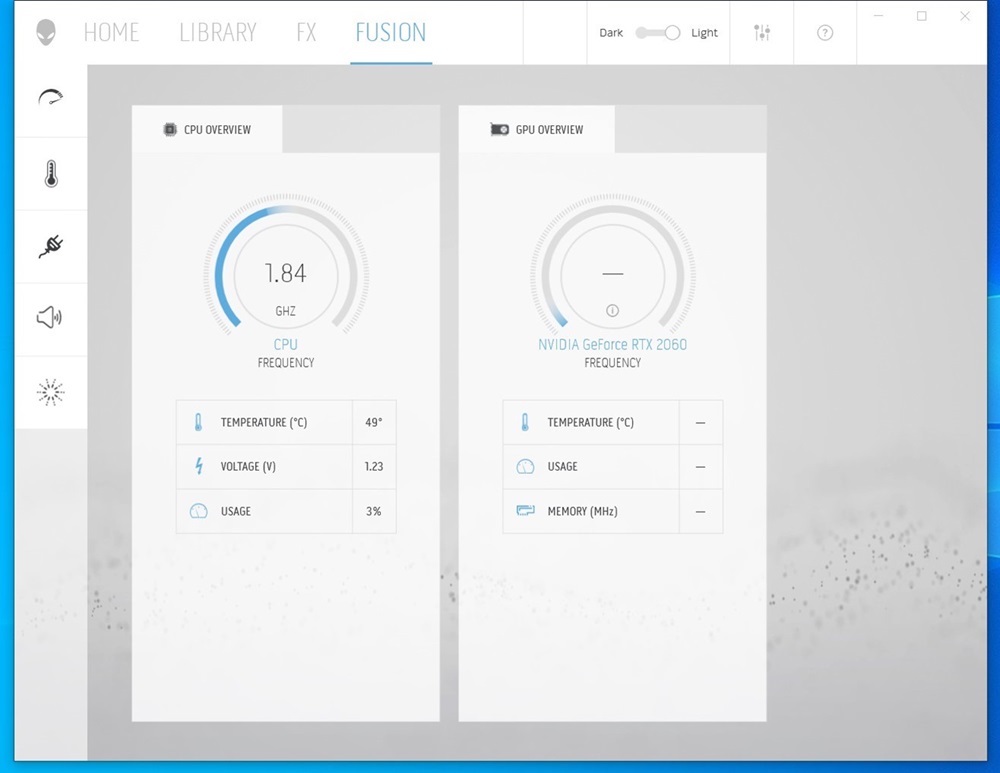
Figure 1
Affected Products
Alienware Command Center, Dell G5 15 5590Article Properties
Article Number: 000220229
Article Type: Solution
Last Modified: 13 May 2025
Version: 3
Find answers to your questions from other Dell users
Support Services
Check if your device is covered by Support Services.